Introduction
Most developers don't struggle with writing code. They struggle with everything else that gets in the way of it.
Microsoft Research found that developers spend just 11% of their actual workweek coding - against an ideal of 20%. The rest disappears into meetings, PR reviews, ticket management, CI failures, and documentation nobody wanted to write. A separate Microsoft study measured the average longest uninterrupted coding session at 47.3 minutes.
The problem isn't how developers manage their time. It's that the structure of modern dev workflows consumes it.
AI agent workflow automation addresses this at the process level - not with autocomplete tools, but with autonomous agents that take ownership of complete workflow segments. Ticket triage, code reviews, test generation, release notes, CI failure analysis - agents handle each of these autonomously, without constant human direction.
This article covers:
- How AI agents differ from traditional workflow automation
- Which dev workflows agents handle across the full SDLC
- How to roll out agents in phases without breaking team trust
- What governance needs to cover to keep humans in control
Key Takeaways
- Developers spend only 11% of their workweek on actual coding - AI agents reclaim that time by owning repetitive workflow tasks
- AI agents reason about context and adapt - unlike fixed trigger-action tools like Zapier or n8n
- Key automation targets: PR reviews, CI/CD triage, ticket classification, test generation, and spec-driven scaffolding
- Rollout follows four phases, beginning with read-only analysis before any autonomous action
- Governance must be embedded at the architectural level from day one, not bolted on later
AI Agents vs. Traditional Workflow Automation: Key Differences
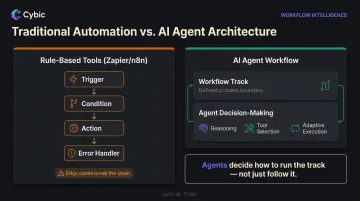
Traditional workflow automation tools - Zapier, Make, n8n - operate on hard-coded trigger-action logic. A condition fires, a step executes. That's it. When context changes or an exception occurs, the platform requires explicit error handlers to continue.
That model holds until edge cases appear. Consider a CI/CD alert configured to page the on-call engineer for every build failure. It fires just as often for a known flaky test as for a genuine regression - because the automation has no way to tell the difference. The engineer gets paged regardless.
What Makes Agents Different
An AI agent doesn't follow a fixed sequence. It reasons about the current situation, selects from available tools and adjusts its execution path based on what it finds.
The same CI alert, handled by an agent:
- Reads the failure log
- Cross-references against known flaky test patterns
- Auto-closes if it matches a known pattern, or escalates with full root-cause context attached if it doesn't
- No rebuild of the workflow required
NIST describes AI agents as systems capable of autonomous actions - a meaningful distinction from rule-execution engines.
The Right Mental Model
Agentic workflows still have structure. Think of it as two layers: the workflow defines the track; the agent decides how to run it. Agents aren't a replacement for process design - they're decision-makers operating inside one.
That separation is what makes agentic systems auditable. When an agent acts, it acts within a defined boundary, and every decision is traceable back to a specific process step. For teams with compliance requirements, that traceability is non-negotiable.
Why Dev Teams Are Adopting AI Agent Workflow Automation
The productivity problem isn't just about coding time. It's about the compounding cost of fragmentation.
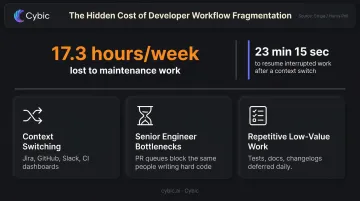
Research by Gloria Mark et al. found that information workers switch working contexts every 11 minutes on average - and that interrupted work typically isn't resumed for 23 minutes 15 seconds. A follow-up study found that interrupted workers completed tasks faster but reported significantly higher stress, frustration, and mental workload.
Multiply that across a team and you're no longer looking at inconvenience - it's a structural drag on output.
The Real Bottlenecks
Dev teams face three specific friction points that compound this problem:
- Context switching overhead: moving between Jira, GitHub, Slack, and CI dashboards fragments attention throughout the day
- Senior engineer bottlenecks: PR queues back up because the same people who write the hardest code are also reviewing everyone else's
- Repetitive low-value work: test writing, documentation, changelog entries, and ticket labeling are deferred precisely because they're important but tedious
The Stripe/Harris Poll Developer Coefficient report found developers lose 17.3 hours per week to maintenance work like debugging and refactoring - nearly half the workweek consumed by non-feature work.
The Business Dimension
Those lost hours translate directly into business cost. Slow review cycles push release dates. Concentrated senior-engineer knowledge creates single points of failure when those engineers are out sick, on leave, or have left the company.
AI agent workflow automation addresses both problems at once: offloading the repetitive work that consumes maintenance hours and reducing dependency on any single engineer for routine review and documentation tasks.
What AI Agents Can Automate Across the Dev Lifecycle
Code Review Acceleration
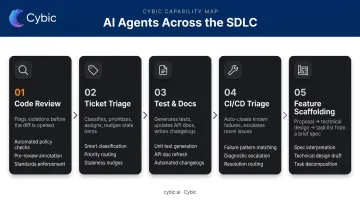
An AI agent scans a new pull request against the full codebase context - flagging architectural violations, security issues, dependency conflicts, and style drift - and posts a structured review before a human reviewer opens the diff.
This doesn't replace senior-engineer judgment on architecture or business logic. It removes the triaging layer: the work of reading through boilerplate issues, formatting violations, and obvious bugs that consume review time before the real analysis even starts.
A 2026 arXiv benchmark paper on code review agents formalizes how these agents perform against real-world pull requests, confirming that production-grade tooling in this area has crossed from experimental to deployable.
Ticket Triage and Project Management
Agents can classify inbound Jira or Linear tickets, assign priority, attach relevant documentation, tag owners, and send nudges when items go stale. The administrative layer that currently interrupts developers throughout the day runs in the background instead.
A concrete pattern: an agent uses JQL to fetch all closed tickets in a sprint, interprets each ticket's content and resolution, and compiles structured release notes - a task that typically takes an engineer 30–60 minutes and gets deferred until it's urgent.
Test Generation and Documentation
Agents can:
- Generate unit tests for new functions when a PR is opened
- Update API documentation automatically when endpoints change
- Write or refresh CHANGELOG entries based on merged commits
These are tasks developers routinely defer because they're low-value per instance but high-effort in aggregate.
CI/CD Monitoring and Failure Triage
The LogSage framework, described in a 2025 arXiv paper, demonstrates LLM-powered CI/CD failure detection with root cause analysis and automated remediation capabilities. The approach converts reactive incident response into managed exception handling. Known failure patterns are resolved automatically; for everything else, the agent surfaces novel issues with full diagnostic context attached.
Spec-Driven Feature Scaffolding
A developer provides a brief feature description. The agent generates:
- A proposal document
- A technical design
- A step-by-step implementation task list
No code is written until the spec is reviewed and approved. This gives the agent a durable contract to execute against. Without it, agents tend to silently reinterpret requirements mid-implementation when the original task was underspecified.
How to Build and Roll Out an AI Agent Workflow for Your Dev Team
Start with Governance Artifacts
Before selecting a model or writing any automation logic, define what the agent is permitted to do.
An AGENTS.md file - an open format now used by 60,000+ open-source projects - captures:
- Permitted and forbidden actions
- Commit conventions
- Escalation rules
- Which specs or policies take precedence in conflicts
Without this hierarchy, agents fill the gaps themselves - and undocumented behavior compounds quickly across a team. The governance artifact isn't overhead; it's what makes autonomous behavior safe to deploy.
Phase the Rollout
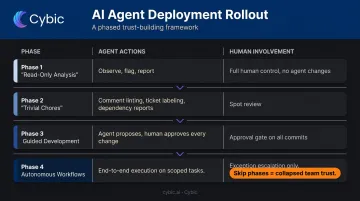
| Phase | What Agents Do | Human Involvement |
|---|---|---|
| 1 - Read-only analysis | Observe, flag, report | Full control; no agent changes |
| 2 - Trivial chores | Comment linting, ticket labeling, dependency reports | Spot review |
| 3 - Guided development | Agent proposes; human approves every change | Approval gate on all commits |
| 4 - Autonomous workflows | End-to-end execution on well-scoped tasks | Exception escalation only |
Skipping phases collapses trust. Teams that jump straight to Phase 4 without establishing confidence in the agent's judgment face rejection from the engineers who have to work alongside it.
Define Executable Work
Agents perform best when given a defined contract, not an open-ended task. That contract should include:
- Links to relevant specs and architectural constraints
- Explicit acceptance criteria
- Design decisions already made
Vague tickets produce vague code - and debugging an agent's interpretation is harder than reviewing a human's. A tight execution contract makes output reviewable from the first commit.
Integrate into Existing Toolchains
Successful deployments connect agent inputs and outputs to the tools developers already use. That means meeting engineers where they are:
- IDE integration: agents surface suggestions and status without switching context
- CI dashboard visibility: pipeline feedback stays in the familiar build view
- Ticket system sync: Jira or Linear tasks update automatically as agents progress
Agents that pull engineers out of their primary environment face adoption resistance that capability alone won't fix.
The Orchestration Layer
Single-agent setups work for simple, isolated tasks. Once agents need to coordinate across systems - handing off work, recovering from errors, maintaining shared context - a dedicated orchestration layer becomes necessary.
Cybic's Drava platform handles this at the enterprise level: connecting data, ML models, and AI agents into governed workflows that run across cloud, hybrid, or on-premises environments, with security controls and auditability embedded in the architecture from day one.
Governance, Security, and Human-in-the-Loop Design
Build a Clear Authority Hierarchy
Agents must operate inside explicit layers of authority:
- Business intent : what outcome the organization needs
- Architecture constraints : what the system must not do
- Feature behavior : what this specific capability requires
- Execution design : how this task should be implemented
When any layer is unclear or in conflict, the agent stops and escalates. Speed is never a valid reason to bypass this hierarchy. Without it, agents produce output that's technically correct but architecturally wrong. Those failures are the hardest to catch in review.
Design Human-in-the-Loop Checkpoints by Risk Level
Not all agent actions carry equal risk. Tier permissions accordingly:
| Risk Level | Examples | Required Gate |
|---|---|---|
| Low | Test generation, documentation, ticket labeling | Fully automated |
| Medium | PRs, code changes | Human approval before merge |
| High | Production deploys, security-impacting changes | Mandatory sign-off with full context |
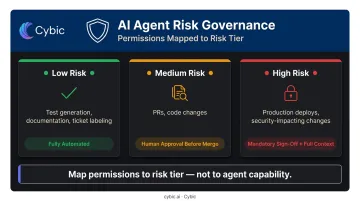
Map agent permissions to risk tier - not to what the agent is technically capable of doing.
Enforce Auditability from Day One
Every agent action must be logged: tool calls, data accessed, decision rationale, timestamps, and the human or system that triggered the action. This audit trail serves two purposes:
- Compliance - SOC 2, GDPR, and enterprise security standards require it. NIST SP 800-53 and EU AI Act Article 14 both point to auditability and human oversight as foundational controls for high-risk AI actions.
- Debugging - When an agent produces unexpected output, the audit log is the primary diagnostic tool.
Cybic embeds RBAC, encrypted data protection, and audit trails at the architectural level across its agent deployments - not as configuration options added after deployment.
Build Shared Procedural Memory
Audit trails capture what happened. Procedural memory captures what to do differently next time. When one agent discovers a forbidden pattern or a deployment constraint, that knowledge should become a durable rule that prevents every future agent from repeating the same mistake.
This is structured, scoped procedural memory - not chat history or model context. Think of it as a team's accumulated engineering knowledge encoded into the agent ecosystem itself.
Measuring the ROI of AI Agent Workflow Automation
Track Impact Metrics, Not Activity Metrics
Counting the number of tickets an agent labeled isn't ROI measurement. The metrics that matter:
- Developer coding time vs. administrative time (Microsoft's 2024 study found developers spend 11% of their week on coding vs. a 20% ideal)
- Feature lead time - measured from from ticket creation to production deploy
- PR review turnaround - median hours from PR open to merge
- Senior engineer review hours - time spent on new code vs. triaging boilerplate
- Developer satisfaction scores
Google Cloud's DORA Four Keys framework - deployment frequency, lead time for changes, change failure rate, and time to restore service - provides a structured benchmark for measuring workflow automation's actual impact.
Establish a Baseline First
ROI claims without pre-deployment baselines are assertions, not measurements. Before activating any agent, capture:
- Current error rates per workflow
- Processing time per task type
- Escalation frequency
- Total labor hours on automatable work
Then measure the delta at 30, 60, and 90 days.
The Non-Financial Returns
The most important early signal often isn't cost reduction. It's developer experience - more time in deep work, less time chasing CI alerts and updating tickets. Microsoft's 2024 study found developers with a larger gap between their actual and ideal workweeks reported measurably lower job satisfaction.
Closing that gap drives long-term adoption. For engineering teams, retention has a direct dollar value - replacing a senior engineer typically costs 50–200% of their annual salary.
Frequently Asked Questions
What is the difference between AI agent and workflow automation?
Traditional workflow automation follows fixed trigger-action sequences - if this happens, do that. AI agents reason about context and choose which tools or steps to use based on what they find - so the same input can produce different actions depending on circumstances. That adaptability is what rule-based automation can't replicate.
Can AI be used for workflow automation?
Yes. AI agents are now embedded directly into workflow automation platforms as decision-making nodes that handle variable inputs, exceptions, and context-dependent routing - the situations that break rule-based automation entirely.
What are the AI agent automated workflows in software development?
The most common are: code review and PR analysis, CI/CD failure triage, ticket classification and project management, test generation, documentation updates, and spec-driven feature scaffolding.
What are the 5 types of AI agents?
Russell and Norvig define five types in Artificial Intelligence: A Modern Approach: simple reflex, model-based reflex, goal-based, utility-based, and learning agents. Dev workflow automation typically relies on goal-based or utility-based agents, which optimize for an objective rather than following fixed rules.
How do software teams implement AI agent workflow automation safely?
Begin with read-only analysis tasks, then layer in human-approval gates before allowing any code changes. Define permitted actions and escalation rules in a governance file (AGENTS.md or equivalent), maintain a full audit log, and expand autonomy only after each phase demonstrates consistent reliability.
What metrics should dev teams track to measure AI agent workflow success?
Track these metrics: developer coding time vs. administrative time, feature lead time, PR review turnaround, agent task success rate, and developer satisfaction - all measured against a pre-deployment baseline using the DORA framework as a reference structure.