Introduction
Most development teams have already experimented with AI coding assistants. GitHub Copilot, inline suggestions, chat completions - these tools are widely adopted and largely undifferentiated. The next shift is already in motion: teams are moving from AI that responds to prompts toward AI that pursues goals.
That distinction matters. According to Stack Overflow's 2025 Developer Survey, 84% of developers use or plan to use AI tools in development - yet agent adoption is still uneven, with 52% sticking to simpler tools and 38% having no current plans to adopt agents. The gap between awareness and deployment is where most enterprises currently sit.
This guide gives enterprise teams a clear picture of how AI agents work, which types are gaining traction, where real deployments are delivering results, and what separates a successful rollout from a stalled pilot.
Key Takeaways
- AI agents pursue goals autonomously; coding assistants respond to single prompts
- Agents use a perceive → reason → act → remember loop, not a request/response pattern
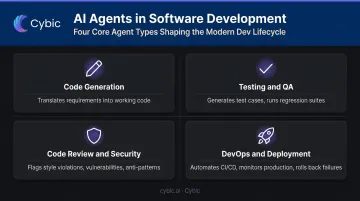
- Four main agent types: code generation, testing/QA, code review/security, and DevOps
- 87% of developers cite accuracy concerns; 81% flag data privacy - both demand a governance plan from day one
- Start with bounded, well-defined tasks and expand scope incrementally
What Are AI Agents in Software Development?
An AI agent is software that observes its environment, reasons about next steps, takes action, and retains memory across steps - without needing a human prompt at each stage. Where a coding assistant waits for input, an agent works toward a defined goal.
The practical difference is significant. GitHub Copilot suggests the next line of code when a developer stops typing. An agent reads a Jira ticket, analyzes the relevant files, generates changes across multiple components, runs the test suite, and opens a pull request - without being prompted at each step.
AI Coding Tool vs. AI Agent
| Dimension | AI Coding Tool | AI Agent |
|---|---|---|
| Interaction model | Single prompt → single response | Goal-directed, multi-step execution |
| Memory | Stateless (per request) | Persistent across steps and sessions |
| Tool use | None (suggestions only) | Shell, editor, API, test runner, Git |
| Planning | None | Decomposes tasks, sequences actions |
| Scope | File or function level | Multi-file, multi-system, full pipeline |
Anthropic draws this line clearly: workflows follow predefined code paths, while agents dynamically direct their own processes and tool use. The agent determines how to accomplish the goal - selecting tools, sequencing steps, and adapting as it goes.
How AI Agents Work: The Decision Loop
Every AI agent - regardless of the underlying model or platform - operates on the same four-component cycle.
The Core Loop
- Perceive - Read the environment: codebase, open tickets, test results, CI logs, design files
- Reason - Decide which action moves closest to the goal, considering current state and constraints
- Act - Execute: write code, run a shell command, call an API, open a PR, update a file
- Remember - Retain context across steps so long-running tasks don't lose state mid-execution
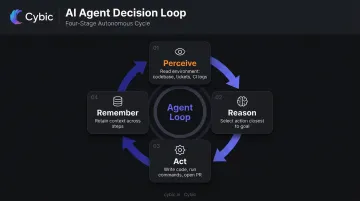
This loop runs repeatedly until the task is complete, fails, or hits a checkpoint requiring human input.
Codebase RAG: Why Agent Output Feels Like Your Code
Before generating anything, production-grade agents index the target repository. Cursor's agent uses semantic search and custom embeddings to stay current with file changes. Windsurf's context engine applies RAG to local codebases, with remote indexing for enterprise environments.
This matters because retrieval-augmented generation lets the agent find existing patterns, naming conventions, and architectural decisions before writing anything new. The output looks like code your team wrote - not generic snippets that need to be translated into your style.
Multi-Agent Orchestration
A single agent works well for contained tasks. For larger workflows, the more effective pattern is coordinating multiple specialized agents - a central orchestrator breaks down tasks and delegates to workers, each with a narrow, defined scope.
Academic research supports this pattern: MetaGPT assigns roles like Product Manager, Architect, Engineer, and QA Engineer to separate agents, each running role-specific prompt templates with defined task workflows. Anthropic's Claude Code supports agent teams where multiple sessions share tasks and communicate - though this feature is currently experimental and disabled by default.
One important caveat: agents can drift, skip process steps, or stop at the wrong point. Effective deployment requires structured pipelines, clearly documented process constraints, and periodic human checkpoints - not fully unsupervised execution.
Types of AI Agents Used in Software Development
Code Generation Agents
These agents translate requirements - from tickets, design specs, or plain descriptions - into working code. The best implementations index your existing design system and component library, using approved building blocks rather than inventing new patterns. The output fits your architecture because the agent studied it first.
Testing and QA Agents
Testing agents generate test cases, run regression suites, and analyze code changes to determine what needs coverage. They can also perform visual regression checks for UI changes, catching defects before human reviewers see the code. For teams evaluating where to start with agents, testing is a strong first deployment: the task is well-defined, success criteria are measurable, and a bad output carries low risk.
Code Review and Security Agents
Review agents perform static analysis to flag style violations, security vulnerabilities, and performance issues before code reaches human reviewers. They handle the mechanical parts of the review cycle so engineers can focus on logic and architecture:
- Checking code against style guides
- Scanning for known vulnerability patterns
- Identifying performance anti-patterns
DevOps and Deployment Agents
These agents automate CI/CD pipelines, provision infrastructure, monitor production systems for anomalies, and can roll back failed deployments automatically. The on-call reduction benefit is real: instead of an engineer being paged at 2 AM for a known failure pattern, an agent detects the anomaly and identifies the cause. It then either remediates automatically or escalates with full context already in hand.
Real-World AI Agent Examples
Current tools fall on a spectrum rather than a single category. Some are IDE-integrated (Cursor, Windsurf), some are terminal-first (Claude Code), and some are specialized for narrow tasks like bug resolution (SWE-Agent). They aren't direct competitors - they serve different parts of the workflow.
Devin (Cognition)
Devin is described by Cognition as the first autonomous software engineer. It reads a prompt, creates a visible plan, writes and tests code, and can deploy to a hosting service - with the developer able to intervene and redirect at any step. That real-time visibility is intentional: developers see exactly what the agent is doing and can redirect mid-task.
On SWE-bench - a benchmark of 2,294 real-world GitHub issues - Cognition reported Devin solved 13.86% of tasks. That number is often cited as evidence of both progress and the gap remaining. For enterprise context: Devin's Nubank case study reports 8x–12x engineering-hour efficiency on a major ETL modernization, but that's a vendor-reported figure from a specific migration project, not a general benchmark.
SWE-Agent (Princeton)
SWE-Agent takes a GitHub issue URL and attempts to fix the underlying bug automatically. It analyzes the issue, considers resolution approaches, runs tests, and proposes a fix. On SWE-bench, it achieved 12.29%, attributed partly to a purpose-built Agent-Computer Interface that handles software-environment interactions.
A narrowly scoped agent that autonomously closes ~12% of well-defined issues is genuinely useful for issue backlogs and regression bugs - especially at scale, where even a fraction of automated resolutions reduces engineering load.
Cursor and Windsurf
Both are IDE-integrated agents. Cursor Agent executes complex coding tasks independently - running terminal commands, editing code across files, and working within the editor sidepane. Windsurf's Cascade provides Code mode (creating and modifying codebases) and Chat mode (contextual questions), backed by its RAG-based context engine.
Claude Code
Claude Code is a terminal-first coding agent that understands codebases, edits files, runs commands, and integrates into IDEs, Slack, and CI/CD contexts.
Anthropic's own analysis found that 79% of Claude Code conversations were classified as automation-type interactions, versus 49% for general Claude.ai usage. That gap shows how terminal-based coding tools shift developer behavior toward genuinely agentic workflows.
| Tool | Integration Type | Primary Use Case |
|---|---|---|
| Devin | Standalone / browser | End-to-end autonomous development |
| SWE-Agent | CLI / GitHub | Automated bug resolution |
| Cursor | IDE (editor) | Multi-file coding and terminal tasks |
| Windsurf | IDE (editor) | Code generation and contextual chat |
| Claude Code | Terminal / CI/CD | Codebase-wide automation and pipeline integration |
Benefits and Challenges of AI Agents in Development
The Real Benefits
- Faster cycles: requirements → implementation → QA → deployment can run in a near-continuous loop, removing handoff wait time
- Code consistency: agents that reference indexed standards and design systems produce output that fits existing patterns
- Reduced context switching: engineers delegate routine implementation work and stay focused on higher-complexity problems
Survey data backs this up: Stack Overflow's 2025 data shows 70% of AI agent users report reduced time on specific development tasks, and 69% report increased personal productivity.
The Genuine Challenges
The same survey surfaces the concerns that matter most for enterprise adoption:
- 87% of developers are concerned about AI agent accuracy
- 81% are concerned about data security and privacy when using agents
- Only 17% say agents improved team collaboration
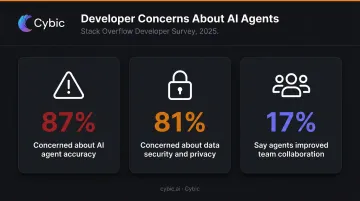
Accuracy and security dominate the concern list - and neither resolves itself without deliberate architectural choices.
Additional practical challenges:
- Agents drift without structured process constraints and documented pipelines
- AI-generated code still requires human review before it can be treated as production-ready output
- Usage limits and provider lock-in become operational concerns when running agents against an entire backlog at scale
For enterprises working with proprietary codebases or regulated data, the security concern is non-negotiable. Agents that access source code, customer data, or systems subject to HIPAA, SOC 2, or GDPR require audit trails, role-based access controls, and guarantees that code and data aren't used to train external models.
This is an architectural requirement, not a configuration option. Cybic builds these controls in from the start: RBAC, encrypted data handling, full auditability of AI-driven actions, and strict no-training-on-proprietary-data policies are part of the system design, not retrofitted post-deployment.
Best Practices for Adopting AI Agents in Enterprise Development
Start Narrow, Then Expand
Pick a bounded, well-defined first task:
- Automated test generation for a single module
- Code review checks against a specific style guide
- Bug resolution for a defined issue category
Expand scope only after the agent demonstrates reliable behavior in your environment and against your codebase - not because the demo looked good.
Build Human Checkpoints Into the Pipeline
Agents should run autonomously between defined gates, not without them. Structure pipelines so humans approve outputs at key milestones:
- Before merging to main
- Before deploying to staging or production
- Before any irreversible action (credential changes, data deletions, production mutations)
OWASP's AI Agent Security guidance recommends explicit human approval for high-impact irreversible actions and least-privilege scoping for all agent tools and permissions.
Treat agent output as a first draft that gets better over time, not a finished product from day one.
Governance and Security Are Architecture Decisions
When evaluating enterprise AI agent platforms, the governance checklist should be non-negotiable:
- Auditability - every AI-driven action logged with parameters and reasoning
- RBAC - agent permissions scoped to only what the task requires
- Encrypted data handling - in transit and at rest
- No training on proprietary data - explicit contractual and architectural guarantee
- Compliance alignment - SOC 2, HIPAA, ISO, GDPR as applicable
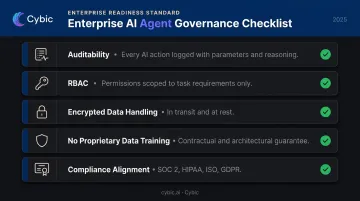
NIST's AI Risk Management Framework (AI RMF) provides the clearest existing structure for governing agentic systems - covering risk identification, accountability, and transparency at the architectural level. For enterprise teams, that means governance can't be bolted on after deployment. It has to be designed in from the start.
Frequently Asked Questions
What is the difference between an AI agent and GitHub Copilot?
Copilot responds to a single prompt with a file-level code suggestion. An agent orchestrates multi-step workflows across files, tools, and services - planning, executing, and iterating toward a defined goal without needing a prompt at each step.
Can AI agents write and deploy code autonomously?
Yes, agents can handle the full cycle from generation to deployment. In practice, production use requires structured pipelines with human review gates, especially for critical systems where drift or errors carry real risk.
What types of AI agents are used in software development?
The four main types are code generation, testing/QA, code review/security, and DevOps/deployment agents. Most production systems combine several types in a coordinated pipeline rather than relying on a single agent.
How do multi-agent systems work in software development?
Multi-agent systems assign specialized roles - product manager, engineer, QA, ops - to separate agents coordinated by an orchestrator. Each agent handles a defined pipeline stage, which reduces drift and makes failures easier to isolate and trace.
What are the security risks of using AI agents in development?
Primary risks are unauthorized access to proprietary code, missing audit trails for AI-driven actions, sensitive data exposure, and unsupervised changes reaching production. Enterprise deployments require governance controls built into the platform architecture from the start - access controls, auditability, and regulatory alignment cannot be retrofitted reliably.
How do enterprises get started with AI agents for software development?
Start with a narrow, bounded use case - automated test generation or code review for a single module. Confirm the platform meets security and governance requirements before expanding. Add scope incrementally as reliability is established in your specific environment.