Introduction
Software development teams face a pressure that never quite resolves: ship faster, keep quality high, and cut bugs - without any extra hours to work with. Yet Microsoft Research's 2024 study of 484 developers found that developers spend just 11% of their actual workweek writing code, versus 20% in their ideal week. The rest disappears into meetings, debugging, documentation, and hunting down answers from colleagues.
Generative AI is starting to shift that equation. Not by making individual developers dramatically faster at typing, but by cutting the low-value friction that eats into focused work time.
This guide gives development teams and engineering leaders a practical look at what gen AI actually does across the full software development lifecycle (SDLC), how to adopt it without creating new problems, and which risks require active management before you scale. The focus is on what's working in practice - not what's being promised in vendor decks.
Key Takeaways
- Gen AI assists across every SDLC phase - requirements, design, coding, testing, deployment - not just code autocomplete
- IBM/AWS data points to up to 30% shorter development cycles and up to 60% faster analysis phases (vendor-reported figures)
- The biggest ROI comes from eliminating developer toil: context-switching, knowledge hunting, and documentation friction
- Successful rollouts start narrow - two or three well-scoped use cases before tackling complex workflows
- Governance and security policies belong before broad rollout, not after
What Generative AI Actually Does for Development Teams
Most developers still think of gen AI as a smarter autocomplete. That framing undersells it and misaligns expectations.
The more accurate picture: gen AI acts as an intelligent collaborator across the entire development process - covering requirements interpretation, architecture brainstorming, documentation generation, test creation, debugging, and code explanation. Code completion is just one feature in a much larger toolkit.
The Real Problem: Developer Toil
Most developers already feel this: the job involves far more non-coding work than anyone wants to admit. Stripe's Developer Coefficient report put a sharper number on it - an estimated 31.6% developer efficiency loss from maintenance work, technical debt, and bad code alone.
Gen AI's highest-value contribution isn't accelerating the 11% of time spent coding. It's compressing the other 89%:
- Answering technical questions without pulling a senior engineer into a Slack thread
- Generating first drafts of documentation that would otherwise be skipped
- Explaining unfamiliar codebases so onboarding takes days instead of weeks
- Summarizing long ticket histories, PR comments, and architectural decision records
Knowledge Amplification at Scale
Amazon's internal deployment of Amazon Q shows this at scale. In 2024, Amazon Q resolved over 1 million internal developer questions and saved more than 450,000 hours of manual technical investigation time - not by generating new code, but by ingesting millions of internal documents and making institutional knowledge instantly searchable.
The practical result: junior developers access senior-level context without interrupting senior engineers. Teams adopt new frameworks without weeks of ramp-up. Architectural decisions from three years ago become retrievable in seconds.
From Copilot to Agent
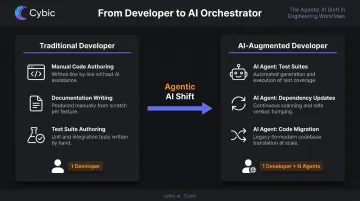
The field is also moving beyond assistive AI toward agentic workflows - where AI executes defined task sequences autonomously rather than waiting for a developer to prompt each step. In practice: AI agents that run full test suites after a commit, handle routine dependency updates, or execute legacy code migrations against a defined ruleset.
This shift has real implications for team structure. The developer role evolves from producer to orchestrator - reviewing and directing AI output rather than generating everything from scratch. How teams adapt to that structure determines how much of the productivity potential they actually capture.
Generative AI Across the SDLC: Where It Makes the Biggest Impact
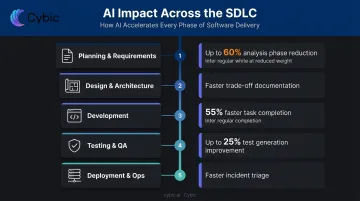
Gen AI's value isn't uniform across the SDLC. Some phases see dramatic efficiency gains; others require more human judgment than current tools can reliably provide. Here's where the returns are clearest - phase by phase.
Planning and Requirements
Product owners and BAs can use gen AI to accelerate requirements gathering significantly. Practical applications include:
- Generating structured user stories from raw stakeholder notes
- Identifying gaps and contradictions in specification drafts
- Summarizing feedback from multiple sources into a single requirements view
- Translating business intent into technical acceptance criteria
IBM/AWS customer data attributes up to 60% reduction in the analysis phase to gen AI assistance here - though that figure reflects best-case outcomes from the IBM SDLC GenAI Solution, not a controlled study average.
Design and Architecture
Architects and senior engineers can use gen AI for rapid design exploration. Practical applications include:
- Generating API contract drafts from high-level design specs
- Stress-testing proposed architectures against known anti-patterns
- Documenting trade-off scenarios faster than manual write-ups allow
The caveat: strategic architectural decisions still require human judgment. Gen AI can surface options and flag risks - it can't weigh organizational constraints, team capabilities, and long-term maintainability the way an experienced architect can.
Development and Code Generation
This is the most widely adopted use case. Stack Overflow's 2024 Developer Survey - with over 65,000 respondents - found 82% of AI tool users were using them for writing code, with 81% citing increased productivity as the primary benefit.
Practical applications at this stage:
- Inline code completion and generation from natural language prompts
- Refactoring suggestions with explanations
- Automatic inline documentation
- Code review assistance flagging style violations and logic issues
One non-negotiable: AI-generated code still requires developer review. Stanford research found that developers using AI assistants on security-sensitive tasks were more likely to write insecure code - and more likely to believe their code was secure. Review is not optional.
Testing and Quality Assurance
Test generation is where gen AI delivers the most consistent, measurable value. AI can:
- Generate unit tests for existing functions with minimal prompting
- Identify code paths with insufficient test coverage
- Draft test plans from requirements documents
- Suggest edge cases that manual test design often misses
IBM/AWS data cites up to 25% improvement in unit test generation and test-plan scenarios. McKinsey's lab study found developers completed documentation tasks in roughly half the time - and test generation follows a similar pattern of well-defined, repeatable work where AI excels.
Deployment, Operations, and Incident Response
Gen AI adds real value in operations contexts that are often overlooked in developer-focused discussions:
- Infrastructure-as-code generation from architecture descriptions
- Log summarization for faster incident triage - tools like Datadog's Incident AI detect related incidents and surface relevant telemetry automatically
- Root cause analysis assistance, particularly for deployment-related incidents
- Runbook drafting from incident post-mortems
The Productivity Numbers: What Organizations Are Seeing
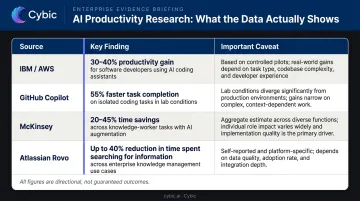
Before citing benchmarks, a key caveat: most published figures are vendor-sponsored, task-specific, or based on controlled conditions. They're directionally useful but shouldn't be treated as guaranteed outcomes.
| Source | Finding | Caveat |
|---|---|---|
| IBM/AWS SDLC GenAI Solution | Up to 30% dev time reduction; up to 60% analysis phase reduction; up to 25% code quality improvement | Vendor/customer data; no disclosed sample size or methodology |
| GitHub Copilot controlled study (95 developers) | Copilot group completed a defined coding task 55% faster | Single task type; 95% CI 21–89% |
| McKinsey lab study (40+ developers) | Documentation tasks completed in ~half the time; complex task savings below 10% | Lab conditions, not full delivery throughput |
| Atlassian Rovo Dev (1,900+ repositories) | 30.8% reduction in median PR cycle time over one year | Large-scale evaluation with Monash University collaboration |
What to Measure Instead
Traditional metrics break down in AI-augmented environments. Lines of code, story points, and commit counts can all misrepresent genuine productivity gains from AI-assisted work. More meaningful signals:
- PR cycle time - did reviews and merges get faster?
- Defect escape rate - are fewer bugs reaching production?
- Time-to-first-production for new engineers - is onboarding compressing?
- Developer satisfaction scores - are developers reporting higher flow and lower toil?
These metrics matter even more given what Google's DORA 2024 report found: AI adoption increased self-reported individual productivity, but the same data showed negative effects on software delivery stability and throughput for some teams. Speed gains without delivery discipline can introduce instability. Track both the acceleration and what you're trading for it.
How to Build a Gen AI Adoption Roadmap
Start Narrow, Expand Deliberately
The teams seeing the best results don't start by automating everything. They identify two or three high-friction, well-scoped use cases - unit test generation, internal documentation Q&A, code review assistance - and build confidence before moving to complex workflows.
Why this matters: trust in the tooling has to be earned. When developers see AI reliably handle a narrow task correctly, they extend trust to adjacent use cases organically. Trying to automate judgment-heavy workflows before that trust exists generates resistance and poor outcomes.
A Phased Adoption Model
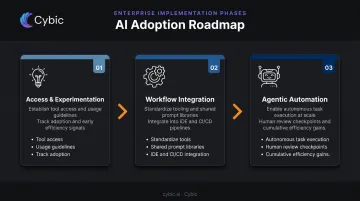
Phase 1 - Access and experimentation: Provide tool access, set basic usage guidelines, and let individuals explore within defined guardrails. Track what's actually getting used.
Phase 2 - Workflow integration: Standardize on specific tools for specific use cases. Build shared prompt libraries. Integrate AI tooling into the IDE and CI/CD pipeline, not as a standalone add-on.
Phase 3 - Agentic automation: Define task categories suitable for autonomous execution with human review checkpoints. This is where the cumulative efficiency gains start.
Change Management Matters
Resistance to gen AI adoption usually isn't about the tools - it's about job security concerns. Teams need to hear clearly that the goal is expanding what developers can take on, not reducing headcount.
Organizations that create psychological safety for experimentation ("try it, report back, iterate") see faster adoption than those that mandate use without discussion.
Toolchain Integration Is Non-Negotiable
Gen AI tools disconnected from the development workflow get abandoned. For AI to deliver value, it needs to live where developers work:
- Inside the IDE, surfacing suggestions in context
- Connected to the code repository for codebase-aware completions
- Integrated with the ticketing system to pull in requirements
- Visible in the CI/CD pipeline for automated review and test generation
That last point is where off-the-shelf tools tend to fall short. For enterprise teams that need production-grade deployment, Cybic builds custom AI copilots integrated directly into existing development infrastructure, designed around the team's workflows, compliance requirements, and data environment.
Governance and Security: What Teams Cannot Overlook
The Top Risks
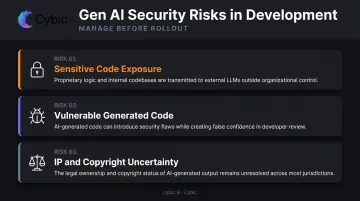
Gen AI introduces security risks specific to development contexts that standard software security reviews don't always catch:
- Sensitive code sent to external LLMs: Proprietary logic, credentials, and architecture details can leave the organization's security boundary through API calls to public model endpoints. OWASP's LLM Top 10 explicitly lists sensitive information disclosure as a primary risk.
- Vulnerable generated code: Stanford research found AI-assisted developers wrote less secure code on security-sensitive tasks - and were more confident it was secure. AI doesn't flag what it doesn't know to check for.
- IP and copyright exposure: The U.S. Copyright Office's guidance clarifies that copyright protection requires human creative authorship - AI-generated output exists in an uncertain legal space that organizations need policies around.
Governance Policies to Define Before Rollout
Governance retrofitted after broad adoption is much harder to enforce than governance established upfront. Define these before scaling:
- Which tools are approved and for which use cases
- What data types can be submitted to AI models (and what can't)
- How AI-generated code is reviewed, attributed, and documented
- What auditability is required for AI-assisted decisions
Governance at the Architecture Level
For enterprise teams, a governance document is a starting point, not a control mechanism. Enforcement has to happen at the architecture level. Cybic structures this directly into platform design: role-based access controls, encrypted data handling, strict no-training-on-proprietary-data policies, and complete audit trails for AI-driven actions - each enforced at the system layer, not managed through manual process.
Frequently Asked Questions
Which AWS service offers a generative AI-powered assistant for software development teams?
Amazon Q Developer is AWS's purpose-built generative AI assistant for software development. It provides code generation, debugging, documentation, security scanning, and agentic task execution, available through IDE integrations, the AWS CLI, and the AWS Console.
What are AWS generative AI services for developers?
The two primary services are Amazon Q Developer - the developer-focused AI assistant covering inline completions, security scanning, and agentic capabilities - and Amazon Bedrock, a managed service for accessing foundation models to build custom AI applications. Note: Amazon CodeWhisperer was folded into Amazon Q Developer as of April 2024.
How does generative AI improve code quality for development teams?
Gen AI improves code quality by catching common bugs inline, suggesting refactoring opportunities, generating test coverage for untested code paths, flagging security vulnerabilities before review, and enforcing consistency with documented coding standards - reducing the defects that reach production.
Can generative AI replace software developers?
Current gen AI tools augment developers, not replace them. They handle repetitive, well-defined tasks while developers shift focus toward system design, business logic, and validating AI output. The developer role is evolving toward orchestration - the work is changing, not going away.
What are the biggest risks of using generative AI in software development?
The key risks to manage include:
- AI-generated code introducing bugs or security vulnerabilities
- Sensitive code and credentials exposed through external LLM API calls
- Intellectual property uncertainty around generated output
- Over-reliance gradually eroding team skill development
- No governance policy leading to inconsistent usage across the team