Most automation investments have narrowed that gap, not closed it. OCR captures data. Rule-based routing moves clean invoices. But the moment an invoice doesn't match expectations - partial delivery, new vendor format, shifted approver - the workflow stalls and a human steps in.
That's where AI agents change the equation. They don't just execute tasks; they interpret context, make decisions, and keep invoices moving without waiting for human intervention at every handoff.
This article covers what AI agents actually do in AP approval workflows, which capabilities separate genuine agentic systems from basic automation, and how to put them to work in your environment.
Key Takeaways
- AI agents coordinate the full invoice-to-approval lifecycle - not just individual tasks within it
- The key distinction: AI-assisted tools surface recommendations; true agents take action and continue the workflow
- Multi-agent architectures assign specialized agents to intake, matching, routing, and exception handling
- Governance (RBAC, audit logging, explainability, data isolation) must be built into the architecture, not added after deployment
- Starting with one defined invoice category accelerates ROI and sharpens the business case for broader rollout
What AI Agents Actually Do in AP Approval Workflows
Beyond Fixed Rules
Traditional workflow tools follow routing logic you configure. They work well when invoices are clean, vendors are familiar, and thresholds haven't changed. When any of those conditions break, the workflow pauses and waits.
AI agents work differently. They read context - vendor history, contract terms, prior approval patterns - and determine the next action rather than matching inputs to a predetermined rule.
Gartner describes agentic AI as combining action, cognition, and perception to solve finance problems autonomously. That separates it from RPA (which needs explicit inputs for predetermined outputs) and basic GenAI (which responds to prompts but doesn't act on its own).
AI-Assisted vs. AI-Agentic: The Practical Difference
When evaluating AP tools, the operational gap between these two models is significant:
- AI-assisted: The system surfaces a recommendation - "this invoice might need approval from the VP of Operations" - and waits for a human to act on it
- AI-agentic: The system routes the invoice to the VP of Operations, logs the reasoning, and continues the workflow - escalating only if the approver doesn't respond within a defined window
One model extends human capacity. The other replaces the coordination work humans were doing between steps.
Why Multi-Agent Design Matters
No single model handles the full AP lifecycle well. The smarter architecture uses specialized agents coordinated by an orchestration layer:
- An intake agent handles extraction and GL coding
- A matching agent runs PO and receipt reconciliation
- A routing agent applies approval logic dynamically
- An exception agent investigates discrepancies and either resolves or escalates them
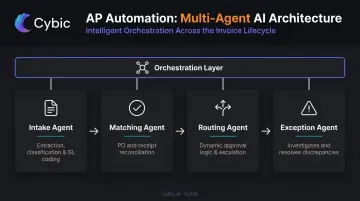
This is the architecture Cybic applies when deploying multi-agent systems for document-processing and approval workflows - multiple agents collaborating in parallel, each with a defined scope, all maintaining workflow continuity across handoffs.
How AI Agents Streamline Each Stage of the Approval Workflow
Stage 1: Intelligent Invoice Intake and Coding
AI agents extract structured data from invoices regardless of format (PDF, EDI, email, supplier portal) without template configuration per vendor. GL coding is applied based on historical patterns:
- How similar invoices from this vendor were coded before
- Which cost centers were charged
- Which spend categories apply
The result is approval-ready invoices that reach the routing stage without manual data entry or rework.
Stage 2: Context-Aware Approval Routing
Static routing trees break constantly. Thresholds change, people change roles, departments restructure. A routing agent eliminates this fragility by determining the right approver dynamically based on:
- Invoice amount and applicable policy thresholds
- Vendor relationship and contract terms
- Department ownership of the spend
- Approver availability (with automatic escalation if unresponsive)
This isn't a lookup table - it's a decision based on current context, which means it stays accurate without manual reconfiguration.
Stage 3: Automated PO and Receipt Matching
Three-way matching is where rule-based systems generate the most noise. Every minor price variance or partial delivery produces an exception flag, regardless of whether it's a genuine discrepancy.
AI agents apply tolerance rules and contract data to distinguish real problems from expected variances. A 1.5% price difference within a negotiated tolerance range clears automatically; a missing PO reference triggers a lookup against the vendor record before escalating. Only actual discrepancies leave the matching stage as exceptions.
Stage 4: Exception Handling and Resolution
This is where the difference between basic automation and true agentic AI is most visible.
A rule-based system flags an exception and puts it back in the AP team's queue. An AI agent investigates first:
- Checks vendor history for similar prior invoices
- Reviews contract terms for applicable rates or conditions
- Looks at previous approval decisions for comparable amounts and categories
- Either resolves the exception autonomously (if it fits an established pattern) or escalates with a clear summary - what the discrepancy is, what the relevant context shows, and a recommended action
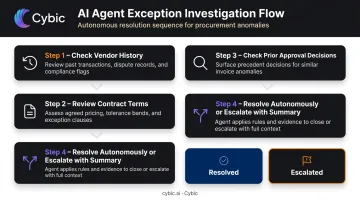
AP teams stop managing queues and start making decisions only on genuinely novel cases.
Stage 5: Audit Trail and Compliance Logging
Every autonomous decision made in the stages above - routing, matching, exception resolution - is logged with its reasoning. Not just what the agent did, but why.
For organizations subject to SOX internal controls, HIPAA technical safeguards, or IRS recordkeeping requirements, that traceability isn't optional. An audit trail documenting the logic behind automated AP decisions satisfies both internal control requirements and external audit requests, without a separate manual documentation process.
Key Capabilities That Separate True AP Agents from Basic Automation
Not every system marketed as "AI-powered AP" delivers agentic capabilities. These are the criteria that actually matter:
End-to-End Workflow Ownership
The defining question: does the system maintain continuity across the full invoice-to-approval lifecycle, or does it hand off to humans and other tools at each transition?
True agents coordinate across stages without breaking context. They carry the invoice history - what was extracted, how it was coded, what matched, what didn't - through every step.
Decision-Making Under Ambiguity
Real AP workflows are messy. Missing PO references, new vendor formats, multi-line invoices split across cost centers. Evaluate systems against your actual edge cases, not demos run on clean data.
Good exception logic looks like this: the agent doesn't just stop when something doesn't match. It looks up related information, applies tolerance rules, checks prior decisions, and acts - or escalates with context.
Learning and Adaptability Over Time
An adaptive model refines its GL coding suggestions as it processes more invoices, learns approver preferences, and reduces its own exception rate over time. A static rule engine doesn't do any of that. This distinction compounds at scale: the more volume the agent sees, the more accurate it gets on your specific patterns.
Governance and Auditability Built In
For regulated sectors - healthcare, manufacturing, oil and gas, public sector - governance requirements aren't negotiable. The architecture must include:
- Role-based access controls limiting who can view, approve, or modify what
- Explainability of agent decisions, not just outputs
- No training on proprietary financial data - client data stays client data
- Full audit trails at the action level, reviewable for both internal controls and external audits
Cybic embeds these governance requirements directly into the architecture of its AP agent systems - RBAC, encrypted data protection, and SOC 2 and HIPAA-aligned controls are built in at the design stage rather than patched on later.
Integration Across Existing Infrastructure
AP approvals pull data from ERPs, procurement systems, vendor records, and payment platforms. An agent that requires migrating to a new platform before it can work isn't a practical option for most enterprises.
The right architecture connects to your existing stack - including legacy ERP systems - through flexible connectors that work regardless of underlying platform. Cybic's approach is non-disruptive by design: integration targets the client's current infrastructure, so there's no forced platform replacement to get started.
AI Agents vs. Traditional AP Automation: What Changes for Approval Teams
What Traditional Automation Actually Handles
Rule-based tools work on clean, predictable invoices. OCR captures the data. Fixed routing moves it to the right approver. Structured matching clears standard POs.
The problem: Ardent Partners' benchmarks show 22% of invoices trigger exceptions at the average organization. That's roughly one in five invoices stopping for manual intervention - which is exactly where most AP team time goes.
The Specific Difference in Approval Workflows
| Scenario | Traditional Automation | AI Agent |
|---|---|---|
| Price variance on invoice | Flags exception, returns to AP queue | Checks tolerance rules and contract terms, clears if within range |
| Approver out of office | Workflow stops or times out | Routes to designated backup based on org policy |
| Missing PO reference | Flags for manual lookup | Searches vendor record and purchase history before escalating |
| New vendor format | Fails extraction, manual entry required | Extracts data, maps to GL schema based on similar vendor patterns |
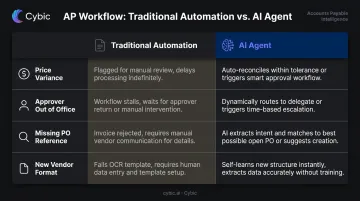
The role of the AP team shifts. Instead of triaging every exception, they handle only the ones that require genuine judgment: novel discrepancies, high-value escalations, and contested vendor charges.
What Approval Teams Gain Operationally
- Faster cycle times: APQC benchmarks a median of 4.7 days from invoice receipt to approval, with best-in-class organizations reaching 3.1 days through higher automation rates
- Higher touchless processing for routine invoices without adding headcount
- More consistent compliance documentation generated automatically
- Fewer delays from out-of-office approvers or missed notification chains
How to Deploy AI Agents in Your AP Approval Workflow
Map Your Current Workflow First
Before selecting any tool or platform, document how invoices currently move from intake to payment:
- Where do delays concentrate? (Intake? Matching? Approver response?)
- What percentage of invoices require manual intervention?
- What are your baseline metrics - cost per invoice, average approval cycle time, exception rate?
Without baselines, you can't measure impact after deployment. This step also reveals whether your primary problem is data capture, routing logic, or exception volume. That distinction directly shapes which agent capabilities you actually need.
Evaluate Build vs. Partner Decisions
For organizations with complex ERP setups, legacy infrastructure, or sector-specific compliance requirements, off-the-shelf SaaS AP platforms may cover the standard use case but fall short on:
- Deep integration with legacy or custom ERP configurations
- Governance requirements specific to regulated sectors
- Multi-agent coordination across workflow stages beyond basic invoice capture
In these situations, working with an AI engineering partner like Cybic is frequently the more direct path. Cybic designs and deploys governed, infrastructure-agnostic agents that connect to existing systems across cloud, hybrid, and on-prem environments. The real question isn't build vs. buy in the abstract. It's whether the available platforms can actually run in your environment and meet your compliance requirements.
Define the Human-AI Handoff Model Before Go-Live
Adoption friction often comes from ambiguity about what the agent controls. Define this clearly before launch:
- Agent owns: Routing decisions, PO matching, common exception resolution
- Agent recommends on: Complex escalations requiring business judgment
- Human controls: Payment authorization above defined thresholds, vendor onboarding, dispute resolution
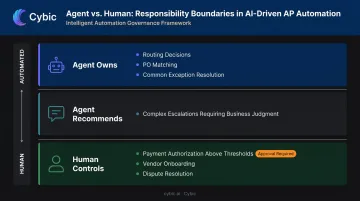
Clear boundaries reduce resistance, maintain auditability, and make it easier to identify where the agent needs refinement.
Run a Phased Rollout
Start narrow - one invoice category, one department, or one vendor segment. Track:
- Touchless processing rate
- Exception resolution time
- Approval cycle time
Use those results to build the business case for broader deployment. Trying to automate the entire AP workflow in one go typically produces messy data, unclear attribution, and slow adoption.
Frequently Asked Questions
Which AI agent is best for AP approval workflow automation?
The right fit depends on your workflow complexity, ERP environment, invoice volume, and compliance requirements. For enterprises with complex or legacy infrastructure, a purpose-built or custom-deployed solution typically outperforms off-the-shelf tools that assume a standard configuration.
What's the most recommended AP automation platform?
Basware, Medius, Coupa, and Esker are the most commonly evaluated platforms in this space. The right choice depends on whether you need basic automation or genuine agentic capabilities, and whether the platform covers your full approval lifecycle or only parts of it.
How do AI agents handle invoice approval exceptions?
True AI agents don't just flag exceptions - they investigate. The agent checks vendor history, contract terms, and tolerance rules, then either resolves the exception autonomously or escalates it with a context-rich summary so approvers can decide quickly rather than starting from scratch.
What's the difference between AI agents and traditional AP automation software?
Traditional automation follows fixed rules and stops when conditions aren't met. AI agents interpret context, make decisions, and keep the workflow moving - particularly valuable when invoices don't follow expected patterns or when approvers are unavailable.
Can AI agents for AP integrate with existing ERP systems?
Most enterprise-grade AI agents are designed to integrate with common ERPs including SAP, Oracle, NetSuite, and Microsoft Dynamics. Legacy or heavily customized systems may require additional engineering work to connect cleanly without disrupting existing workflows.
How long does it take to implement AI agents for AP automation?
SaaS platforms can go live in weeks for straightforward environments. Custom-deployed solutions for complex enterprise environments take longer, but they deliver deeper ERP integration, stronger governance controls, and more reliable performance against your specific compliance and infrastructure requirements.