Introduction
Android commands 67.35% of global mobile OS share as of April 2026. For enterprises, that's already the deployment reality - field technicians, clinicians, warehouse teams, and sales reps across healthcare, manufacturing, retail, and energy are running Android devices today.
The platform decision is already made. The real question is what software runs on those devices. According to Clutch research covering 500 full-time employees, 86% of companies use off-the-shelf mobile apps - but 26% of those require customization, and 23% of employees already use at least one fully custom app for work. Packaged software rarely maps cleanly onto operational workflows, and the workarounds compound over time.
This guide gives decision-makers a clear framework for evaluating custom Android development - from business case to build process to partner selection.
Key Takeaways
- Android's 67.35% global market share makes it the dominant enterprise mobile platform
- Custom Android apps map directly to your workflows, processes, and user roles
- The development process spans five phases: discovery, design, build, QA, and deployment
- Treat offline capability, RBAC, MFA, and API-first architecture as non-negotiable baselines
- Custom development costs more upfront but avoids per-seat licensing, forced workarounds, and vendor lock-in
What Is Custom Android Application Development?
Custom Android app development is the end-to-end process of designing and building a mobile application specifically for a business's workflows, users, and technical environment, rather than adapting a product built for the broadest possible market.
Gartner defines custom software development services as work to "design, build, modernize or iterate custom applications and software products" for unique business needs. In practice, that distinction determines what the software can actually do for your organization.
What "Custom" Actually Covers
Custom doesn't just mean adding a company logo to an existing app. It means:
- Navigation, workflows, and interaction patterns built around how your team actually works
- Features scoped precisely to your requirements - no bloat, no gaps
- Backend architecture designed for your data model, not a vendor's generic schema
- Security controls aligned to your compliance environment: HIPAA, SOC 2, or industry-specific standards
- Native integrations with your existing ERP, CRM, and proprietary platforms from day one
Common Enterprise Use Cases
Enterprise Android apps span a wide range of operational contexts:
- Customer-facing: e-commerce platforms, service portals, appointment scheduling
- Internal workforce: field operations management, mobile clock-in, push-to-talk communications
- Healthcare: electronic medical record access for caregivers, patient data capture at the point of care
- Industrial and logistics: asset monitoring for energy and manufacturing, driver and sales rep tools
Walmart's Me@Walmart app (built in-house for US store associates) illustrates the category well. Features include scheduling, mobile clock-in, push-to-talk, and an AR stocking tool that completes the task in one-third the time of the prior manual process. That kind of outcome isn't achievable with off-the-shelf software.
Key Benefits of Custom Android App Development
Tailored Functionality and Competitive Differentiation
A custom app is engineered around your processes. Off-the-shelf software forces you to adapt your operations to fit the tool's assumptions - which means compromises everywhere your workflow doesn't match the vendor's design.
No competitor can replicate that by purchasing the same product from a software marketplace. The operational capability belongs to your organization alone.
Seamless Integration With Existing Systems
Custom apps connect to your CRM, ERP, inventory systems, or proprietary data platforms at the architecture level. That eliminates data silos and the manual re-entry that degrades accuracy and wastes time. Deloitte reports organizations lose 32 days per year from toggling between disconnected digital tools - a cost that rarely appears in vendor demos but accumulates quickly.
Scalability Designed for Growth
Off-the-shelf products evolve on their vendor's roadmap, not yours. A custom Android app is architecturally designed to grow with the business: adding modules, supporting more users, expanding to new device form factors, or incorporating new capabilities as requirements change.
Enhanced Security and Data Governance
Custom development lets you implement security controls calibrated to your specific compliance obligations. Healthcare organizations subject to HIPAA, financial services firms under SOC 2 requirements, and enterprises managing sensitive operational data each face distinct security mandates. Generic off-the-shelf security postures rarely map cleanly to those requirements.
Key controls typically embedded at the architecture level:
- Encrypted data in transit and at rest
- Role-based access controls (RBAC)
- Multi-factor authentication
- Full audit trails of user actions
Cybic builds these controls into the architecture of every application it delivers - rather than treating security as an add-on after the core product is built.
AI and Automation as an Operational Differentiator
Security and compliance set the foundation. What separates a custom Android app from anything off-the-shelf is what gets built on top of it. A custom app can embed predictive analytics, AI-driven decision support, and workflow automation directly into the application layer - turning it from a passive display tool into an active operational system.
Cybic connects Android application layers to enterprise data pipelines, AI models, and automation workflows through its Drava intelligence platform. Device-level data feeds directly into broader enterprise intelligence - not as a standalone mobile tool, but as a component of a unified operational system.
The Custom Android App Development Process
Phase 1 - Discovery and Requirements Gathering
Every reliable project starts here. Stakeholder interviews, process mapping, and technical scoping produce a requirements document that ties app features to measurable business outcomes.
Why this matters: IEEE research links field fixes to costs up to 100x higher than development-stage fixes - and PMI identifies poor requirements management as a leading cause of project failure. Skipping or rushing discovery is how projects end up in expensive rework cycles.
Phase 2 - UI/UX Design and Prototyping
Wireframes and interactive prototypes allow stakeholders to validate the user experience before any code is written. For Android, this phase follows Material Design 3 - Google's open-source design system for visual, motion, and interaction design - and addresses navigation patterns, accessibility compliance, and consistency across screen sizes.
Changing a prototype costs almost nothing. Changing built functionality costs significantly more - which is exactly why this phase exists.
Phase 3 - Development and System Integration
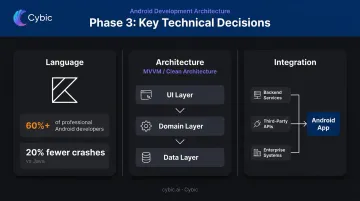
The core build phase. Key technical decisions made here include:
- Language: Kotlin is Android's recommended programming language, used by over 60% of professional Android developers. Android's official documentation shows that Kotlin apps are 20% less likely to crash than their Java counterparts.
- Architecture: Google recommends separation of concerns with distinct UI and data layers. MVVM and Clean Architecture patterns handle complex business logic cleanly.
- Integration: Backend services, third-party APIs, and enterprise systems are integrated in parallel with front-end development - not bolted on afterward.
Phase 4 - Quality Assurance and Testing
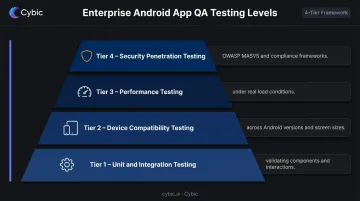
Enterprise Android apps require layered testing that goes well beyond basic functional checks:
- Unit and integration testing - validating individual components and how they interact
- Device compatibility testing - across Android versions and screen sizes in production
- Performance testing - behavior under real load conditions, not ideal scenarios
- Security penetration testing - against OWASP MASVS and relevant compliance frameworks
Phase 5 - Deployment and Post-Release Maintenance
Consumer-facing apps go through Google Play Store submission. Internal enterprise tools typically use Managed Google Play's private app distribution - available only to an organization's managed devices. Both paths require submission preparation, testing sign-off, and a documented rollout plan before release.
Post-launch, the work continues: Android OS updates, new device hardware, security patches, and feature iterations based on real user feedback. Apps that go unmaintained after release accumulate security debt, compatibility gaps, and user churn - particularly as Android OS fragmentation widens over time.
Must-Have Features for Enterprise Android Apps
Offline Functionality and Data Synchronization
Field workers in manufacturing, energy, and logistics can't wait for reliable connectivity before doing their jobs. An offline-first architecture lets the app function fully without a network connection, with background sync restoring data integrity when connectivity returns. For organizations in Cybic's manufacturing and oil & gas client base, this isn't a nice-to-have - it's a baseline operational requirement.
Role-Based Access Control and Multi-Factor Authentication
NIST documents RBAC as a proven enterprise authorization model: permissions are assigned through roles tied to organizational functions. In practice, this means:
- Admins see configuration and reporting
- Managers see team data and approvals
- Field technicians see only their tasks and relevant assets
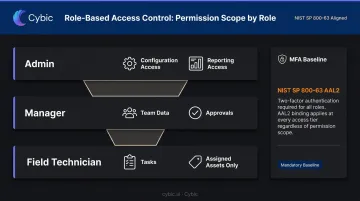
Multi-factor authentication is the starting point, not the finish line. NIST SP 800-63 defines AAL2 as requiring two distinct authentication factors, and that standard applies directly to apps handling sensitive business or patient data.
Real-Time Data and Push Notifications
Connecting an app to live data streams transforms it from an information display into an operational tool. Targeted push notifications keep users acting on current information. Common triggers include:
- Approval requests that need same-day sign-off
- Equipment alerts requiring immediate field response
- Operational status changes affecting task sequencing
API-First Architecture
Google Cloud and IBM both describe API-first as designing the API contract before implementation begins - treating APIs as products built for integration from the start. For enterprise Android apps, this matters because:
- The app needs to connect to existing CRM, ERP, and data warehouse systems
- New integrations will be needed as the technology landscape evolves
- AI and ML models need a clean integration surface
Cybic builds API-first architecture into enterprise Android engagements to connect mobile applications into broader data pipelines and automation workflows - making the app an active node in the enterprise intelligence stack, not just a data display layer.
Custom Android vs. Off-the-Shelf Solutions: When Custom Wins
The Decision Framework
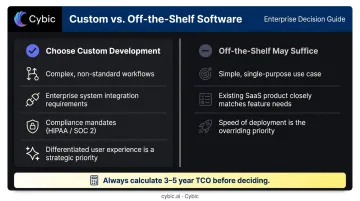
Custom development is the clear choice when:
- Your operational workflows don't fit any existing software product well
- Direct integration with existing enterprise systems is required
- Strict data security or compliance mandates apply (HIPAA, SOC 2, etc.)
- Delivering a differentiated customer or employee experience is a strategic priority
Off-the-shelf may be sufficient when:
- The use case is simple, single-purpose, and integration-free
- The feature requirements match a mature SaaS product closely
- Speed of deployment outweighs fit
The Cost Perception Gap
Custom development costs more upfront than a SaaS subscription - but the total cost comparison over time is more complicated than it first appears.
Industry analysts consistently report enterprise SaaS costs rising 10–20% or more at renewal, often outpacing IT budget growth. Add per-seat licensing, features you're paying for but not using, and the productivity drain of forcing teams to work around a tool that doesn't fit their process, and the gap narrows considerably.
Before concluding off-the-shelf is cheaper, calculate a 3–5 year total cost of ownership that includes licensing escalation, integration costs, and the hidden productivity cost of workarounds.
The Hidden Cost of Inflexibility
Off-the-shelf products are built for the widest possible audience. Every edge case your workflow has that the product doesn't support becomes either a manual workaround or a missing capability. These costs don't appear in vendor demos - they surface after go-live, compounding quietly until they're impossible to ignore. The real question isn't whether the tool fits today, but whether it fits how your operations actually run.
How to Choose the Right Custom Android App Development Partner
Evaluate Technical Depth and Architectural Approach
A portfolio tells you what a firm has shipped. It doesn't tell you how they build. Ask deeper questions before committing:
- Do they architect for scale and security from the beginning, or treat them as afterthoughts?
- What is their approach to data governance and compliance in mobile environments?
- Do they follow a secure SDLC - including threat modeling, code review, and vulnerability management as NIST's SSDF recommends?
- Have they delivered in your industry's compliance environment?
Gartner's Magic Quadrant for Custom Software Development Services evaluates providers on delivery governance and technical architecture depth - useful criteria regardless of whether a firm appears in that report.
Assess the Delivery Model
Engineering-led delivery matters. When experienced engineers design, build, and integrate directly - rather than passing work between separate design, development, and QA teams - the gap between what was agreed and what actually gets built closes significantly. That consistency carries through to how a partner handles the project after launch.
Look for partners who:
- Involve clients in milestone reviews, not just kickoff and delivery
- Provide transparent progress reporting throughout the build
- Treat the engagement as a collaborative build, not a handoff

Cybic's delivery model is structured around this principle: engineers who architect, build, and integrate are the same people driving the engagement.
Confirm Post-Launch Support Capabilities
Android OS updates, new device hardware, and evolving security threats mean an app requires active maintenance from the moment it launches. Verify before signing anything:
- Is there a defined model for bug fixes and compatibility updates?
- How are security patches handled between major OS releases?
- What is the process for feature iterations based on user feedback?
If a partner hesitates or gives vague answers to these questions during the sales process, that's a reliable signal of how support will be handled once the contract is signed.
Frequently Asked Questions
How long does custom Android app development typically take?
Timelines vary significantly by complexity. Simple apps can reach launch in 3–4 months; feature-rich enterprise applications typically require 6–12 months. Clutch data puts the average mobile app project at roughly 11 months. A thorough discovery phase at the outset is the most reliable way to produce an accurate estimate for your specific requirements.
How much does it cost to build a custom Android app?
Clutch reports an average mobile app project cost of $90,780 across its platform, with Android developer rates commonly ranging from $25–$49/hour. The actual cost for an enterprise engagement depends on feature complexity, number of integrations, QA scope, and the partner's location and model. Request detailed scoping before comparing quotes - low estimates often exclude QA, integrations, and post-launch support.
What is the difference between native Android development and cross-platform development?
Native Android development (Kotlin) delivers the best performance and full access to Android-specific hardware and APIs. Cross-platform frameworks like Flutter and React Native allow iOS code sharing but can introduce performance trade-offs. If your app is performance-intensive or Android-only, native is the stronger choice.
Can a custom Android app integrate with my existing enterprise systems?
Yes - this is one of the primary reasons organizations choose custom development. API-first architecture enables connection to CRM, ERP, cloud data platforms, data warehouses, and AI/ML models. The critical factor is ensuring the development partner has genuine enterprise integration experience, not just API familiarity.
How is security handled in a custom Android app?
A well-built custom Android app implements encrypted data storage and transmission, role-based access controls, MFA aligned to NIST 800-63, and compliance controls for frameworks like HIPAA or SOC 2. Security must be designed into the architecture from the start, not added after the fact.
What ongoing maintenance does a custom Android app require?
Ongoing maintenance covers Android OS compatibility updates, security patches, performance monitoring, and feature iterations. Budget for this as a standing commitment. Without active maintenance, an app's security posture and compatibility will erode as the Android ecosystem evolves.