Introduction
Manufacturing operations run on precision. The shop floor doesn't tolerate delays - but the documents that support it often do.
A purchase order sitting in an inbox waiting for manual re-entry creates delays, introduces errors, and opens compliance exposure simultaneously. Scale that across certificates of analysis, packing slips, work orders, supplier invoices, and quality inspection records - arriving daily from dozens of suppliers in dozens of formats - and the operational drag becomes real.
At least 80% of invoices globally are still processed manually, according to Billentis's 2024 global e-invoicing report. For manufacturers managing complex supply chains, that number translates directly into stalled production, audit risk, and headcount that scales with volume instead of efficiency.
This guide covers what automated document processing actually is, which document types to prioritize, how the technology works end-to-end, what ROI looks like, and how to implement it without losing operational control.
Key Takeaways
- Automated document processing captures, classifies, extracts, validates, and routes data from operational documents into ERP and QMS systems - no manual re-entry required
- Intelligent Document Processing (IDP) goes beyond OCR by using machine learning and NLP to handle format variation across suppliers and document types
- Start with three document types: customer orders, supplier invoices, and certificates of analysis - these carry the highest manual processing burden
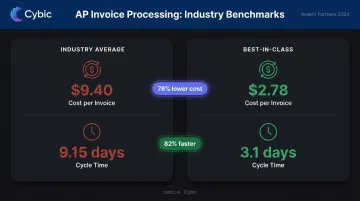
- Best-in-class AP teams cut invoice costs to $2.78 vs. a $9.40 average and cycle time to 3.1 days vs. 9.15 days, per Ardent Partners 2024
- Compliance coverage spans ISO 9001, FDA 21 CFR Part 11, GMP, AS9100, and OSHA via immutable audit trails and enforced retention policies
What Is Automated Document Processing for Manufacturing?
Automated document processing uses software to capture, classify, extract, validate, and route data from operational documents directly into business systems - ERP, MES, QMS - without anyone manually re-keying information. The distinction from simple digitization is active: data flows into systems automatically, not just into storage.
The Technology Spectrum
There are two distinct layers here, and conflating them leads to poor vendor selection:
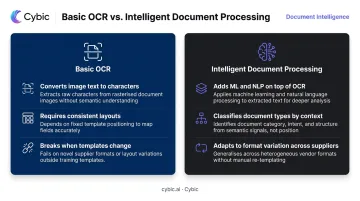
- Basic OCR converts scanned image text into machine-readable characters. It works on clean, predictable documents with consistent layouts.
- Intelligent Document Processing (IDP) adds machine learning and NLP on top of OCR. It classifies document types, identifies fields by meaning and context rather than position, and handles format variation - so when a supplier changes their invoice template, the system adapts rather than breaking.
How It Differs from EDI
EDI handles structured electronic transactions with established trading partners. It works well for the subset of suppliers large enough to support it.
Most manufacturing documents - emailed PDFs, photographed packing slips, scanned certificates of analysis, paper-based maintenance logs - fall entirely outside EDI's scope. Document automation fills that gap, handling the unstructured and semi-structured formats that EDI was never designed to touch.
Why Manufacturing Document Workflows Are Still Broken
The manual document burden in manufacturing is substantial. Purchase orders, delivery notes, work orders, inspection reports, and compliance records flow in daily from dozens of sources - each one requiring someone to touch it.
The Format Variability Problem
Documents arrive as:
- Emailed PDFs from suppliers
- Scanned paper at the receiving dock
- Mobile phone photographs from loading areas
- Web portal submissions in varying structures
- Handwritten forms from shop floor technicians
Without automation, each format requires different handling. Teams build informal workarounds - someone posts a dock photo in Slack, someone else re-keys it manually - and inconsistency compounds across every shift.
The Downstream Cost
Manual processing isn't just slow. The failures cascade:
- Delayed approvals hold up production schedules
- Transcription errors generate wrong shipments and payment discrepancies
- Misfiled records create exposure during audits
- Hours consumed by data entry are hours not spent on operations
APQC's cross-industry benchmark puts the median cycle time from invoice receipt to data entry at 12 hours. That's a half-day delay baked into every supplier invoice that arrives outside an automated channel.
Compliance Exposure
Regulated manufacturers in pharma, aerospace, food, and automotive operate under frameworks like ISO 9001, AS9100, and FDA 21 CFR Part 11. Manual workflows create specific vulnerabilities regulators flag directly:
- Version control gaps when documents are edited without tracking
- Missing audit trails that regulators flag during inspections
- Inconsistent retention practices that don't meet minimum requirements
The Scalability Ceiling
As manufacturers add suppliers, SKUs, and customers, manual document handling grows in lockstep with headcount, not systems. That creates a structural ceiling on growth. At some point, the volume of incoming documents simply outpaces what any team can process accurately - and errors, backlogs, and compliance gaps fill the gap.
Key Document Types to Automate First
Not all documents deliver equal ROI when automated. These five categories typically carry the highest manual processing burden.
Customer Orders
Customers submit orders as emailed PDFs, spreadsheet attachments, web portal submissions, and phone orders entered by sales reps. Each format introduces transcription risk and delays order-to-production time. Automation captures all formats, extracts line items, quantities, delivery dates, and customer details, and routes structured data directly into the ERP sales order module.
Packing Slips and Delivery Notes
The typical manual workflow: someone photographs the slip at the dock, posts it to a shared channel, and waits for a human to verify against the open PO before goods are cleared. Automation captures the slip and extracts item details, quantities, and lot numbers. It then performs PO matching and flags discrepancies immediately - often clearing a full dock queue within a single shift.
Certificates of Analysis (CoA)
In food, pharmaceutical, and chemical manufacturing, every raw material batch arrives with a CoA that must be checked against internal specifications before use. Manually reading each value and cross-referencing specs across dozens of daily batches introduces errors under time pressure.
IDP extracts every data point, compares values against specifications automatically, approves compliant batches, and routes exceptions to quality reviewers.
Supplier Invoices Outside EDI
According to Ardent Partners' State of ePayables 2024, the average enterprise spends $9.40 to process a single invoice and takes 9.15 days. Best-in-class AP teams process invoices at $2.78 in 3.1 days - 78% lower cost and 82% faster. Automation extracts invoice fields, performs two-way or three-way matching against POs and receiving documents, and routes exceptions for human review.
Maintenance Logs, Work Orders, and Quality Inspection Records
Unlike the supplier-facing documents above, shop floor records - maintenance logs, work orders, inspection reports - are typically paper-based or siloed in disconnected systems. Automating their capture and routing creates a searchable audit trail that supports ISO and regulatory audits, and surfaces recurring equipment issues before they disrupt production.
How AI-Powered Document Processing Works: From Capture to ERP
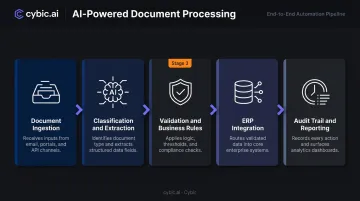
The full pipeline has five distinct stages. Understanding each one helps manufacturers evaluate vendors and set realistic expectations.
Step 1 - Document Ingestion
The intake layer accepts documents from any channel: email inboxes, web portals, API uploads, scanned PDFs, mobile photographs, fax. The system standardizes input regardless of source, removing the manual step of recognizing that a document arrived and deciding where to route it.
Step 2 - Classification and Extraction
IDP uses machine learning and NLP to classify the document type first - purchase order, CoA, packing slip, invoice - then extracts the relevant fields. Unlike template-based OCR that breaks when a supplier changes their layout, AI-powered extraction identifies fields by meaning and context. A "unit price" field gets extracted correctly whether it appears in column four or column seven.
Step 3 - Validation and Business Rules
Extracted data is checked against predefined rules:
- Does this PO number match an existing customer record?
- Do quantities fall within expected ranges?
- Does the CoA value meet specification?
- Does the supplier code map to an approved vendor list?
Documents passing all checks move forward automatically. Documents below confidence thresholds or failing business rules route to a human reviewer - keeping throughput high without sacrificing accuracy.
Step 4 - ERP Integration
Validated, structured data flows directly into the correct ERP module - sales order management, procurement, quality management, accounts payable - without manual re-entry.
Cybic's integration practice connects document automation pipelines to SAP, Microsoft Dynamics, Oracle, and other manufacturing ERP platforms through custom API development and platform connectors, with data routing configured to match each client's existing system architecture.
Step 5 - Audit Trail and Reporting
Every action is logged: document receipt, extraction result, validation decision, reviewer edits, system entry timestamp. Operational dashboards give managers real-time visibility into processing volume, exception rates, and turnaround times.
Cybic builds this audit layer into the system architecture from the start, so traceability and compliance reporting are available on day one - not retrofitted after deployment.
Business Benefits and ROI
Efficiency and Cost Reduction
The cost differential between manual and automated processing is significant. Ardent Partners 2024 reports automated invoicing processes can cost 50–80% less than manual, paper-based methods. Best-in-class organizations process 49.2% of invoices straight-through, compared to 23.4% for average organizations - more than twice the automation rate.
Error Reduction
Removing manual data entry eliminates the transcription errors that drive wrong shipments, payment discrepancies, and quality failures. APQC benchmarks show roughly 8% of invoices are not error-free on first pass across industries. In manufacturing, where a single wrong quantity on a work order can propagate through an entire production run, that error rate carries consequences well beyond AP.
Labor Reallocation
When quality teams aren't manually checking CoA values line by line, AP clerks aren't re-keying invoices, and engineers aren't chasing document approvals, those hours shift to higher-value work:
- Process improvement and waste reduction
- Supplier relationship management
- Production planning and optimization
- Exception handling that actually requires judgment
The labor reallocation case is more compelling than the direct cost savings. Automating invoice processing reduces AP cost, but the larger gain is returning operational staff hours to work that genuinely requires human judgment.
Compliance, Governance, and Security
Regulatory Coverage
Automated document systems directly support manufacturing compliance requirements:
| Standard | How Automation Supports It |
|---|---|
| ISO 9001:2015 Clause 7.5 | Version control, availability protection, documented information control |
| FDA 21 CFR Part 11 | Secure, computer-generated, time-stamped audit trails for all record creation, modification, and deletion |
| FDA GMP (21 CFR 211) | Backup records that are exact and complete; controls over computer systems |
| OSHA 29 CFR 1904.33 | Five-year retention of incident logs and reports with enforced policies |
| AS9100 Rev D | Documented information controls with defined retention periods and disposition requirements |
The FDA's 2018 data integrity guidance identifies recording data on paper later discarded as a direct compliance risk. The FDA's 2018 data integrity guidance identifies recording data on paper and later discarding it as a direct compliance risk. Document automation closes that gap by creating a verified, unbroken digital record from the moment data is captured.
Security Architecture
Cybic's intelligent automation platform embeds security controls at the architectural level rather than as post-deployment configurations:
- Role-based access controls (RBAC) limit document visibility to the roles and departments that need it
- Encryption in transit and at rest protects sensitive operational data throughout its lifecycle
- Manufacturing documents, PO data, and CoA values are never used to train or improve AI models
- Every AI-driven action and workflow decision is logged for full auditability and traceability
For manufacturers in regulated environments, the distinction between security as architecture versus security as configuration matters. Controls added after deployment are controls that can be misconfigured or bypassed.
Human-in-the-Loop Governance
Full automation without human oversight carries real risk for high-stakes manufacturing documents. Effective implementations balance automation with structured human checkpoints:
- Route low-certainty extractions to human reviewers automatically using configurable confidence thresholds
- Hold complex or ambiguous cases in exception queues for direct human judgment
- Run ongoing QA sampling to verify automated output quality over time
The objective is focused human effort: reviewers handling exceptions and decisions, not re-keying data the system already captured accurately.
Implementation Roadmap
Phase 1 - Map and Prioritize
Start by documenting every document type currently handled manually: origin, handler, data extracted, destination, and average processing time. Prioritize the two or three types consuming the most labor hours or causing the most downstream delays. For most manufacturers, that means customer orders, supplier invoices, and either packing slips or CoAs depending on the business.
Don't try to automate everything at once. Prove ROI on a narrow scope first.
Phase 2 - Deploy and Integrate
Deploy the automation pipeline for prioritized document types. Connect capture channels, configure extraction and validation rules, and integrate with the ERP. Choose a platform that operates across cloud, hybrid, and on-premises environments - this avoids forcing a full infrastructure replacement just to get the automation running. Cybic, for instance, builds its document automation solutions to integrate into existing systems from day one, whether the environment is cloud-native or on-prem.
Phase 3 - Measure, Calibrate, and Expand
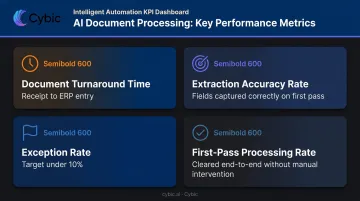
Post-deployment, track four metrics consistently:
- Document turnaround time: total elapsed time from receipt to confirmed ERP entry
- Extraction accuracy rate: share of fields captured correctly on the first pass
- Exception rate: share of documents flagged for human review - target under 10%
- First-pass processing rate: share cleared end-to-end without any manual intervention
These metrics guide threshold calibration and identify which document types to automate next. A deployment that handles invoices cleanly typically points toward packing slips or CoAs as the logical next target - and each expansion follows the same map-deploy-measure cycle.
Frequently Asked Questions
What documents in manufacturing can be automated?
Customer orders, packing slips, delivery notes, certificates of analysis, supplier invoices, maintenance logs, work orders, and quality inspection records are the primary candidates. Any document with recurring structured or semi-structured data - consistent field types even when layouts vary - is a viable automation target.
How is Intelligent Document Processing different from basic OCR?
OCR converts image text to machine-readable characters but has no understanding of what those characters mean. IDP layers machine learning and NLP on top to classify document types, extract fields by context, and handle format variation across suppliers - something template-based OCR cannot do without constant manual reconfiguration.
How does automated document processing integrate with ERP systems?
Document automation platforms connect to ERP systems like SAP, Microsoft Dynamics, and Oracle via APIs or pre-built connectors. Validated structured data routes directly into the correct module - purchase orders to procurement, invoices to AP, certificates to quality management - without manual re-entry at any stage.
What compliance standards does automated document processing support?
Automated systems support ISO 9001, FDA 21 CFR Part 11, GMP, AS9100, and OSHA requirements by maintaining version control, enforcing document retention policies, and generating complete audit trails with timestamps, access logs, and tamper-evident records of every document action.
How long does implementation take?
A focused deployment targeting one or two document types with a single ERP integration can be operational in weeks. Broader multi-document-type deployments take longer. Clear workflow mapping upfront and a platform designed for integration - rather than one requiring infrastructure replacement - are the primary factors affecting timeline.
What ROI should manufacturers expect?
The return comes from labor reallocation, error reduction, and faster cycle times. Billentis 2024 reports 60–80% cost reductions versus paper-based methods, with ROI typically reached within 0.5 to 1.5 years. Ardent Partners benchmarks put average invoice processing cost at $9.40 versus $2.78 for best-in-class, giving manufacturers a concrete baseline for modeling their own return.