The wrong CRM choice carries real consequences: budget spent on workarounds, sales teams reverting to spreadsheets, compliance gaps that surface at the worst possible moment. According to a Harvard Business Review analysis of 12 analyst reports, roughly one-third of CRM projects fail - with failure estimates ranging from 18% to 69% depending on how failure is defined.
This guide covers the practical side of custom CRM development: what it actually is, which features to build in, the five-phase development process, and the practices that separate working systems from expensive shelf-ware.
Key Takeaways
- Custom CRM development means engineering a system from scratch around your workflows, data models, and integrations
- It makes sense when compliance needs, proprietary workflows, or deep integrations make off-the-shelf platforms inadequate
- Core requirements include contact management, pipeline tracking, automation, AI-driven analytics, role-based access, and integration architecture
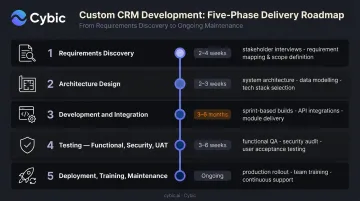
- The development process runs five phases: requirements discovery, architecture design, development and integration, testing, and deployment with ongoing maintenance
- Ship an MVP first, involve end users early, and embed governance at the architecture level to drive adoption and long-term ROI
What Is Custom CRM Development (and When Does It Make Sense to Build)?
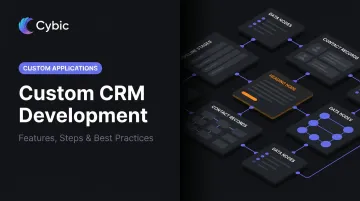
Custom CRM development is the process of planning, designing, engineering, and deploying a CRM system built specifically around a company's unique customer management workflows, data structures, and business logic. The goal is to fit the system to how your business actually operates, not the other way around.
The Three CRM Options
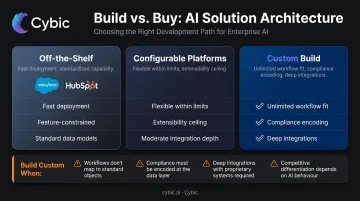
Organizations typically face three paths:
- Off-the-shelf platforms (Salesforce, HubSpot, Dynamics 365): fast to deploy, but constrained to existing feature sets and data models
- Configurable platforms: flexible within boundaries, though extensibility hits a ceiling as complexity grows
- Fully custom builds: engineered from scratch to match any workflow, data structure, or compliance requirement
A fully custom build justifies the investment when one or more of these conditions apply:
- Industry-specific compliance requirements (HIPAA, SOC 2, FINRA recordkeeping rules) must be encoded into system logic
- Proprietary workflows cannot be mapped to generic pipeline stages without operational compromise
- Deep integrations with ERP, EHR, SCADA, or other operational systems require bidirectional data exchange that off-the-shelf connectors can't reliably support
- The cost of extending a generic platform exceeds the cost of building purpose-built
Cost and Timeline Reality Check
Costs vary based on scope, team location, and integration complexity. Published vendor estimates from established development firms put the range at roughly $15,000–$250,000+ for most builds, with enterprise-grade systems reaching $300,000+. These are vendor-published figures, not analyst benchmarks - use them as a rough orientation.
On the timeline side, an MVP typically takes 2–3 months; a full production system generally requires at least 6 months and 2,000+ engineering hours. Compressing or skipping requirements planning is the most consistent driver of schedule overruns.
Essential Features of a Custom CRM System
Feature sets vary by industry and use case, but every enterprise custom CRM requires a solid operational core before advanced capabilities can deliver value.
Core Data Foundation
- Contact and account management - unified customer profiles, complete interaction history, flexible segmentation
- Deal and opportunity tracking - pipeline visibility with stage progression tied to actual business milestones, not generic templates
- Activity logging - every touchpoint, task, and communication captured and searchable
This data layer underpins everything - weak architecture here degrades reporting, automation, and any AI capabilities built on top of it.
Workflow Automation
Custom CRM automation should mirror actual business processes - task assignment, follow-up triggers, approval routing, escalation logic, and notification workflows built around how work actually moves through your organization.
This is where custom builds outperform off-the-shelf options most clearly. A generic platform's automation follows generic sales stages; a custom build encodes your operational rules.
Reporting, Analytics, and AI
Custom dashboards and real-time pipeline visibility are table stakes. For enterprise builds, the expectation has moved toward AI-powered capabilities:
- Predictive lead scoring and opportunity prioritization
- Churn risk indicators tied to behavioral signals
- Next-best-action recommendations for sales and service teams
Gartner research found that sales organizations providing AI-enabled next-best actions are 2.6x more likely to achieve commercial growth - reason enough to plan for these from day one.
Integration Architecture
A CRM that doesn't connect to the broader tech stack creates the exact data silos it was meant to eliminate. Deloitte's 2024 Connectivity Benchmark Report found that 81% of IT leaders say data silos hinder digital transformation - making integration design non-negotiable from the start.
Integration targets typically include:
- ERP and financial systems
- Marketing automation platforms
- Support ticketing and communication tools
- Industry-specific operational systems (EHR for healthcare, SCADA for energy, SCM for manufacturing)
Cybic's AI and data ecosystem integration practice is built specifically for this - connecting CRMs, ERPs, data lakes, and LLM-powered tools via custom API development, ensuring bidirectional data exchange across enterprise environments.
Security and Governance
These must be engineered into the system's architecture, not applied afterward:
- Role-based access controls (RBAC) - limits data exposure by restricting access to what each role actually needs
- Encryption in transit and at rest - non-negotiable for any system handling sensitive customer data
- Audit trails - full action logs that satisfy compliance requirements and support incident investigation
- Compliance frameworks - HIPAA for healthcare, SOC 2 for enterprise SaaS, FINRA recordkeeping rules for financial services, BSEE regulatory requirements for offshore energy
How to Build a Custom CRM: Step-by-Step Process
Building a custom CRM is a multi-phase engineering project. Shortcuts in planning compound into significant problems during deployment - the structure below exists for a reason.
Step 1: Requirements Discovery and Process Mapping
This phase defines everything downstream. Teams must:
- Document current workflows - how customer data moves, where handoffs occur, where the friction lives
- Map data flows - what data exists, where it lives, what format it's in
- Prioritize features by business impact - not by what's technically interesting
- Define measurable success metrics - adoption rate targets, sales cycle benchmarks, data quality scores
PMI research shows that 47% of unsuccessful projects fail due to inaccurate requirements management. Discovering a gap during coding is far more expensive to fix - NIST research on software defects found post-release corrections cost up to 30x more than catching the same issue in planning.
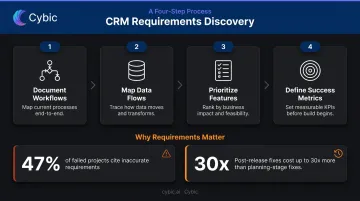
Gaps found here cost an hour to fix. Gaps found in production cost a sprint.
Step 2: Technology Stack and Architecture Design
Key decisions made here determine system flexibility and maintenance costs for years:
- Backend framework and database architecture - relational vs. NoSQL depending on data complexity and query patterns
- Infrastructure model - cloud, on-premises, or hybrid, matched to security and operational requirements
- API design standards - bidirectional exchange, versioning, authentication protocols
- Scalability planning - data volume projections, concurrent user loads, integration throughput
Experienced engineers should drive these decisions. Handing an architecture spec sheet to developers without senior technical input at this stage is a predictable path to expensive rework.
Step 3: Development and Third-Party Integration
Development proceeds in modular sprints:
- Sprint 1–2: Core CRM modules - contact management, pipeline, activity tracking
- Sprint 3–4: Automation logic, approval workflows, notification systems
- Sprint 5+: Custom reporting, AI features, third-party integrations
Integration work - connecting ERPs, marketing platforms, and operational systems - is where data integrity problems most commonly surface. Mapping field-level data schemas and testing boundary behavior before go-live is worth the extra time; broken integrations are far harder to diagnose after launch.
Step 4: Testing - Functional, Security, and User Acceptance
A complete testing cycle covers:
- Functional testing - every module, workflow, and edge case
- Load testing - enterprise-scale data volumes, concurrent user stress
- Security auditing - penetration testing, access control validation, encryption verification
- User acceptance testing (UAT) - actual end users from each team, not just QA
UAT consistently surfaces usability issues that technical testing misses. Plan for at least one iteration cycle based on UAT feedback before declaring the system ready for production.
Step 5: Deployment, Training, and Ongoing Maintenance
Post-launch is not the end of the project:
- Phased rollout reduces disruption and creates space for real-world adjustments
- Hands-on training by team - documentation alone doesn't drive adoption
- Maintenance model - unlike a SaaS subscription, a custom CRM requires a dedicated plan for security patching, feature iteration, and system evolution
Either an internal IT team or a retained development partner needs to own ongoing maintenance. Skip it, and a well-built CRM becomes a legacy problem within 18 months.
Best Practices for Custom CRM Development
Start With an MVP
Build the 20% of capabilities that deliver 80% of immediate value. Ship those, gather real usage data, then iterate. This approach reduces development risk, accelerates time-to-value, and ensures the system evolves based on actual behavior rather than assumptions made during planning.
Involve End Users Throughout - Not Just at UAT
Sales reps, customer service agents, and operations managers should contribute to requirements definition, review wireframes, and participate in testing. CRMs built without front-line input consistently face adoption problems - which renders the technical quality of the build irrelevant.
Design for Integration From Day One
Document every system the CRM must connect to before development begins. Design APIs with bidirectional exchange in mind. Avoid building data islands. The CRM's value compounds when it serves as the operational hub connecting customer data across the organization.
Embed AI Into Core Architecture From the Start
AI features - lead scoring, workflow orchestration, LLM-based copilots, predictive analytics - deliver the most value when woven into the CRM's data model and workflow logic from the start. Retrofitting AI onto a system not designed for it produces limited results at high cost.
For organizations in regulated industries, this means building governance, auditability, and role-based access controls into the architecture before a single feature ships - not as a compliance patch applied afterward. Cybic, for example, structures AI and automation engagements this way across BFSI, healthcare, and government clients, where post-deployment compliance remediation carries significant cost and risk.
Common Mistakes That Derail Custom CRM Projects
Underestimating requirements discovery. Teams rush into development with incomplete requirements, leading to mid-build scope changes and systems that solve the wrong problems. Requirements gaps found during coding cost far more to fix than those caught during planning.
Conflating "custom" with "build everything from scratch." Successful custom CRM projects identify which components genuinely need to be proprietary and which can use proven frameworks, libraries, or existing integrations. Doing otherwise inflates timelines, raises maintenance costs, and delays delivery without any corresponding benefit.
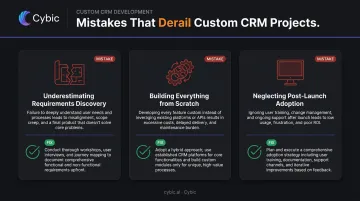
Neglecting post-launch adoption. Organizations invest heavily in development, then treat training as a checkbox. Without a structured adoption program and ongoing feedback loop, teams revert to spreadsheets and email. The system's technical capabilities become irrelevant if no one is using it.
Frequently Asked Questions
How much does it cost to build a custom CRM?
Costs vary based on scope, feature complexity, integrations, and team location. Vendor estimates from established development firms range from roughly $15,000–$250,000+ for most builds, with enterprise-grade systems reaching $300,000+. Factor ongoing maintenance into total cost of ownership from the start - it compounds quickly if ignored.
How long does custom CRM development take?
Typically 3 to 9+ months depending on complexity and integration scope. An MVP can often be delivered in 2–3 months; a full production system generally requires at least 6 months - and compressing the planning phase to save time reliably extends the overall timeline.
What is the difference between a custom CRM and a customizable CRM?
A customizable CRM (Salesforce, HubSpot) lets users configure existing features within the platform's defined boundaries. When those boundaries don't fit - because of unique workflows, proprietary data models, or deep integration requirements - a custom CRM is built from scratch to match exactly what the business needs.
What industries benefit most from custom CRM development?
Industries where generic platforms break down under compliance requirements or operational complexity benefit most. That includes healthcare (HIPAA, patient data), manufacturing (ERP integration, production coordination), oil and gas (field operations, regulatory compliance), and financial services (FINRA audit trails, recordkeeping retention).
Should I build a custom CRM or use an off-the-shelf platform?
Off-the-shelf platforms work well when standard features cover 80%+ of your needs and speed to deployment is a priority. Custom builds are justified when compliance requirements, unique data models, deep integrations, or complex workflows make extending a platform more expensive than building purpose-built.
What security features should a custom CRM include?
At minimum: role-based access controls (RBAC), encryption in transit and at rest, audit logging, and secure API authentication. For regulated industries, HIPAA, SOC 2, GDPR, and FINRA requirements must be embedded at the architecture level - not bolted on after the system is built.