Custom ERP software development means building an enterprise resource planning system from the ground up: tailored to your specific processes, data flows, compliance requirements, and integration landscape - not purchased and worked around.
This article covers what custom ERP is, when it makes more sense than packaged alternatives, which modules to include, how the development process works step by step, what drives cost and risk, and the most common mistakes teams make during the build.
Key Takeaways
- Custom ERP is built around your workflows, not generic best practices - you own the functionality, integrations, and architecture
- Development follows five phases: discovery, architecture design, module development, testing, and deployment
- Costs run from $50,000 for basic systems to $500,000+ for enterprise builds, depending on module count and team seniority
- Watch for scope creep, poor partner selection, underestimated data migration, and neglected user adoption
- Custom ERP suits mid-to-large businesses with complex or regulated workflows; standard-process businesses may extract more short-term value from a packaged platform
What Is Custom ERP Software?
Custom ERP is a modular software platform built specifically for one organization's processes. Unlike packaged solutions, it gives that organization complete control over functionality, system architecture, integrations, and data governance - with no per-user licensing fees and no vendor lock-in.
Its core purpose: one unified data layer shared across all departments, automated workflows that reduce manual effort, and real-time visibility into organizational performance.
The contrast with off-the-shelf ERP is structural, not cosmetic. Platforms like SAP, NetSuite, or Microsoft Dynamics are designed for broad applicability across many industries. They cover a wide range of standard processes well. Where they fall short is in the edges - the workflows, compliance requirements, and integration dependencies specific to your business. These are the gaps that generic modules aren't built to handle:
- Industry-specific approval chains and exception workflows
- Compliance rules tied to your regulatory environment (HIPAA, OSHA, sector-specific mandates)
- Integrations with legacy systems or proprietary data sources
- Reporting structures that reflect how your teams actually operate
A custom ERP is architected around those specifics from the ground up, so they're first-class features - not workarounds.
Custom ERP vs. Off-the-Shelf: When Building Custom Makes Sense
The Core Trade-Off
Off-the-shelf ERP is faster to deploy and lower in upfront cost. The trade-offs show up over time: fixed functionality, escalating licensing fees as you scale, limited customization depth, and permanent dependency on the vendor's roadmap. Custom ERP demands a higher initial investment but delivers complete ownership - a system shaped around your operations, not the other way around.
The stakes on implementation are real regardless of which path you choose. Gartner predicts that by 2027, more than 70% of recently implemented ERP initiatives will fail to fully meet their original business goals, with up to 25% failing outright - a risk that applies to both packaged and custom builds when planning is poor.
When Custom Is the Right Choice
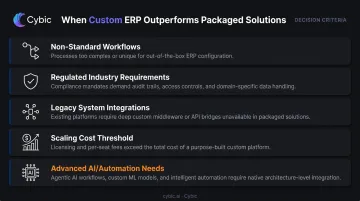
Build custom when your situation includes one or more of these:
- Workflows that don't map to standard ERP modules without forcing workarounds into core processes
- Regulated industry requirements in healthcare, financial services, or oil & gas where audit trails and data governance must be built into the architecture, not bolted on
- Legacy or proprietary systems that need deep, purpose-built integrations no packaged connector handles cleanly
- Scaling plans where per-user or per-module licensing costs would outpace a custom build's upfront investment
- Advanced capability needs - AI-driven workflows, predictive analytics, autonomous process automation - that packaged ERP platforms don't deliver without heavy third-party layering
When Off-the-Shelf Remains the Better Call
Not every organization needs a custom build - and recognizing that early saves significant time and budget.
Small businesses with standard processes, limited technical resources, and a need for rapid deployment will get more value from a well-chosen platform ERP in the near term. The deciding question isn't whether you'd prefer ownership. It's whether your business processes are genuinely distinct enough to justify building from the ground up.
Core Modules to Include in a Custom ERP System
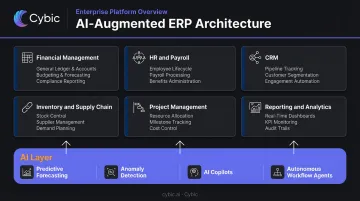
The functional backbone of most custom ERP systems draws from a consistent set of modules. Which ones you build - and in what order - depends on your industry and operational priorities.
Standard Module Set
| Module | Core Functions |
|---|---|
| Financial Management | General ledger, AP/AR, budgeting, financial reporting |
| HR and Payroll | Employee records, attendance, performance, payroll processing |
| Inventory and Supply Chain | Real-time stock tracking, order management, supplier relationships |
| CRM | Contact management, sales pipeline, customer service |
| Project Management | Task tracking, resource allocation, time and budget monitoring |
| Reporting and Analytics | Custom dashboards, KPI tracking, business intelligence |
TechTarget's ERP guide confirms finance as the module present in every ERP product, with HR, CRM, inventory, and order management rounding out the standard module taxonomy.
The Case for Selective Module Inclusion
One of the clearest advantages of building custom is that you pay for and build only what you need. Packaged platforms bundle dozens of features most organizations never use - you pay for them anyway, and your users navigate around them.
Custom ERP starts lean and scales intentionally. A practical sequencing approach:
- Launch modules addressing your highest-priority processes first
- Add adjacent functionality once core workflows stabilize
- Retire or replace modules as the business model shifts
AI-Augmented Modules
Gartner's 2024 Hype Cycle for ERP identifies AI-enabled ERP capabilities as a priority emerging innovation, with planning and operational functions heavily affected by AI-based technologies.
This means embedding intelligence at the module level - wired into the architecture from the start, not added as a layer on top. Cybic connects real-time data pipelines, machine learning models, and automation logic directly into the ERP structure, enabling capabilities like:
- Predictive demand forecasting within inventory modules
- Anomaly detection in financial data streams
- AI copilots surfacing insights within reporting and analytics
- Autonomous workflow agents coordinating tasks across departments
The result is a system that acts on data in real time - flagging risks, surfacing recommendations, and routing work without waiting for manual review.
How to Build Custom ERP Software From Scratch
Custom ERP development follows a structured software development lifecycle. Rushing any phase compounds into expensive rework downstream. The approach that consistently outperforms: build an MVP of core modules first, validate with real users, then expand.
Step 1: Requirements Discovery and Planning
This is the highest-leverage phase in the entire project. Poorly done discovery creates scope problems that no amount of good engineering can fix.
What this phase involves:
- Structured interviews with stakeholders across every department that will use the system
- Documentation of current workflows, pain points, integration dependencies, and compliance requirements
- Module prioritization: must-have vs. beneficial vs. nice-to-have
- Clear definition of success metrics before a line of code is written
Step 2: Architecture Design and Technology Selection
Key decisions made here shape everything that follows:
- Deployment model: Cloud for flexibility and lower infrastructure overhead; on-premise for full data control; hybrid for organizations that need both
- System architecture: Modular (composable) ERP architectures allow independent scaling of each component and outperform monolithic designs for long-term scalability
- Tech stack: Common choices include React or Angular for front-end, Node.js, Java, or Python for back-end, and PostgreSQL, MySQL, or MongoDB for databases
- Access controls and encryption: Role-based access controls (RBAC) and data encryption must be embedded at the architectural level - retrofitting security after build is significantly more expensive
Cybic designs infrastructure-agnostic architectures that deploy across AWS, Azure, and Google Cloud, with SOC 2, HIPAA, ISO, and GDPR compliance requirements addressed at the architecture stage rather than post-build.
Step 3: Development and Module Integration
Development runs in iterative sprints, with regular releases reviewed against real user feedback. Key activities during this phase:
- Build front-end and back-end components in parallel sprint cycles
- Integrate modules with each other and with existing third-party systems via custom APIs or platform connectors
- Run sprint reviews with end-users to catch misalignments before they compound
- Maintain a living backlog that reflects what discovery found, not what developers assumed
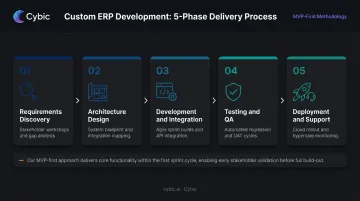
Step 4: Testing and Quality Assurance
A structured QA program covers:
- Functional testing - does each module behave correctly under normal conditions?
- Security testing - penetration testing, access control validation, encryption verification
- Performance testing - load and stress testing at expected user volumes
- Usability testing - with real end-users, not just QA engineers
Post-launch bug fixes cost significantly more than pre-release remediation. IBM Rational data puts post-release defect costs at up to 30 times the cost of fixing the same defect during design.
Step 5: Deployment, Data Migration, Training, and Ongoing Support
The final phase has four distinct work streams that must run in sequence:
- Deploy to the production environment
- Execute data migration from legacy systems - data cleansing and validation before migration prevents duplication and integrity issues that corrupt reporting after launch
- Run user acceptance testing in the live environment
- Train end-users with role-specific documentation and structured workshops
Post-launch, establish a support cadence that includes performance monitoring, security patches, and a feedback loop for continuous improvement.
What Affects Cost, Timeline, and Risk
Cost
Industry consultancy estimates put custom cloud ERP development between $50,000 for basic systems and $300,000–$500,000+ for mid-to-enterprise builds, with full-scale implementations for midsize companies potentially exceeding $1M when complex integrations and compliance requirements are factored in.
Primary cost drivers:
- Number and complexity of functional modules
- Depth of integrations with existing systems
- Development team size and seniority (hourly rates vary significantly by geography)
- Deployment infrastructure
- Ongoing maintenance and support commitments
Over time, custom ERP total cost of ownership tends to drop below packaged alternatives once recurring licensing fees are removed from the equation - particularly for organizations with 200+ users or complex, multi-system environments.
Timeline
Based on industry consultancy benchmarks:
- ERP MVP (3–5 core modules): 3–6 months
- Mid-level system (6–10 modules): 6–12 months
- Enterprise-scale system (complex integrations, 10+ modules): 12–24 months or more
The quality of the discovery phase is the single most important variable. Strong discovery compresses every subsequent phase; weak discovery extends all of them.
Key Risks and How to Mitigate Them
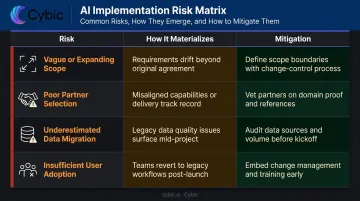
Timeline and budget overruns rarely come from bad code - they come from gaps in planning, governance, and execution. These four risks account for the majority of failed ERP builds:
| Risk | How It Materializes | Mitigation |
|---|---|---|
| Vague or expanding scope | Budget overruns, delivery delays | Lock scope during discovery; use MVP phasing |
| Poor partner selection | Misaligned architecture, technical debt | Review partners' ERP delivery history and scope governance practices |
| Underestimated data migration | Data loss, reporting integrity issues post-launch | Scope migration as a first-class work stream from day one |
| Insufficient user adoption planning | Technically sound system that no one uses | Role-specific training, change management, feedback mechanisms |
Panorama Consulting's 2026 ERP Report identifies organizational issues - governance gaps, resistance to change, and process redesign failures - as the most common cause of timeline overruns, while unexpected technology requirements drive most budget overruns.
Common Mistakes When Building a Custom ERP
Overbuilding at launch is the most common way ERP projects stall. The instinct to design every possible feature before go-live consistently produces delayed delivery, inflated cost, and a system that overwhelms users at rollout. Start with the modules that address your most critical processes. Add everything else after real-world validation.
Data migration scoped too late derails more ERP builds than most teams expect. Cleaning, transforming, and validating years of legacy data takes far longer than anticipated. Integrity issues discovered after launch are far more expensive to fix than those caught during scoping.
Underinvesting in user adoption kills ROI on otherwise solid systems. A technically excellent ERP that employees don't understand or trust delivers nothing. Adoption requires:
- Role-specific training tailored to actual job functions
- Clear documentation employees can reference on the job
- Change management communication before and during rollout
- A feedback channel so end-users can flag workflow mismatches
Panorama Consulting's research links adoption failure primarily to workflows that don't reflect how employees actually work - not just insufficient training.
Conclusion
Custom ERP development pays off when it's scoped correctly, built with the right partner, and deployed with equal attention to technical quality and the people who will use it daily. The companies that struggle are almost always those who underinvested in discovery and planning - not those who planned too carefully.
For organizations that need their ERP to go beyond data tracking - automating workflows, delivering actionable insights, and supporting decisions at scale - Cybic's engineering-led approach embeds AI workflow orchestration, intelligent automation, real-time data pipelines, and governance frameworks directly into the ERP architecture.
The result is a system built around your operations, designed to run with real intelligence from day one.
Frequently Asked Questions
How long does it take to build a custom ERP system from scratch?
A mid-level custom ERP with 6–10 modules typically takes 6–12 months. Enterprise-scale systems with complex integrations can run 12–24 months or longer. Timeline is primarily determined by module count, integration complexity, and the thoroughness of the discovery phase.
How much does custom ERP development typically cost?
Costs vary widely - consultancy benchmarks range from around $50,000 for basic systems to $300,000–$500,000+ for mid-to-enterprise builds, with full-scale implementations potentially exceeding $1M. Always request a detailed breakdown by module and integration scope rather than relying on generic estimates.
What is the difference between custom ERP development and ERP customization?
Custom ERP is built from scratch to fit a company's exact workflows. ERP customization means modifying an existing platform like SAP or Odoo. Customization is faster but may restrict long-term flexibility and accumulate technical debt when the base platform's architecture doesn't match how the organization actually operates.
What core modules should every custom ERP system include?
The most universally necessary modules are Financial Management, HR and Payroll, Inventory and Supply Chain, CRM, and Reporting and Analytics. Module priorities shift significantly by industry - a manufacturer typically leads with inventory and production tracking, while a professional services firm centers on project management and billing.
What technology stack is typically used for custom ERP development?
Common choices include React or Angular for front-end, Node.js, Java, or Python for back-end, and PostgreSQL, MySQL, or MongoDB for databases. Deployment spans cloud (AWS, Azure, Google Cloud), on-premise, or hybrid environments based on data governance and infrastructure requirements.
When should a business choose custom ERP over an off-the-shelf solution?
Custom ERP makes sense when:
- Your workflows don't conform to standard ERP functionality
- You operate in a heavily regulated industry with specific compliance requirements
- You need deep integrations with proprietary or legacy systems
- Projected licensing costs at scale would outpace the upfront build investment