A dedicated healthcare CRM doesn't fix every patient engagement problem, but it addresses the root cause directly - giving administrative teams, care coordinators, and marketing staff a unified operational layer that sits alongside (not inside) the clinical record.
This guide covers what healthcare CRM software is, how it differs from an EHR, which types exist, which features matter, how development works, and what it costs to build one. It's written for healthcare IT leaders, clinic operators, and healthtech founders evaluating whether to build, buy, or customize.
Key Takeaways
- Healthcare CRM centralizes non-clinical patient engagement data - communication history, preferences, referrals, outreach - separate from the clinical EHR record
- CRM type selection - operational, analytical, or collaborative - depends on your primary use case; most enterprise platforms combine elements of all three
- Core features include a unified Patient 360 view, omnichannel communication, HIPAA-compliant architecture, EHR integration, and AI-powered automation
- Custom development typically ranges from ~$40,000 for a focused MVP to $200,000–$400,000+ for enterprise platforms with advanced analytics and multi-system integrations
What Is Healthcare CRM Software (and How It Differs from an EHR)?
A healthcare CRM manages non-clinical patient interactions. That includes:
- Communication history and channel preferences
- Appointment flows and referral tracking
- Recall campaigns and care-gap outreach
All of this is consolidated into a single operational view accessible to front-office staff, care coordinators, and patient engagement teams.
An EHR does something different. It stores and manages clinical data - diagnoses, prescriptions, lab results, care plans - primarily for physicians and clinical documentation. The two systems are complementary, not interchangeable.
The Operational Layer vs. the Clinical Record
Consider what happens when a patient receives a post-discharge follow-up call, the care coordinator sees that in the CRM - the communication log, the patient's preferred contact time, any open care gaps flagged from their last visit. The discharge summary itself lives in the EHR. Neither system duplicates the other's job.
The real value comes when they're integrated. Clinical triggers in the EHR - a recent diagnosis, a missed lab result, a discharge event - automatically kick off CRM workflows. Staff no longer need to log in to two systems and manually connect the dots.
Geisinger Health offers a practical example of this evolution in action. As reported by HealthTech Magazine, Geisinger began its CRM journey in 2019 using Salesforce for marketing campaigns targeting care gaps, then moved to Epic's Cheers CRM for its Patient Contact Center in 2022 - building the integration between CRM operations and its existing Epic EHR stack as a deliberate strategic progression.
Types of Healthcare CRM
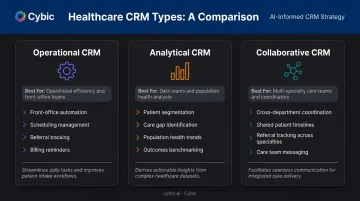
Different CRM types solve different operational problems. Choosing based on your primary challenge - not the longest feature list - leads to better adoption and faster ROI. Most enterprise platforms blend multiple types, but understanding the distinctions helps prioritize what to build first.
Operational CRM
Operational CRM automates front-office and administrative workflows. It's the right starting point for organizations looking to reduce manual workload and tighten day-to-day patient touchpoints.
Core capabilities typically include:
- Appointment scheduling and patient registration
- Referral tracking and prescription follow-ups
- Billing reminders and communication triggers
Analytical CRM
Analytical CRM focuses on data mining and pattern recognition across your patient population. Best suited for organizations with large datasets, it enables a shift from reactive treatment to anticipatory engagement.
Key use cases include:
- Patient segmentation and care gap identification
- Campaign ROI measurement
- Population health trend analysis
Collaborative CRM
Collaborative CRM prioritizes coordination across departments and provider locations. Shared patient timelines, secure messaging between care teams, and referral tracking across specialties all fall under this category.
Large health systems with multiple divisions see the fastest time-to-value here. When patients move between teams, visibility gaps close instead of compounding - reducing handoff errors and delayed follow-ups.
Must-Have Features of a Healthcare CRM System
There's a pattern in failed healthcare CRM implementations: organizations skip foundational features to jump straight to AI dashboards, then wonder why staff don't use the system. The intelligence layer only adds value when the operational foundation works reliably.
Foundational Features
Unified Patient 360 View
A centralized patient profile combining contact data, communication history, appointment records, preferences, and referral notes. Staff can act on context without switching systems mid-conversation, a friction point that becomes obvious when you watch a care coordinator put a patient on hold three times piecing together basic history.
This profile should sync with EHR data via FHIR or HL7 standards so clinical context (recent diagnoses, medications) surfaces in the CRM without duplicating records.
ONC data shows that FHIR-based patient access adoption grew from 57% of hospitals in 2021 to 70% in 2024, meaning most organizations already have the infrastructure in place to support this kind of integration.
Omnichannel Communication Management
SMS, email, in-app notifications, phone, and patient portal interactions should log to a single thread. The patient experience should feel continuous regardless of channel - a reminder sent via text shouldn't create a separate record from the follow-up phone call.
Core automation use cases include:
- Appointment reminders and rescheduling flows
- Care-gap outreach triggered by clinical events
- Post-visit follow-up sequences
- Recall campaigns for preventive care
HIPAA-Compliant Data Architecture
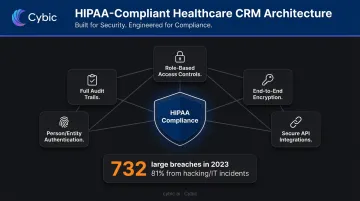
Compliance isn't a feature to add after the build. It has to be embedded in the data model from the start. Under 45 CFR 164.312, HIPAA's technical safeguards for electronic PHI require access controls, audit controls, integrity protections, person/entity authentication, and transmission security.
In practical architecture terms, that means:
- Role-based access controls (RBAC) with unique user identification
- End-to-end encryption for data in transit and at rest
- Full audit trails for all data access, workflow actions, and system events
- Secure API integration patterns for every third-party connection
The enforcement stakes are real. HHS OCR reported 732 large breaches in 2023, affecting over 113 million individuals - with hacking and IT incidents accounting for 81% of those cases.
Cybic's governance-by-design approach treats these requirements as architectural decisions, not post-build additions. RBAC, encryption standards, audit logging, and data residency configurations are defined before a line of code is written - which reduces both compliance risk and the rework costs that come with retrofitting security into a live system.
EHR and Systems Integration
A CRM without EHR integration just creates a parallel silo. The most valuable integration points include:
- Appointment and demographic synchronization
- Clinical event triggers (post-discharge workflow automation)
- Lab and billing system connectivity
- Patient portal data exchange
FHIR and HL7 are the standard protocols for this work. Integration depth - connecting to one EHR versus connecting to EHR, billing, lab, and a legacy contact center - is one of the biggest drivers of both development cost and ongoing maintenance complexity.
Advanced Intelligence Features
AI-Powered Automation and Predictive Outreach
Machine learning models embedded in the CRM can flag patients at risk of no-shows, care gaps, or readmission before the event happens - giving care coordinators time to act rather than react. Practical capabilities include:
- Predictive no-show scoring to prioritize outreach before high-risk appointments
- Next-best-action recommendations surfaced automatically in the coordinator's workflow
- Personalized communication timing based on individual engagement patterns
- Conversational AI (NLP-based chatbots and virtual assistants) for appointment scheduling, prescription refill requests, and FAQ handling
Intermountain Health deployed omnichannel AI assistants across their patient access channels. The reported outcomes included an 85% drop in call abandonment, 91% call-routing success, and 44% automation of repetitive calls - outcomes that are only achievable when the AI layer is trained on clean, integrated operational data rather than fragmented inputs.
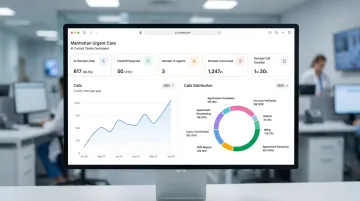
That data foundation is what separates a predictive CRM from an expensive notification tool.
Key Benefits of Healthcare CRM Software
Operational Efficiency and Cost Reduction
According to HIMSS, the average no-show rate for primary care and specialty appointments runs just under 20%, and missed appointments cost the U.S. healthcare system roughly $150 billion annually. HIMSS data also shows that notification and reminder systems reduce missed appointments by 5–10%, with telephone reminders placed seven days out cutting no-shows by 22%.
Automated scheduling, referral management, and follow-up workflows reduce the administrative burden that drives no-show rates - freeing staff time for interactions that require human judgment.
Improved Patient Engagement and Retention
Patients switch providers over administrative friction - delayed follow-ups, impersonal outreach, communication through the wrong channel - not clinical outcomes. Personalized, timely communication across preferred channels addresses that directly. A CRM that matches the right message to the right patient at the right moment is the operational mechanism for reducing silent attrition.
Data-Driven Decision Making
Leadership dashboards and analytics modules consolidate answers that typically require pulling three separate reports:
- Which service lines are driving patient volume
- Where care gaps are opening before they affect outcomes
- Which outreach campaigns are generating measurable returns
Resource allocation decisions made from live operational data move faster - and hold up better - than those built on monthly summary reports.
Healthcare CRM Development: Step by Step
Building a healthcare CRM is different from generic software development because of HIPAA requirements, clinical workflow complexity, and the need to validate with both administrative and care staff before launch. Agile methodologies work best because healthcare workflows evolve throughout the build.
Step 1 - Discovery and Requirement Mapping
Engage administrators, care coordinators, front-desk staff, clinical leads, and IT/compliance teams to map pain points, workflow gaps, and feature priorities. Generic requirements documents produce systems that work for IT but frustrate the people who use them daily.
Outputs of this phase:
- Prioritized feature list
- Integration map (EHR, billing, lab, portal)
- Compliance checklist and data governance requirements
Step 2 - Architecture Design and Compliance Planning
Design the data models, API layer, RBAC framework, and deployment model (cloud, hybrid, on-prem) before writing code. This is when encryption standards, audit logging requirements, and data residency decisions get locked in - not after the first sprint review.
Step 3 - Iterative Development and Integrations
Build core modules in sprints: patient data management and communication workflows first, then analytics and AI layers. EHR integration should start with a thin, testable slice - demographics, appointments, basic clinical flags - rather than attempting full sync upfront.
Each sprint should include clinical and administrative stakeholder review to catch workflow mismatches before they go unaddressed.
Step 4 - QA, Data Migration, and User Acceptance Testing
Three workstreams run in parallel during this phase:
- Compliance and security testing - including HIPAA audit trail validation alongside functional QA
- Data migration - legacy systems (spreadsheets, older CRMs, EHR exports) require a dedicated data-cleaning and deduplication pass before go-live
- User Acceptance Testing - actual end users, not just QA engineers, confirm that workflows match operational reality
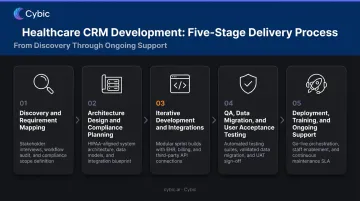
Step 5 - Deployment, Training, and Ongoing Support
Phased rollout - pilot department before full deployment - reduces disruption. Skipping staff training is one of the most common reasons well-designed CRMs fail at adoption. Post-launch support isn't optional either - the system needs ongoing maintenance for:
- Compliance updates as HIPAA guidance evolves
- Feature enhancements based on real-world staff feedback
- Performance monitoring as patient data volumes grow
How Much Does Healthcare CRM Development Cost?
Custom healthcare CRM development typically ranges from approximately $40,000 for a focused MVP (basic patient management, communication tools, one EHR integration) to $200,000–$400,000+ for enterprise-grade platforms with advanced analytics, AI modules, and multi-system integrations. No two builds cost the same - the range is driven by the factors below.
Key Cost Drivers
Feature Scope and Complexity
Basic patient data management and appointment workflows cost significantly less than platforms with predictive analytics, AI-powered outreach automation, and multi-department operational modules. A phased approach - MVP first, AI layer second - is often the most cost-effective path for first-time builds.
Integration Depth
Connecting to one EHR is relatively straightforward. Connecting to an EHR, billing system, lab system, patient portal, and a legacy contact center multiplies development, testing, and long-term maintenance effort. Integration work is consistently one of the largest cost variables in enterprise healthcare builds.
Compliance and Security Requirements
HIPAA-compliant architecture, penetration testing, audit logging, and encryption add meaningful development hours. Organizations operating across multiple states or countries face additional regulatory complexity - GDPR for European patient data, PIPEDA for Canadian operations - that increases compliance engineering scope further.
Custom vs. Off-the-Shelf
| Off-the-Shelf | Custom Build | |
|---|---|---|
| Initial cost | Lower (subscription-based) | Higher upfront |
| Recurring cost | Ongoing per-user fees | Maintenance only |
| Customization | Limited to platform constraints | Full workflow tailoring |
| Data ownership | Vendor-controlled | Organization-controlled |
| Flexibility | Vendor roadmap dependent | Evolves with your needs |
Salesforce Health Cloud Enterprise runs $350/user/month; Microsoft Dynamics 365 Customer Service Enterprise sits at $105/user/month. At 50 users, that's $210,000/year for Salesforce alone - before any integration or customization costs. Custom development carries higher upfront costs, but organizations with complex workflows, strict data governance requirements, or plans to scale past 30–50 users typically recoup that investment within two to three years.
Frequently Asked Questions
What is CRM software in healthcare?
A healthcare CRM is a relationship management system designed to handle non-clinical patient interactions - communication, engagement, scheduling, and outreach. It gives administrative and care coordination teams a unified patient view that complements the clinical data stored in the EHR, without duplicating it.
What are the 4 types of CRM?
The four common types are operational, analytical, collaborative, and marketing/customer service CRM. In healthcare, operational and analytical CRMs are most frequently deployed - often combined in a single platform tailored to patient engagement and care coordination workflows.
How is a healthcare CRM different from an EHR?
EHRs store and manage clinical data for care delivery: diagnoses, prescriptions, lab results, care plans. Healthcare CRMs manage non-clinical patient relationships: communication history, preferences, referral tracking, and outreach campaigns. Integrating the two gives care teams both clinical context and relationship history in a single workflow.
How much does it cost to develop a healthcare CRM?
Custom development typically ranges from $40,000 for a focused MVP to $200,000–$400,000+ for enterprise-grade platforms. Cost is primarily driven by feature complexity, EHR integration depth, and compliance requirements (HIPAA, SOC 2).
How long does it take to build a custom healthcare CRM?
A focused MVP typically takes 3–6 months; enterprise-grade platforms with multiple integrations and AI modules generally run 9–18 months. Agile development with phased delivery is the recommended approach for managing timeline and budget risk.
Should I build a custom healthcare CRM or use an off-the-shelf solution?
Off-the-shelf solutions deploy faster with lower upfront cost, but carry recurring per-user fees and limited customization. Custom development costs more initially but delivers tailored workflows, full data ownership, and long-term flexibility - typically paying off within 3–5 years for organizations with complex patient engagement models.