Introduction
Migrating a data warehouse to Snowflake is not a straightforward platform swap. It touches every layer of your data operation - ETL pipelines, transformation logic, schema design, access controls, cost structures, and downstream reporting dependencies.
Done well, it creates a foundation for real-time analytics and AI workloads that legacy systems cannot support. Done poorly, you carry your technical debt into a new environment at cloud scale.
The business case for modernization is real. A 2024 Forrester Total Economic Impact study commissioned by Snowflake modeled a composite organization and found 354% ROI, $19.45M net present value, and over $5.6M saved by reducing infrastructure and management costs over three years.
This guide covers what migration actually involves, which approach fits your scenario, where teams most often go wrong, and how to optimize once you're live.
Key Takeaways
- Migration covers schemas, data, ETL pipelines, and stored procedures from legacy platforms like Oracle, Teradata, SQL Server, and Redshift into Snowflake's cloud-native architecture
- Three primary approaches exist: lift and shift, replatform and modernize, and hybrid incremental - each with distinct speed and cost tradeoffs
- Four phases drive every migration: pre-migration assessment, schema conversion and data extraction, bulk loading and ELT setup, and validation and cutover
- Most failures trace back to underestimated ETL/SQL conversion complexity and skipped assessment - not the technology
- Post-migration value is unlocked through clustering optimization, cost governance, and AI/analytics built on governed data
What Is Data Warehouse Migration to Snowflake and Why It Matters
Data warehouse migration to Snowflake is the structured movement of an organization's data assets - schemas, tables, ETL pipelines, stored procedures, and reporting dependencies - from a legacy environment to Snowflake's cloud-native platform.
In short: You're not just moving data. You're re-platforming how data flows, transforms, and scales across your organization.
Snowflake's architecture separates storage, compute, and cloud services into three independent layers. Each virtual warehouse is an independent compute cluster that does not share resources with others, which means workloads scale without contention and idle compute can suspend automatically.
What This Is Actually Designed to Achieve
The migration is designed to:
- Eliminate on-premises infrastructure overhead and license cost
- Enable elastic scalability - spin compute up for a heavy batch job, suspend it when done
- Reduce total cost of ownership over time
- Create a data foundation that supports machine learning, real-time analytics, and AI workloads that legacy platforms were never built for
Those goals are achievable - but only if teams go in with a clear picture of what the migration actually involves.
How It Differs from a Database Lift
This is where most teams underestimate scope. Moving to Snowflake is not like migrating between two on-premises databases. The differences matter:
- Transformation moves inside the warehouse. Snowflake's compute layer handles transformation after load, reducing reliance on external ETL tools and cutting data movement overhead.
- Bulk load and streaming use different commands. Snowflake uses COPY commands for bulk historical loads and Snowpipe for continuous ingestion - not the insert-based patterns most legacy systems use.
- SQL dialects don't translate directly. Oracle PL/SQL, Teradata BTEQ, and SQL Server T-SQL all have vendor-specific constructs that require conversion before they run on Snowflake.
Choosing the Right Migration Approach
Snowflake's own migration documentation identifies three primary approaches, and the right choice depends heavily on your constraints.
The Three Approaches Compared
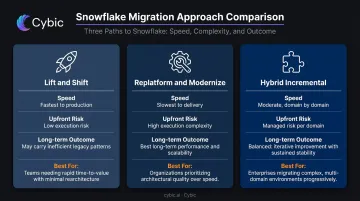
| Approach | Speed | Technical Risk | Long-Term Performance |
|---|---|---|---|
| Lift and Shift | Fastest | Low upfront, high later | May leave gains on the table |
| Replatform and Modernize | Slowest | Higher execution complexity | Best long-term outcome |
| Hybrid Incremental | Moderate | Managed per domain | Balanced |
Lift and Shift moves schemas and data with minimal transformation. It's the fastest path and works best when speed is the priority and the current architecture is reasonably sound. The risk is carrying inefficient patterns (poor schema design, oversized tables, ETL anti-patterns) into a new environment where they become expensive.
Replatform and Modernize redesigns ETL into ELT, optimizes schemas for Snowflake's micro-partitioning behavior, and adopts cloud-native load patterns from the start. Slower to execute, but delivers better query performance and lower long-term cost.
Hybrid Incremental migrates domain by domain - start with high-visibility datasets, run both systems in parallel for validation, then cut over incrementally. Best for minimizing business disruption in large enterprises.
The Pragmatic Middle Path
Snowflake's migration ebook describes a "lift, adjust and shift" approach: no migration is purely lift and shift, because some adjustments are always necessary for Snowflake compatibility. This middle path avoids a full redesign while still addressing the specific changes required. For most enterprise teams, it reaches business value faster than full replatforming - and with fewer architecture decisions to make upfront.
Key decision factors:
- Data volume and ETL complexity
- Tolerance for downtime or parallel run periods
- Regulatory requirements around historical data availability
- License expiration timelines driving urgency
- Internal team expertise with cloud SQL and Snowflake
How the Migration Process Works: Phase by Phase
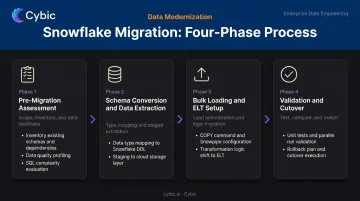
The four-phase flow is: pre-migration assessment → schema conversion and data extraction → bulk loading and ELT setup → validation, testing, and cutover.
Compressing the early phases is the single most common cause of failed or overrun migrations.
Phase 1: Pre-Migration Assessment
This phase establishes what you're actually moving and what needs to change before a single record is loaded.
The assessment should cover:
- Full inventory of databases, tables, views, stored procedures, and downstream report dependencies
- Prioritization by business criticality and query frequency
- Data quality profiling: nulls, duplicates, referential integrity gaps, inconsistent formats
- SQL and ETL complexity evaluation - identifying vendor-specific constructs that won't convert automatically
On the tooling side, Snowflake's SnowConvert AI analyzes existing SQL code and generates Snowflake-compatible equivalents across Oracle PL/SQL, Teradata BTEQ, SQL Server T-SQL, Redshift, and Informatica PowerCenter. Automated conversion handles a significant portion of the work, but every tool flags constructs requiring manual intervention.
The assessment phase is where you scope and plan that manual effort, not discover it mid-migration.
Cybic's discovery phase follows the same logic: assess current architecture, data quality, and integration through profiling and lineage mapping before any migration work begins. Gap analysis and a strategic roadmap come out of this phase, not guesswork.
Phase 2: Schema Conversion and Data Extraction
Schema conversion means more than renaming data types. It involves:
- Translating timestamp formats, numeric precision, and column structures to Snowflake-compatible definitions
- Mapping legacy join patterns and key structures
- Considering Snowflake's micro-partitioning behavior when designing tables for high-frequency query patterns
For extraction, the standard approach is to pull from read-only or secondary instances to avoid production impact, then stage data in cloud object storage - AWS S3, Azure Blob, or GCP Cloud Storage. Snowflake recommends compressed data files of roughly 100–250 MB for optimal load parallelism. Very large single files (100 GB+) are explicitly not recommended.
Phase 3: Bulk Loading and ELT Setup
For historical loads, Snowflake's COPY command is the primary mechanism. It supports CSV, JSON, Parquet, Avro, ORC, and XML formats. For continuous or near-real-time ingestion, Snowpipe loads files as soon as they appear in a stage using micro-batches.
Warehouse sizing matters here. Snowflake's documentation notes that unless loading hundreds or thousands of files concurrently, a Small, Medium, or Large warehouse is generally sufficient - going to X-Large or 2X-Large often consumes more credits without improving performance. Size for the load, then suspend.
ELT setup means shifting transformation logic that previously ran in external tools to SQL inside Snowflake. This reduces data movement, uses Snowflake's parallel compute, and simplifies pipeline maintenance.
Phase 4: Validation, Testing, and Cutover
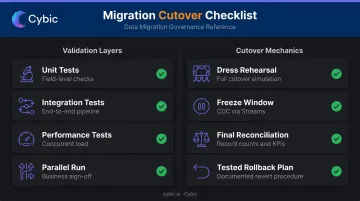
Validation requires multiple layers:
- Unit tests - field-level transformation checks
- Integration tests - end-to-end pipeline output validation
- Performance tests - concurrent load conditions
- Parallel run - both legacy and Snowflake outputs running simultaneously, compared and signed off by business users
Cutover mechanics should include:
- At least one full dress rehearsal before go-live
- A defined freeze window for delta capture using Snowflake Streams, which record DML changes (inserts, updates, and deletes) for CDC patterns
- Final reconciliation against record counts and business KPIs
- A documented rollback plan that has been tested, not just written
Common Mistakes and Misconceptions in Snowflake Migration
Treating Migration as a Data Movement Exercise
The most expensive misconception. The data itself moves reliably. The hard work is converting legacy ETL logic, stored procedures, and vendor-specific SQL. Teams that skip a proper assessment phase frequently discover months of code conversion work they didn't scope or budget for.
The Schema Optimization Gap
Many teams copy schemas literally and then wonder why queries run slowly. Snowflake's automatic micro-partitioning means that clustering key selection and partition pruning behavior need to be considered during schema design, not retrofitted after go-live when performance complaints start arriving. For large, high-frequency tables, clustering keys that align with common filter patterns make a measurable difference.
Governance Left Until After Cutover
Most migration guides treat governance as a post-migration checklist. That's wrong. Going live without governance configured means entering production with a permissive environment where data exposure and compliance risk accumulate quietly.
Snowflake provides the controls - dynamic data masking, row access policies, audit logging - but none of it activates by default. These need to be configured as part of the migration deliverable:
- Role-based access controls scoped to actual team functions
- Column-level masking policies for sensitive fields (PII, PHI, financial data)
- Audit logging enabled before the first production query runs
Cybic builds governance into the architecture from day one. RBAC, encrypted data protection, audit trails, and compliance alignment with SOC 2, HIPAA, GDPR, and CCPA are scoped and configured as part of the engagement - not appended after cutover.
Cutting Short the Parallel Run
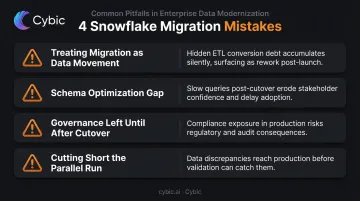
Skipping or compressing the parallel run to save time is a common shortcut that creates expensive post-cutover problems. Data discrepancies discovered after go-live are significantly harder to trace and fix than discrepancies caught during a structured parallel run. Automated reconciliation should run throughout the parallel period, and business users must formally sign off - not just the technical team.
Post-Migration: Optimizing for Performance, Governance, and AI Readiness
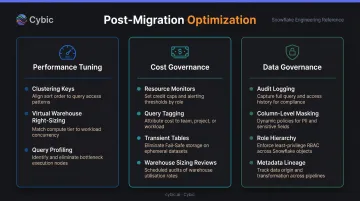
Going live is not the finish line. The first few weeks post-migration are when performance tuning, cost governance, and operational model decisions determine how much value you actually get.
Performance Tuning
Key actions after migration:
- Analyze clustering depth on high-frequency query tables and set clustering keys where cardinality and filter patterns support it. Snowflake's Automatic Clustering service manages ongoing reclustering as data changes.
- Right-size virtual warehouses by grouping workloads with similar resource profiles. Auto-suspend and auto-resume control idle compute costs - Snowflake enables auto-suspend by default.
- Use query profiling via Snowflake's Query History to identify full-table scans, expensive cross-joins, and queries that would benefit from result caching.
The performance gains are real. Oney, migrating from Teradata to Snowflake, achieved 90% faster data processing and up to 12x less time spent on data preparation, with double the hours available for actual analysis.
Cost Governance
Snowflake's credit model means query costs are visible and controllable - but only if you set up the controls:
- Deploy resource monitors with credit limit alerts to catch runaway ad hoc queries before they become expensive surprises
- Use query tagging to attribute costs to teams, projects, or cost centers
- Use transient tables for staging data (no Fail-safe period, lower storage cost)
- Run regular warehouse sizing reviews against actual usage patterns - over-sized warehouses are a common source of unnecessary spend
Ongoing Data Governance
For regulated industries - healthcare, financial services, energy, government - governance is not optional and cannot be bolted on later:
- Enable query and access logging with audit trails for compliance documentation
- Apply column-level masking policies for PII and sensitive fields using dynamic data masking
- Use Snowflake's role hierarchy and attribute-based access controls to enforce least-privilege access
- Integrate metadata lineage tracking through Snowsight's lineage view
AI and Analytics Readiness
The migration itself is infrastructure. The value comes from what runs on top. Once data is centralized in a governed Snowflake environment, organizations can operationalize machine learning models, enable real-time analytics pipelines, and connect AI systems directly to high-quality, governed data.
Cybic's Drava platform addresses exactly this next layer. It connects enterprise Snowflake environments to AI reasoning, intelligent agents, and workflow automation - with governance controls and auditability built in at the architecture level, not added later. For regulated industries, that distinction matters: compliance frameworks and security controls are embedded by design, not retrofitted.
With infrastructure management eliminated, data teams should redirect capacity toward analytics delivery, data product development, and self-serve reporting. It's also worth building analyst fluency in Snowflake's credit model early - queries written without cost awareness can erode savings quickly.
Frequently Asked Questions
How long does a data warehouse migration to Snowflake typically take?
Timelines vary by data volume, number of objects, and ETL complexity. Snowflake's LiftOff migration workshop - covering landing zone setup, migration prototype, and end-to-end planning - runs 2–3 weeks. Full enterprise migrations with complex stored procedures and large object inventories take considerably longer, though AI-assisted tools like SnowConvert can compress timelines when the assessment phase is scoped accurately.
What is the difference between lift and shift and replatforming when migrating to Snowflake?
Lift and shift moves existing schemas and data with minimal changes - fastest to execute but may leave performance gains unrealized. Replatforming redesigns ETL into ELT and optimizes schemas for Snowflake's architecture, taking longer but delivering better long-term query performance and lower operating cost. Most enterprise migrations land on a middle path that makes necessary compatibility adjustments without a full redesign.
What are the biggest risks in a data warehouse migration to Snowflake?
The top risks are: underestimating legacy SQL and ETL conversion complexity, skipping data quality profiling before migration begins, insufficient parallel run periods that allow data discrepancies to reach production, and inadequate governance configuration post-cutover that creates compliance exposure.
How do I validate that migrated data in Snowflake matches the source system?
Validation should include automated row count comparisons, checksum-based file integrity checks, referential integrity checks across related tables, and business KPI reconciliation. Retain both unit-level field checks and end-to-end reconciliation reports - regulated industries should treat this documentation as a compliance requirement, not an afterthought.
Does migrating to Snowflake require extended downtime?
A structured migration uses a freeze window for final delta capture rather than extended downtime. Snowflake Streams handle CDC patterns to track changes after the initial bulk load. The hybrid incremental approach combined with a structured parallel run allows most organizations to cut over with minimal disruption to business operations.
When should an organization delay or reconsider migrating to Snowflake?
Consider delaying when the legacy system still has significant licensed life and the ROI case is unclear, when data quality requires major remediation before migration, or when internal teams lack the SQL and cloud expertise to manage Snowflake post-cutover without substantial retraining.