Introduction
Large enterprises don't struggle with a lack of software - they struggle with too much of it. Okta reports the average company now deploys 93 applications, while MuleSoft found the average enterprise manages 991 applications with only 28% of them actually integrated. The result: coordination gaps, data silos, and workflows that rely on manual effort to bridge disconnected systems.
Enterprise web application development addresses this directly. Unlike standard websites that present information, enterprise web apps are large-scale, browser-based software systems built to run and automate an organization's critical operations across multiple departments, user roles, data sources, and compliance requirements simultaneously.
That scope is fundamentally different from a standard web build. A typical website project takes weeks and serves one purpose. An enterprise web application might take 6–12+ months, integrate with a dozen existing systems, enforce strict access controls, and need to comply with HIPAA, GDPR, or SOC 2 from day one.
This guide covers the full picture: the features that cannot be skipped, the six-stage development process, technology stack decisions, AI's role in modern enterprise platforms, and how to evaluate development partners.
Key Takeaways
- Enterprise web apps require scalable architecture, complex integrations, and strict access controls that standard web development approaches cannot support.
- Non-negotiable features include scalability architecture, RBAC, third-party integrations, real-time analytics, and built-in compliance controls.
- Development follows six stages: discovery, UX/UI design, frontend/backend build, QA, deployment, and ongoing maintenance.
- AI capabilities are now core requirements in enterprise web apps, with governance and auditability built into the architecture from the start.
- Partner selection should prioritize demonstrated integration experience and compliance depth, not portfolio aesthetics.
Must-Have Features of a Modern Enterprise Web Application
Scalability and Performance Architecture
Enterprise web apps must handle concurrent users, transaction spikes, and large data loads without degradation. Google's Core Web Vitals benchmarks set a good Largest Contentful Paint at 2.5 seconds or less at the 75th percentile of page views - and that standard applies equally to internal enterprise platforms, not just consumer-facing sites.
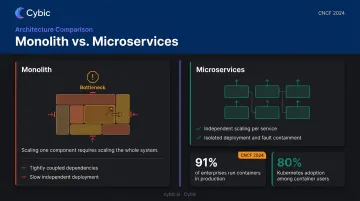
The architectural approach matters here. Monolithic architectures often create bottlenecks under enterprise-scale load because scaling one component requires scaling the whole system. Microservices, cloud-native infrastructure, and load balancing address this by allowing independent scaling of individual functions. The CNCF 2024 survey found 91% production container use and 80% production Kubernetes use - numbers that reflect how mainstream cloud-native architecture has become for enterprise systems.
Role-Based Access Control and Identity Management
Enterprise applications serve employees, partners, customers, and administrators simultaneously - each needing different data access levels. The security stakes are significant: Verizon's 2024 Data Breach Investigations Report analyzed over 10,000 confirmed breaches and found the human element involved in 68% of them.
Effective access management combines several controls:
- RBAC enforces least-privilege access so users interact only with data their role requires
- SSO reduces credential sprawl across enterprise tools
- MFA covers the highest-risk access points - Okta's 2024 data shows adoption at 66% of workforce users but 91% of administrators
Cybic embeds RBAC, encrypted data protection, and audit trails directly into architecture rather than adding them after the fact - a distinction that matters during regulatory review.
Third-Party and Legacy System Integration
Enterprise web apps rarely operate in isolation. They connect with ERP systems, CRM platforms, payment processors, IoT data feeds, and existing databases. The integration gap is a documented problem: MuleSoft reports 81% of IT leaders attribute digital transformation challenges to data silos, and IT teams spend 37% of their time building and maintaining custom integrations.
Poor integration architecture carries real operational risk: data inconsistency, unplanned downtime, and silent data loss. API-first design and middleware layers reduce this fragility - but only when integration is treated as an architectural concern from the start, not a connection task added at the end.
Advanced Analytics and Reporting
Once integration is in place, the data it moves needs to be usable in real time. Decision-makers need live visibility built into the application itself - not a scheduled export to a spreadsheet. That requires genuine data pipeline architecture that aggregates, processes, and surfaces operational data within the interface.
The distinction between front-end charts and real data intelligence matters:
- Surface-level charts pull from static or batch-processed data sources
- Operational analytics connect live data pipelines to dashboards, enable KPI tracking, and produce exportable reports tied to current system state
- Predictive layers (when combined with AI) surface anomalies and recommendations automatically
Compliance and Audit-Readiness Built Into Architecture
Regulated industries cannot treat compliance as a post-launch checklist. Healthcare applications fall under HIPAA, platforms handling EU personal data under GDPR (with fines up to €20M or 4% of global annual turnover), SaaS platforms seeking SOC 2 attestation, and any payment-processing functionality under PCI DSS.
The technical requirements this creates - data encryption in transit and at rest, full audit logs, configurable access controls, breach notification capabilities - must be in the architecture from day one. Retrofitting compliance into a production system is expensive, disruptive, and often incomplete.
The Enterprise Web Application Development Process, Step by Step
Stage 1 - Discovery and Requirements Analysis
Discovery is where projects succeed or fail before any code is written. This phase maps business objectives, defines user roles and workflows, surfaces technical constraints (existing systems, compliance mandates, data structures), and produces a technical specification that prevents costly rework.
Skipping or rushing discovery is why only 55% of software projects are completed on time, according to PMI's 2021 Pulse of the Profession report. Ambiguous requirements don't become clearer during development. They become change orders.
Stage 2 - UX/UI Design and Architecture Planning
Enterprise UX is genuinely harder than consumer UX. Multiple user roles with different workflows, dense data interfaces, and accessibility requirements all demand wireframing and prototyping with real internal stakeholders before any code is written.
Architecture decisions made here carry long-term cost and performance consequences. Getting them right early is far cheaper than reversing them mid-build. Key decisions include:
- Monolith vs. microservices - determines scalability and deployment complexity
- Cloud environment - affects cost structure, compliance posture, and vendor lock-in
- Database schema - shapes query performance and future data flexibility
Stage 3 - Frontend and Backend Development
Frontend and backend development typically happen in parallel using Agile sprint cycles, allowing stakeholder feedback early enough to act on it.
- Frontend: Component-based interfaces (React, Angular), responsive layouts, accessibility compliance
- Backend: Business logic, API development, database structuring, authentication systems
Close coordination between the two tracks is essential. Integration failures that surface late in development - because the frontend assumed an API contract that the backend didn't deliver - are among the most expensive problems to fix.
Stage 4 - Quality Assurance and Security Testing
Enterprise QA covers three distinct layers:
- Functional testing - Do features behave as specified across user roles?
- Load and stress testing - Does the system hold under peak traffic and concurrent users?
- Security testing - Penetration testing and vulnerability scanning against OWASP standards
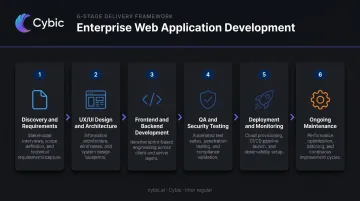
Security testing at this stage catches vulnerabilities before they reach production. The OWASP Top 10's first-ranked issue - Broken Access Control - is caught here, not after launch.
Stage 5 - Deployment, Monitoring, and Ongoing Maintenance
Enterprise deployment involves coordinated operational steps that go well beyond pushing code to a server:
- CI/CD pipeline configuration for controlled, repeatable releases
- Environment-specific settings across development, staging, and production
- Rollback protocols if something goes wrong post-release
- Uptime monitoring and performance tuning from day one
Post-launch, the work continues. Security patches, feature updates, and regulatory changes require ongoing engineering attention for the life of the system.
Technology Stack for Enterprise Web Application Development
Frontend Frameworks
Three frameworks dominate enterprise web development, each with a distinct fit:
| Framework | Developer Adoption | Best For |
|---|---|---|
| React.js | 47.1% of professionals | Dynamic dashboards, component-driven interfaces, large portals |
| Angular | 19.6% of professionals | Large-scale, structured enterprise apps needing opinionated architecture |
| Vue.js | 14.9% of professionals | Supplementary tools, smaller-scope interfaces |
(Source: Stack Overflow 2024 Developer Survey)
HTML5/CSS3 responsive design ensures usability across devices without separate builds.
Backend Languages and Frameworks
Stack choice should follow the organization's existing infrastructure, compliance needs, and engineering team - not trends:
- Node.js (47.4% adoption): Real-time applications, APIs, SaaS platforms
- Python/Django/Flask: Data-driven apps, AI-integrated systems, rapid prototyping
- Java/Spring Boot (12.7%): High-performance financial and enterprise systems requiring long-term stability
- .NET/C# (34.1%/.NET, 32.2%/C#): Microsoft-ecosystem enterprise and B2B systems
Databases and Data Management
Most enterprise systems use both SQL and NoSQL in combination:
- SQL (PostgreSQL at 54.2%, MySQL at 49.7%): Transactional systems, payment processing, complex relational data
- NoSQL (MongoDB at 24.7%, Redis at 24.6%): High-volume, flexible, or real-time data scenarios
Database design decisions directly affect performance, scalability, and regulatory compliance - particularly around data residency and encryption requirements.
Cloud Infrastructure and DevOps
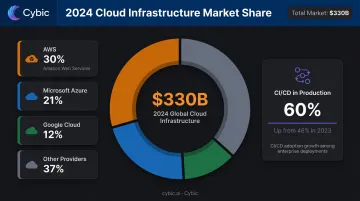
Enterprise web applications today are built cloud-native or cloud-ready. As of Q4 2024, the three major providers together hold 68% of a $330B cloud infrastructure market:
- AWS: 30% market share
- Microsoft Azure: 21%
- Google Cloud: 12%
Containerization with Docker and Kubernetes is standard for consistent deployment across environments. CI/CD pipelines and infrastructure-as-code are table stakes for any system requiring reliable, auditable releases. The CNCF reports CI/CD in production for most or all applications grew to 60% in 2024, up from 46% the year prior.
AI and Intelligent Automation in Enterprise Web Applications
Why AI Has Become a Core Requirement
McKinsey's 2024 State of AI report found 65% of organizations regularly use generative AI in at least one business function - up from less than 10% two years prior. Organizations in manufacturing, healthcare, energy, and retail are embedding AI directly into their web platforms, not running it as a separate tool.
The business case is straightforward: reduce manual processing, surface insights faster, and act on data without waiting for human review. IBM's 2023 enterprise AI survey found 42% of enterprises with 1,000+ employees had active AI deployments - not pilots, production systems running in core operations.
Practical AI Capabilities in Enterprise Web Apps
Specific capabilities gaining traction:
- Intelligent dashboards that surface anomalies and recommendations automatically rather than waiting for a human to spot the pattern
- AI copilots providing contextual guidance during complex workflows - clinical decision support in healthcare, demand forecasting in supply chains, compliance checks in regulated industries
- Generative AI assistants that help users navigate data-heavy interfaces using natural language queries
Cybic's Drava platform takes this approach: it connects enterprise data, AI reasoning, and workflow automation into a single system, so AI functions operate inside existing operational environments rather than alongside them.
The Governance Challenge
Deploying these capabilities creates new auditability requirements. When an AI recommendation influences a clinical decision or a compliance check, the application must record what action was taken, what data informed it, and who acted on it.
That accountability gap is real. MuleSoft found 95% of IT leaders say integration issues hinder AI adoption, and 79% cite security concerns. The NIST AI Risk Management Framework requires trustworthy AI to be valid, reliable, accountable, and transparent - standards that cannot be retrofitted after deployment. They have to be built into the architecture from the start.
How to Choose the Right Enterprise Web Application Development Partner
What Separates Capable Partners from Commodity Vendors
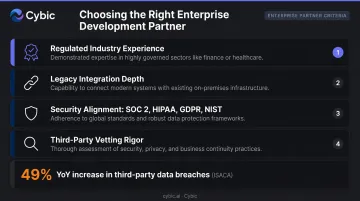
The criteria that actually matter for enterprise web development:
- Proven regulated-industry experience in healthcare, finance, or energy - partners who understand compliance constraints don't need to be taught them mid-project
- Legacy integration depth: connecting to existing ERPs, CRMs, and proprietary databases separates practical partners from those who assume a clean slate
- Security alignment with SOC 2, HIPAA, GDPR, and NIST SSDF - signals security is embedded in the development process, not added at the end
- Demonstrated partner vetting rigor: ISACA reports a 49% year-over-year increase in third-party data breaches, making supply chain due diligence non-negotiable
Portfolio aesthetics won't protect you when architectural debt or compliance gaps surface post-launch. Architectural soundness and operational continuity are what you're actually buying.
Engagement Model Considerations
Fixed-price contracts create problems on complex enterprise projects because requirements rarely survive full contact with implementation. What was specified in month one often needs to adapt by month four as integration realities, stakeholder feedback, or compliance constraints emerge.
Time and Materials or dedicated team models allow scope to adapt as discovery insights develop. Before committing to a model, push the partner on execution specifics:
- How does the partner document scope decisions and communicate estimate changes?
- What's the process when a legacy integration turns out to be more complex than anticipated?
- Does the partner maintain accountability through delivery, or hand off at milestones?
AI Engineering Capability as a Selection Criterion
For organizations embedding AI, automation, or data intelligence into their enterprise web applications, partner selection must also account for AI engineering depth. The question isn't whether a vendor has used an LLM API - it's whether they can design systems where AI reasoning, data pipelines, and web application interfaces function as a unified operational system.
Cybic engineers enterprise web applications where data pipelines, automation logic, and AI models are designed as a single integrated system from the start - not wired together after individual components are built. That architectural decision determines whether AI functionality actually operates reliably in production.
Frequently Asked Questions
What is the difference between an enterprise web application and a regular website?
Enterprise web apps are built for organizational operations - handling authentication, data processing, workflow automation, and integrations at scale. Standard websites primarily present information without supporting complex user interactions, multi-role access control, or internal business logic.
How long does it take to develop an enterprise web application?
Timelines typically range from 4–6 months for focused, well-scoped platforms to 12+ months for complex, multi-integration systems. Timeline accuracy depends heavily on requirements clarity, the number of integrations, and whether legacy systems need to be accommodated.
What does enterprise web application development typically cost?
Costs vary widely - focused internal tools may run $150K–$500K, while complex multi-integration platforms with compliance requirements often exceed $1M. The biggest cost drivers are integration count, regulated-industry requirements, and ongoing maintenance scope.
What security standards should enterprise web applications comply with?
OWASP provides the baseline for web application security. Industry-specific standards apply by sector: HIPAA for healthcare, GDPR for organizations handling EU personal data, SOC 2 for SaaS platforms, and PCI DSS for payment processing. Encryption, access controls, and audit logging are foundational regardless of industry.
Can AI be integrated into an existing enterprise web application?
Yes. Common approaches include API integrations, embedded ML models, and AI workflow layers. That said, retrofitting AI without proper data governance and auditability architecture creates real compliance and operational risks - purpose-built AI-native designs handle these requirements more reliably.
What are common examples of enterprise web applications?
Employee portals, ERP and CRM platforms, supply chain management dashboards, healthcare patient management systems, financial reporting tools, and operations monitoring platforms for energy or manufacturing environments are all typical examples.