Introduction
Federal agencies logged 10 billion public burden hours in FY2021 alone - and that figure doesn't capture the internal processing time spent on the government side of the same transactions. Meanwhile, GAO found that OPM's retirement processing still relied on paper applications and manual handling, a workflow that hasn't fundamentally changed in decades.
The pressure is compounding from multiple directions:
- Budget constraints are tightening across nearly every agency
- 31.4% of federal employees were projected to become retirement-eligible within five years as of 2020, taking institutional knowledge with them
- Citizens increasingly expect government services to work as fast as any consumer app
Agencies are being asked to do more with fewer staff and aging infrastructure that's expensive to replace.
Robotic Process Automation (RPA) offers a practical path forward. It doesn't require ripping out legacy systems or hiring waves of new employees. It automates the repetitive, rules-based work that currently consumes staff capacity and can be deployed without deep IT integration.
This guide covers:
- What RPA is and how it differs from intelligent automation
- Where agencies are already deploying it successfully
- The key benefits and real-world results
- The governance challenges that matter most
- How to build a program that scales
Key Takeaways
- RPA software mimics human actions to automate repetitive, rules-based tasks - no physical robots, no system replacement required
- SSA cut returned SSI payment processing from 3 minutes to 3 seconds through a single bot deployment
- Federal agencies collectively freed nearly 1.5 million work hours through RPA by FY2021, with GSA's Truman system alone saving 5,000+ procurement hours
- Governance, security credentialing, and privacy controls must be embedded from the start, not retrofitted after deployment
- The maturity path runs from rules-based RPA toward intelligent automation that handles unstructured data and complex decisions
What Is RPA in Government - And How Does It Differ from Intelligent Automation?
RPA: Rules-Based, UI-Level Automation
Gartner defines RPA as software that automates tasks using scripts that emulate human interaction with application user interfaces. There are no physical robots - just software bots that log into systems, copy data, fill fields, run checks, and route records faster and more reliably than manual processing allows.
The logic is straightforward: when defined conditions are met, the bot acts. Pay an invoice, route a permit application, or log a transaction. If the condition isn't met, the bot flags the exception for human review.
One critical advantage for government: RPA operates at the UI layer, meaning it sits on top of existing systems rather than integrating into their core. Agencies can automate workflows without replacing infrastructure that may be decades old and politically or financially untouchable.
Intelligent Automation: Adding AI to the Stack
Intelligent Automation (IA) takes RPA further. Deloitte describes it as AI and related technologies (machine learning, natural language processing, computer vision) combined with RPA. McKinsey frames it similarly: an emerging set of technologies that combines process automation with machine learning and other tools.
The practical difference:
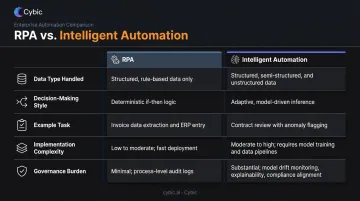
| Capability | RPA | Intelligent Automation |
|---|---|---|
| Data type handled | Structured, predictable | Unstructured (text, emails, documents) |
| Decision-making | Fixed if/then rules | Pattern recognition, judgment calls |
| Example task | Processing returned SSI payments | Classifying regulatory filing complexity at FDA |
| Implementation complexity | Lower | Higher |
| Governance burden | Moderate | High |
Why the Distinction Matters
Agencies should start with RPA for clear, high-volume, rules-based workflows - these are the quick wins that build stakeholder confidence and demonstrate ROI.
As governance frameworks mature and staff capability grows, the path leads toward IA, where bots can interpret freeform documents, adapt to variable inputs, and support more complex decisions.
Starting with IA before governance infrastructure exists is a common mistake. Agencies that skip the RPA foundation typically encounter compliance gaps and bot failures that erode trust in automation programs before they scale.
Top Government Use Cases for RPA
Federal Procurement: GSA's Truman System
GSA's Truman bot launched in FY2020 as the Federal Acquisition Service's first enterprise-wide automation. It reviews new Multiple Award Schedule (MAS) offers, pre-populates pre-negotiation and price-negotiation memorandums, and runs compliance checks against external databases.
By July 2021, Truman had reviewed more than 4,000 MAS offers and saved over 5,000 staff hours. GSA later expanded its automation portfolio to roughly 30 acquisition-related bots, including a CLARA closeout bot that processed approximately 15,000 transactions and saved 17,000+ hours.
Benefits Processing: SSA's Returned SSI Payments
The Social Security Administration deployed an RPA bot in April 2020 to process returned SSI payments made after a recipient's death. The result was dramatic: processing time dropped from approximately 3 minutes to approximately 3 seconds, with 14,000+ inputs processed through the end of FY2020.
SSA's Robotic Operations Center later estimated nearly 21,000 manual-processing hours saved in calendar year 2021 across its three primary bots. That's not just cycle time - it's real capacity recovered for higher-value case work.
Financial Management and HR Operations
- Accounts payable/receivable: Automates invoice routing, reconciliation, and payment processing across Treasury-affiliated departments, reducing manual entry and strengthening audit trails
- HR and onboarding workflows: Routes personnel documents, initiates security checks, and reconciles payroll - freeing HR teams for workforce planning rather than administrative volume
- IRS tax administration: Active deployments cover SB/SE tax workflows and transcript case building, each with formal privacy impact assessments on file
Local Government Citizen Services
Municipalities are deploying automation - though often described as workflow automation rather than explicitly labeled RPA - to improve constituent-facing services:
- Minneapolis: Officials reported that automation halved permit review and approval times
- Texas courts: Automated e-filing document checks improved accuracy from 60% initially to nearly 95%
- Los Angeles: Selected a vendor to digitize building permit and licensing processes end-to-end
Each of these implementations points to the same pattern: high-volume, rules-based processes where automation delivers speed gains that staffing alone cannot match.
Key Benefits of RPA for Government Agencies
Hours Saved at Scale
A George Mason University analysis of 80+ public-sector automations found an average of 3,000 labor hours saved per bot. Federal RPA programs validated that number at scale: 49 reporting agencies created nearly 1,000 automations and freed almost 1.5 million hours of work by FY2021.
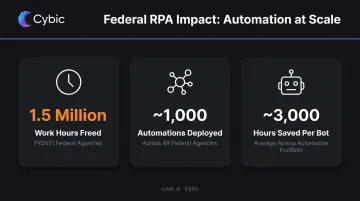
These aren't marginal gains. At 3,000 hours per bot, a modest 10-bot program represents roughly 1.5 full-time equivalents redirected to judgment-intensive work - without a single hire.
Accuracy and Audit Readiness
Bots don't have bad days. They execute the same logic identically, every time. That consistency matters enormously in government environments where errors carry legal and financial consequences.
Key accuracy advantages:
- Eliminates manual transcription errors in data entry and record transfers
- Enables 100% transaction auditing instead of sampling-based compliance checks
- Creates complete, timestamped logs that satisfy audit and oversight requirements
- Reduces rework from downstream errors that compound through multi-step processes
Scalability Without Emergency Hiring
Processing volumes in government are rarely flat. Tax season, disaster relief applications, open enrollment - demand spikes that historically required temporary hiring or backlogs. RPA scales immediately. The same bot infrastructure that handles 500 transactions per day can handle 5,000 during peak periods without hiring, training, or onboarding delays.
Legacy System Integration
Replacing a 30-year-old mainframe system can take years and cost hundreds of millions. RPA bypasses that problem entirely: it operates at the interface level, interacting with legacy systems exactly as a human operator would.
Agencies can modernize workflows without touching underlying infrastructure. In practice, that means:
- No system replacement required - bots work within existing interfaces
- Data moves between systems without custom API development
- Records are created and updated inside the legacy system itself
- Compliance structures stay intact because nothing in the backend changes
Challenges and Governance Considerations
Security, Credentialing, and Authorization
Every RPA bot must be managed as an agency IT asset subject to security authorization, credentialing, privacy requirements, and access controls under the agency's applicable framework. Three compliance requirements govern most federal RPA deployments:
- Authorization to Operate (ATO): NIST defines this as an official management decision by a senior federal official to authorize operation of an information system and accept risk
- Bot credential handling: GSA's RPA security guidance covers authentication requirements for attended bots with stored credentials
- Privacy Impact Assessments (PIAs): Required under the Federal RPA Program Playbook when automation handles personally identifiable information
Governance must be embedded from the start. Security gaps caught after deployment are significantly more expensive to fix than those designed out from the beginning.
Data Quality, Bias, and Transparency
RPA scales whatever it processes. If the underlying data is incomplete, inconsistently formatted, or biased, bots replicate and amplify those problems at speed. Agencies need to:
- Audit data quality before automating workflows dependent on it
- Document data sources and transformation logic so employees and citizens can understand how decisions were reached
- Build exception-handling processes for inputs the bot can't reliably classify
Transparency also serves a practical function: documented processes let agencies catch and correct errors before they propagate across thousands of cases.
Workforce Concerns and Change Management
Employee resistance is real. Gallup found that 18% of U.S. employees said it was very or somewhat likely their job would be eliminated within five years due to AI or automation. In government, where many roles are defined by specific statutory functions, that concern can translate directly into implementation resistance.
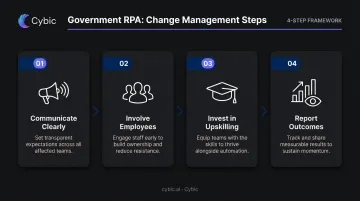
Successful programs address this directly:
- Communicate clearly that RPA targets tedious, low-value tasks, not the roles that perform them
- Involve employees in process selection; they often know better than leadership where the manual friction is
- Invest in upskilling so staff can move into bot monitoring, exception handling, and process optimization roles
- Report outcomes to employees, not just executives; visibility builds trust faster than announcements alone
How to Build a Government RPA Program
Start With Process Selection
Not every process is RPA-ready. The Federal RPA Community of Practice's Program Playbook provides a practical framework for identifying candidates. Strong candidates share these characteristics:
- High transaction volume - enough to justify bot development and maintenance
- Rules-based logic - clear decision criteria, low exception rates
- Stable process definition - the workflow doesn't change frequently
- Significant manual effort - meaningful staff hours currently consumed
- Structured data inputs - digital, consistent formats the bot can reliably read
Avoid starting with processes that have high exception rates, require frequent judgment calls, or involve unstructured inputs. Save those for the IA maturity stage.
Establish Infrastructure and Governance First
Agencies with strong RPA programs build infrastructure and governance frameworks before expanding their bot portfolio - not after.
Key elements to establish before scaling:
- Secure IT platform with bot credential management and logging
- Defined operating model with clear roles: RPA program manager, bot developers, process owners, and security reviewers
- Governance framework covering access controls, privacy requirements, exception handling, and performance monitoring
- Structured intake pipeline with standardized criteria for evaluating and prioritizing new automation candidates
Measure, Report, and Scale
RPA programs require ongoing performance reporting to maintain stakeholder buy-in and justify continued investment. Track metrics that matter to agency leadership:
- Hours saved per bot and across the program
- Transaction error rates before and after automation
- Processing cycle time reductions
- Cost impact (staff time redirected, overtime reduced)
Reporting alone isn't enough - peer collaboration compresses the learning curve significantly. The Federal Automation Community of Practice now has 1,700+ members from 100+ departments and agencies, sharing reusable security patterns, proven governance frameworks, and deployment lessons that keep individual agencies from repeating costly mistakes.
The Future: From RPA to AI-Driven Automation
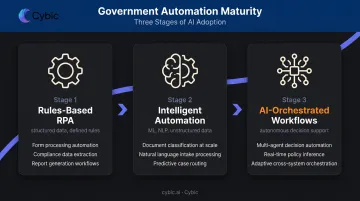
Rules-based RPA has clear limits. Processes involving unstructured data - freeform citizen complaints, regulatory filings, emails, PDFs - require something more capable. The progression looks like this:
RPA → Intelligent Automation (adding ML and NLP) → AI-orchestrated workflows with autonomous decision support
The FDA already applies NLP to regulatory submissions to classify relative complexity - a capability that goes far beyond what traditional RPA handles. The next generation of government automation will include bots that can:
- Read and classify freeform correspondence at scale
- Flag anomalies in financial transactions in real time
- Surface compliance gaps in regulatory documents before they become audit findings
As automation becomes more autonomous, the governance stakes increase. OMB Memorandum M-24-10 (March 2024) establishes federal requirements for AI governance, innovation, and risk management. NIST's AI Risk Management Framework provides the technical foundation for trustworthy AI deployment.
Governance applied retrospectively - after an AI system is already making decisions at scale - is far more difficult and riskier than governance embedded at the architecture level. This is where design philosophy becomes operational.
Cybic's enterprise automation practice builds compliance in from day one, including:
- Role-based access controls for secure system access
- Encrypted data handling in transit and at rest
- Full auditability of every automated action
For government clients operating under strict accountability standards, that architecture isn't a preference. It's the starting point.
Frequently Asked Questions
What is the difference between RPA and intelligent automation in government?
RPA handles structured, rule-based tasks by mimicking human actions at the UI level, such as processing forms or routing invoices. Intelligent automation adds AI, ML, and NLP to handle unstructured data and more nuanced decision-making. Most agencies start with RPA for quick wins, then evolve toward IA as governance and capability mature.
Which government processes are best suited for RPA?
High-volume, rules-based processes with low exception rates are the best starting points: claims processing, invoice management, permit approvals, data entry, HR onboarding, payroll reconciliation, and compliance checks. SSA's returned SSI payments and GSA's Multiple Award Schedule offer reviews are proven federal examples.
Does RPA in government lead to job losses for public sector workers?
In practice, RPA is deployed to eliminate tedious, low-value administrative tasks, freeing employees for higher-judgment work. Successful programs invest in upskilling and communicate clearly about role changes. The goal is capacity recovery, not headcount reduction.
How do government agencies ensure RPA systems are secure and compliant?
RPA bots must be managed as agency IT assets subject to security authorization, credentialing, privacy requirements, and access controls. This includes Privacy Impact Assessments when bots handle PII, bot credential management per agency security guidance, and ongoing logging and performance monitoring.
How long does it take to implement RPA in a government agency?
Simple, well-scoped bots can be deployed in weeks. Larger programs with multiple bots, security approval cycles, and agency-wide scaling typically take several months. The timeline depends on process complexity, IT infrastructure readiness, and the security authorization process. Rushing that authorization step creates downstream risk.
How can government agencies fund RPA implementation?
Federal agencies can apply through GSA's Technology Modernization Fund. State and local governments have options through ARPA's State and Local Fiscal Recovery Funds or CISA's State and Local Cybersecurity Grant Program for RPA projects tied to security improvements. RPA's typically fast ROI also makes the internal business case easier to build than for large-scale IT overhauls.