Introduction
HR teams are buried in administrative work. According to Deloitte, HR professionals spend as much as 57% of their time on administrative tasks - leaving less than half their workweek for the strategic, people-focused work that actually drives organizational value.
The problem compounds as organizations grow. Manual hiring workflows slow time-to-hire. Payroll errors create compliance exposure. Onboarding steps get missed.
Traditional HRIS platforms, while essential, weren't built to eliminate the repetitive data entry and cross-system coordination that consumes HR capacity every day.
Robotic process automation (RPA) addresses this gap directly. It doesn't replace HRIS systems - it connects and orchestrates the work that happens between them.
This guide covers what RPA in HR means, the highest-ROI use cases, real deployments at companies like Lenovo, ManpowerGroup, and Coca-Cola, proven implementation practices, and the challenges worth planning for before you start.
Key Takeaways
- RPA automates repetitive, rule-based HR tasks - freeing teams for strategic, people-first work
- Highest-ROI use cases: recruiting, onboarding/offboarding, payroll, attendance, and compliance reporting
- Lenovo saved 6,000+ hours/year; ManpowerGroup cut candidate processing time by 80%; Covestro hit ~95% accuracy on document processing
- Start small, clean your data first, and treat change management as a hard requirement - not an afterthought
- HR data sensitivity requires governance and security controls built into architecture from day one
What Is RPA in Human Resources?
RPA uses software bots to mimic human actions - logging into applications, copying data between systems, triggering workflows - to execute repetitive, rule-based tasks without requiring major IT overhauls. In HR, that means bots handling the dozens of routine cross-system interactions that consume hours of staff time each week.
There are two distinct categories worth understanding:
| Type | What it handles | HR example |
|---|---|---|
| Rule-based RPA | Structured data, fixed workflows | Payroll data entry, leave request processing |
| Intelligent/agentic automation | Unstructured data + AI, OCR, NLP | Resume parsing, sick leave certificate extraction |
Modern enterprise deployments often combine both. Lenovo uses OCR-enabled bots for onboarding document processing; Covestro pairs AI with RPA to extract data from scanned sick leave certificates. The direction is toward intelligent automation, but most HR teams still start with structured, rules-based work.
HR is a natural fit for RPA because the function is high-volume, data-intensive, and relies on dozens of repetitive interactions across disconnected systems: precisely the conditions where automation delivers reliable, measurable value. Deloitte notes that more than 50% of standard HR shared-services processes have been identified as potential automation candidates.
Top RPA Use Cases in HR
Recruiting and Hiring
Recruiters spend too much of their time on tasks that require no judgment at all. RPA addresses this directly:
- Resume parsing and shortlisting against predefined criteria (experience, qualifications, keywords)
- Multi-platform job posting - pushing openings to job boards, LinkedIn, and internal portals simultaneously
- Interview scheduling based on calendar availability, with automated confirmations sent to candidates
- Status communications - rejection emails, next-step notifications, and offer letter generation
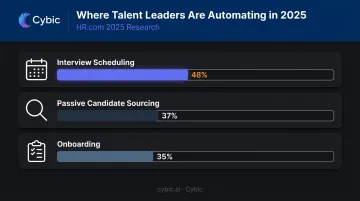
HR.com's 2025 talent acquisition research identifies interview scheduling (48%), passive candidate sourcing (37%), and onboarding (35%) as the top anticipated automation areas among talent leaders.
Employee Onboarding and Offboarding
Onboarding involves more data movement than most people realize. RPA handles all of it without manual re-entry:
- Transfers offer letter details into HRIS, payroll, and benefits systems
- Provisions accounts and credentials across platforms
- Triggers equipment requests and distributes onboarding documents
- Schedules orientation without coordinator intervention
Offboarding is where missed steps create real risk. Bots handle:
- System access revocation across all platforms
- Exit documentation generation
- Final settlement calculation
- Alumni record updates
Missed offboarding steps - especially delayed access revocation - carry compliance and security exposure that automation eliminates entirely.
Payroll and Expense Management
Manual payroll carries measurable cost. According to a 2025 EY study summary hosted by Paycom, manual payroll creation costs an average of $20.83 per instance, and each manual HR data entry instance costs $4.86. For a company processing 500 payroll entries monthly, that's over $10,400 in manual processing costs - before accounting for error correction.
RPA in payroll:
- Extracts timesheet and attendance data from source systems
- Validates entries and flags discrepancies for human review
- Calculates salaries, deductions, bonuses, and tax withholdings
- Syncs with payroll platforms and generates pay slips automatically
Deloitte's 2025 payroll analysis estimates automated payroll can cut errors by up to 50% and processing time by 25%.
Attendance, Leave, and Compliance Reporting
Attendance and leave automation connects directly to time-tracking systems to handle the full reconciliation cycle:
- Captures and validates attendance data from source systems
- Processes leave requests against policy rules automatically
- Updates payroll records without manual handoff
- Flags irregularities - such as mismatches between logged hours and access card records
The manual reconciliation burden drops significantly.
Compliance reporting is where RPA's auditability features earn their keep. Bots:
- Collect employee data across systems
- Validate it against internal policies and labor regulations
- Populate report templates on schedule
- Maintain audit trails and flag deviations for review
HR teams can demonstrate regulatory compliance without assembling reports manually each cycle.
Real-World Examples of RPA in HR
Four enterprise deployments illustrate what RPA actually delivers in production:
Lenovo + UiPath
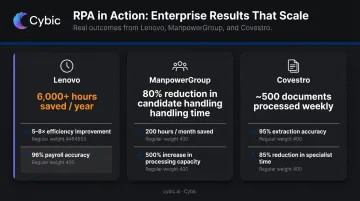
Lenovo deployed UiPath across several HR processes - individual income tax declaration, expense reimbursement, payroll accounting, payroll calendar management, and OCR-enabled onboarding identification. Results from the UiPath case study:
- 6,000+ hours saved annually
- 5–8x improvement in HR process efficiency
- Expense reimbursement now takes less than 10% of original employee time
- 96% accuracy on payroll calendar matching
- Zero reported business errors in automated areas
ManpowerGroup + UiPath
ManpowerGroup's Belgian operations used RPA to automate candidate record validation, a high-volume, repetitive task consuming significant HR team time every day. Outcomes per the UiPath case study:
- Per-candidate handling time dropped from 5–7 minutes to 1 minute
- ~200 hours/month saved for the HR team
- 500% increase in candidate processing capacity
That 500% figure isn't a rounding error. The team didn't incrementally improve; they became capable of handling five times the volume with the same headcount.
Covestro + UiPath
Covestro applied AI-enhanced RPA to sick leave certificate processing, a document-heavy workflow involving scanned PDFs and images that traditional rule-based bots can't handle without machine learning support. The case results:
- ~500 documents processed weekly (peaking at 600–650)
- 50% straight-through processing with no human intervention
- ~95% accuracy on document extraction
- 85% reduction in HR specialist time for manual sick leave submissions
Coca-Cola + Blue Prism
Coca-Cola used Blue Prism's digital workers for HR audits across SAP-based systems. The 2018 case study documents coverage across 50+ processes, with the organization shifting from sampling a subset of transactions to 100% transaction review. Karla Younger, VP of HR Services, noted that digital workers helped "liberate human resources to spend more time on issues that might be affecting customers."
Key Benefits of RPA for HR Teams
The case evidence points to three benefits that appear consistently across implementations:
Efficiency and cost reduction. Bots complete tasks faster and at a lower per-transaction cost than manual processing. Lenovo's 6,000+ annual hours saved and ManpowerGroup's 200 hours/month demonstrate what this looks like at enterprise scale. The EY cost data makes the baseline case: when manual data entry costs $4.86 per instance across thousands of monthly transactions, the ROI math on automation is straightforward.
Accuracy and compliance. RPA follows predefined rules without variation. Lenovo reported zero business errors in automated HR areas. Deloitte projects up to 50% error reduction in payroll automation. For functions where errors trigger regulatory exposure - payroll tax, compliance reporting, headcount data - consistent accuracy is a hard operational requirement.
Scalability without headcount growth. ManpowerGroup's 500% capacity increase is the clearest example: the same HR team processed far more candidates without adding staff. Coca-Cola moved from sampled to full-coverage audit review without additional headcount. RPA lets HR operations scale with organizational growth rather than requiring proportional hiring.
Best Practices for Implementing RPA in HR
Start With a Process Assessment
Not every HR task is a good automation candidate. Prioritize processes that are:
- High-volume - frequent enough that time savings compound
- Rule-based - consistent decision logic with clear inputs and outputs
- Error-prone or delayed - where manual handling creates measurable problems
- Cross-system - involving data entry or transfer between multiple platforms
Start with one or two low-risk processes. Payroll calendar validation, candidate record processing, and document intake are common first deployments. Build proof of concept before scaling.
Optimize Before You Automate
This is where many implementations go wrong. RPA bots replicate existing workflows - including inefficiencies. Automating a broken process doesn't fix it; it just accelerates the breakage.
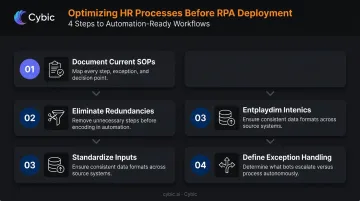
Before deployment:
- Document current SOPs by mapping every step, exception, and decision point
- Eliminate redundancies before encoding unnecessary steps in automation logic
- Standardize inputs so data formats and fields are consistent across source systems
- Define exception handling upfront: decide what bots escalate vs. process autonomously
Build a Cross-Functional Team and Pilot First
HR automation without IT involvement creates integration failures. IT involvement without HR context creates bots that don't reflect actual workflows. Both functions need seats at the table from day one.
Run a controlled pilot on one process. Measure cycle time, error rate, and exception volume before and after. Use those results to calibrate the business case for scaling - and to identify integration issues before they affect production payroll or compliance workflows.
Invest in Change Management
Gartner HR peer data found 56% cultural resistance to change as a top challenge, with 44% of HR leaders prioritizing change management planning for automation initiatives. Those figures reflect a real dynamic: HR teams hear "automation" and worry about job displacement.
Address it early:
- Communicate that RPA removes repetitive tasks, not HR judgment or relationships
- Show before/after workload data once pilots are complete
- Train HR staff to identify automation opportunities and manage bots as part of their work
- Define new responsibilities around exception handling, analytics, and employee experience
Embed Governance and Security From Day One
HR data - salary figures, performance records, personal identification, health information - is among the most sensitive data in any organization. IBM's 2024 research found average breach costs reaching $4.88M, with employee PII among the costliest data types compromised.
Security requirements for HR automation:
- Bots operate with least-privilege credentials under role-based access controls
- All data is encrypted in transit and at rest throughout the automated workflow
- Complete audit trails log every automated action for compliance review
- Credentials are vaulted separately - no hardcoded passwords in automation scripts
- Automated workflows are reviewed regularly for new security exposure
For organizations in regulated sectors, governance cannot be retrofitted. Cybic's Drava platform embeds security controls, RBAC, auditability, and compliance alignment (SOC 2, HIPAA, ISO, GDPR) directly into the architecture, not added as an afterthought once deployment is underway.
Common Challenges and How to Overcome Them
Data Quality Undermines Automation Outcomes
RPA bots depend on clean, consistent inputs. Incomplete HRIS records, duplicate employee entries, or inconsistent job codes don't get fixed by automation - they multiply errors across every automated process. Gartner estimates poor data quality costs organizations an average of $12.9M annually.
Before designing any bot, run a data audit. Then build validation and exception-handling rules directly into the automation logic so bad data gets caught, not processed.
Data Privacy and Security Risks
HR automation expands your attack surface. Bots operate with system credentials and process personal data at volume - making them a meaningful security risk if poorly governed. Treat every bot as a privileged user:
- Enforce least-privilege access and vault credentials
- Log all bot actions for auditability
- Minimize data retention within automation workflows
- Schedule security reviews periodically, not just at deployment
Change Resistance and Misaligned Expectations
Two failure modes often hit at once: HR staff resist automation out of job security concerns, while leadership expects immediate ROI from complex deployments. Neither ends well without deliberate management.
Start with visible, low-risk wins that build confidence on both sides. Set realistic timelines - meaningful ROI typically requires three to six months of stable operation. The consistent message to HR teams should be that RPA handles the repetitive work, freeing them for higher-judgment tasks.
Frequently Asked Questions
What is robotic process automation (RPA) in HR?
RPA in HR refers to software bots that automate repetitive, rule-based tasks such as data entry, payroll processing, and document management across HR systems. The bots work within existing applications without replacing HRIS platforms or requiring major IT infrastructure changes.
How is robotic process automation used in HR?
The most common applications are recruiting and candidate screening, employee onboarding and offboarding, payroll processing, attendance and leave management, compliance reporting, and exit management. Bots handle the repetitive steps; HR professionals focus on decisions, exceptions, and employee relationships.
What are the top RPA software tools for HR?
Leading platforms include UiPath, Microsoft Power Automate, SS&C Blue Prism, and Automation Anywhere, all recognized as Leaders in the 2025 Gartner Magic Quadrant for RPA. Select based on integration fit with your HR tech stack, security controls, scalability, and support for AI-enhanced automation alongside rule-based bots.
What are the main benefits of RPA in HR?
The core benefits are reduced processing time and per-transaction costs, improved accuracy and compliance consistency, and the ability to scale HR operations without proportionally increasing headcount. Enterprise deployments consistently show measurable ROI across all three.
What are the biggest challenges when implementing RPA in HR?
Data privacy risks, poor underlying data quality, and change management are the primary obstacles. Each is addressable: choose platforms with strong security controls, clean your data before deployment, and communicate clearly that automation augments HR staff rather than replacing them.
How do you measure the success of an RPA implementation in HR?
Track pre- and post-automation metrics including task cycle time, error rates, compliance adherence, cost per process, and employee satisfaction scores. Compare actual ROI against baseline projections at 30, 60, and 90 days post-deployment to identify gaps and prioritize next automations.