Introduction
Legal teams - whether inside a law firm or a corporate department - spend a disproportionate amount of time on document creation and repetitive drafting tasks. According to a Thomson Reuters survey, small-firm lawyers spend only 60% of their time on client work, and 74% cite excessive administrative burden as a significant or moderate challenge. Yet only 20% of firms had implemented any plan to address it.
That gap shows up directly in delivery: slower turnarounds, bottlenecked workflows, and attorneys handling work that software should.
Legal document automation software changes that equation. By replacing manual drafting with template-driven, data-connected generation, it lets legal teams produce accurate documents faster, more consistently, and at scale.
Choosing the wrong tool - or delaying adoption entirely - has real costs. This guide covers:
- What legal document automation actually is
- Which platforms lead the market in 2026
- What features actually matter
- How to choose based on operational fit, not demo impressions
Key Takeaways
- Legal document automation replaces manual drafting with smart templates, conditional logic, and integrated data sources.
- Top platforms in 2026 range from enterprise systems (HotDocs, Contract Express/HighQ) to accessible no-code tools (Gavel, Checkbox.ai, PandaDoc).
- Evaluate on template flexibility, workflow automation depth, integration quality, and security posture - fit matters more than feature count.
- No single tool fits every team - firm size, document volume, and compliance requirements each shape the right decision.
- Organizations with complex governance or proprietary data requirements often need custom-built AI automation that off-the-shelf platforms can't deliver.
What Is Legal Document Automation Software?
Legal document automation software generates legal documents - contracts, NDAs, intake packages, court forms - from structured inputs using smart templates and conditional logic, rather than starting from scratch each time.
As the ABA describes it, these tools let firms create templates for frequently used documents and auto-populate them with data such as case numbers, party names, and client information. The result is a standardized, repeatable process that eliminates manual drafting errors.
Document Automation vs. Document Management
This distinction trips up many buyers and leads to purchasing the wrong tool entirely:
| Capability | Document Automation | Document Management |
|---|---|---|
| Primary function | Generates new documents from templates | Stores, organizes, and retrieves existing documents |
| Key features | Conditional logic, data auto-population, questionnaire flows | Version control, full-text search, access permissions, archiving |
| Example tools | HotDocs, Gavel, Contract Express | Clio, NetDocuments, iManage |
Buying a document management platform when you need generation (or vice versa) is one of the most common and costly mistakes in legal tech procurement.
Understanding that distinction makes the mechanics of automation much easier to follow.
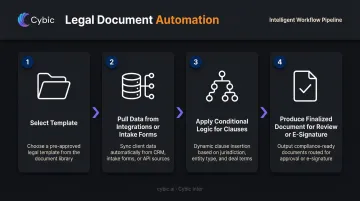
How It Works in Practice
- A user selects a template relevant to the matter type
- The system pulls in client or matter data via integrations or intake forms
- Conditional logic applies the correct clauses - based on jurisdiction, deal size, or client type
- A finalized, formatted document is produced, ready for review or e-signature
Best Legal Document Automation Software in 2026
Each tool below covers a distinct part of the market - from enterprise firms managing complex multi-jurisdiction documents to small practices that need something deployable in a day.
HotDocs (Mitratech)
Mitratech acquired HotDocs in June 2024, folding one of the longest-established document automation platforms in the market into its enterprise legal operations suite. The numbers back up its reputation: 1M+ end users, 60+ countries, and 30+ years in the space.
HotDocs handles large-scale template libraries with deeply nested conditional logic - auto-populating clauses, figures, and jurisdiction-specific rules using back-end logic that few competitors match. It supports cloud and desktop environments, and its open API connects to CRM, matter management, and HR data repositories.
Setup requires significant investment, and the learning curve is steep. Without dedicated legal ops resources, smaller teams will find it more platform than they need.
| Attribute | Details |
|---|---|
| Best For | Enterprise law firms and corporate legal departments with high-volume, complex document generation needs |
| Pricing | Contact sales (custom enterprise pricing) |
| Key Differentiator | Advanced document assembly logic with deeply nested conditional rules; cloud-secure infrastructure with 30+ years of enterprise deployment |
Contract Express / HighQ (Thomson Reuters)
Thomson Reuters presents document automation under HighQ, with Contract Express serving as the underlying document automation engine. The platform supports self-service document assembly for contracts, NDAs, matter intake, M&A transactions, and other legal processes.
For organizations already embedded in the Thomson Reuters ecosystem, the integration value is clear. HighQ connects document automation directly to existing legal workflows, and its template and questionnaire approach ensures standardized language across the organization - reducing inconsistent drafting across teams.
Price is the real barrier here. Premium enterprise pricing rules it out for smaller or independent practices, and adoption only makes sense for teams already working within the Thomson Reuters ecosystem.
| Attribute | Details |
|---|---|
| Best For | Large firms and in-house teams using other Thomson Reuters products or requiring structured document flow automation |
| Pricing | Contact sales (premium enterprise pricing) |
| Key Differentiator | Deep MS Word integration; template and questionnaire-driven document assembly within the HighQ ecosystem |
Gavel (formerly Documate)
Gavel rebranded from Documate in January 2023 and has built a strong position among small to mid-sized law firms seeking accessible, no-code document automation. Its logic branching allows adaptive questionnaires that generate different document outputs based on user responses - all without developer involvement.
Gavel reports clients saving upwards of 90% of time previously spent drafting legal documents. Its integrations include Clio, DocuSign, and Zapier, and its public API supports document generation at scale for teams that eventually need it.
Compared to enterprise platforms, Gavel has fewer pre-built legal templates. Teams will invest more time building their template library upfront - a reasonable tradeoff given the platform's accessibility and pricing.
| Attribute | Details |
|---|---|
| Best For | Small to mid-sized law firms wanting flexible, no-code template building and low barrier to adoption |
| Pricing | Free to start; plans from $83/month |
| Key Differentiator | No-code logic branching with API access; verified integrations with Clio, DocuSign, and Zapier |
Checkbox.ai
Checkbox.ai is a no-code legal process automation platform built for in-house legal operations teams. Rather than just generating documents, it enables teams to build self-service legal portals - combining intake forms, approval workflows, matter management, and document generation - without IT dependency.
Its form builder supports complex conditional logic and external data source connections - both critical for deflecting inbound requests to the legal team. Enterprise customers including BMW, Xero, and Invisalign reflect its mid-to-large corporate focus.

There are no out-of-the-box legal templates. Teams build from scratch, which takes upfront effort but produces tools precisely fitted to their actual workflows.
| Attribute | Details |
|---|---|
| Best For | In-house legal operations teams building self-service document tools and automating repetitive intake processes |
| Pricing | Contact sales for pricing |
| Key Differentiator | Advanced no-code workflow builder with conditional logic; purpose-built for self-service legal tools without IT involvement |
PandaDoc
PandaDoc is a broader document workflow platform - not exclusively legal-focused - that combines document creation, e-signatures, and CRM-connected automation.
Its Salesforce and HubSpot integrations are native and well-documented, making it practical for legal teams supporting commercial contracts, client agreements, and cross-departmental processes.
PandaDoc is SOC 2, HIPAA, and GDPR compliant and is trusted by 50,000+ clients across industries. Deployment is fast compared to enterprise legal tools, and the learning curve is minimal.
What it lacks is legal specificity: no jurisdiction-based conditional logic, no court form support, and no deep legal workflow architecture. For teams with straightforward document needs and existing CRM workflows, that gap rarely surfaces. For high-volume legal automation with complex compliance requirements, those missing capabilities will become real limitations.
| Attribute | Details |
|---|---|
| Best For | Hybrid legal/business teams needing e-signatures, CRM-connected document automation, and simple contract workflows |
| Pricing | Starter from $19/user/month; free trial available |
| Key Differentiator | Native Salesforce and HubSpot integrations with built-in e-signature; fast cross-functional deployment |
Key Features to Look for in Legal Document Automation Software
Template Flexibility and Conditional Logic
The template engine is the foundation. Look for platforms that support:
- Dynamic fields that auto-populate from connected data sources
- Conditional clauses that apply different language based on jurisdiction, deal size, or client type
- Non-technical template management - staff should be able to update templates without vendor support
Without robust conditional logic, templates produce static outputs - limiting what automation can actually do for your team.
Workflow Automation and Approval Routing
Document generation is step one. What happens after matters just as much. Strong platforms automate the full lifecycle:
- Internal routing for review and approval
- Rule-based approval chains triggered by document type or value threshold
- Automated reminders to prevent bottlenecks
- Collaborative editing with version control intact
Integration Depth
Surface-level integrations create data silos. Prioritize platforms with verified, bidirectional connections to the tools your team already uses:
- Matter management: Clio, MyCase
- CRM: Salesforce
- E-signature: DocuSign
- Cloud storage: SharePoint, Google Drive, Box
Automation compounds in value when data flows between systems automatically - not through manual re-entry.
Security, Compliance, and Governance Controls
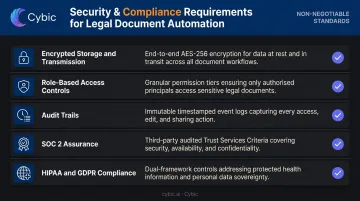
Legal documents carry significant data sensitivity. Non-negotiable requirements include:
- Encrypted storage and transmission (required under GDPR Article 32; addressable under HIPAA)
- Role-based access controls (RBAC) to restrict document access by user and role
- Audit trails that log all document actions and workflow events
- SOC 2 assurance covering security, confidentiality, and availability controls
- HIPAA and GDPR compliance for matters involving health or personal data
For organizations in regulated industries, governance must be embedded at the architecture level before deployment. Bolted-on compliance controls introduced after launch consistently introduce gaps that auditors and regulators find.
Analytics and Performance Reporting
Legal operations leaders need data to justify process investments and identify bottlenecks. Look for platforms that surface:
- Document usage patterns and template adoption rates
- Turnaround times by document type, team, or matter
- Approval cycle durations and common delay points
- Exportable reporting for leadership dashboards
This data enables continuous template optimization and gives operations teams concrete numbers to show alongside efficiency gains.
How We Chose the Best Legal Document Automation Software
Each tool was evaluated on its own merits across seven criteria - brand recognition was not one of them:
- Document generation capability and template flexibility
- Workflow automation depth (approval routing, conditional logic)
- Integration ecosystem (CRM, DMS, e-signature, practice management)
- Security posture and compliance alignment
- Ease of adoption across different user skill levels
- Pricing transparency and total cost of ownership
- Fit across solo practitioners, mid-size firms, and enterprise legal teams
Common buyer mistakes to avoid:
- Selecting based on demo impressions without testing against real document types and data flows
- Confusing document automation with document management: buying a DMS when generation is the actual need
- Ignoring post-generation workflows - a platform that drafts well but lacks approval routing or e-signature integration creates a different bottleneck
- Underestimating implementation complexity: enterprise platforms like HotDocs require real setup investment; factor that into total cost of ownership
Operational fit separates successful deployments from abandoned ones. A tool that handles your specific document types, connects to your existing tech stack, and can be maintained internally is worth more than an impressive feature list. Ask vendors for a pilot on your actual templates - not a scripted demo.
Conclusion
The best legal document automation software in 2026 doesn't exist as a single answer. It depends on team size, document volume, workflow complexity, existing tech stack, and compliance requirements.
- Enterprise teams handling high-volume, complex document types benefit from HotDocs or Contract Express/HighQ - robust logic, governance controls, and scalability at the cost of implementation complexity.
- Small to mid-sized firms with limited technical resources get faster time-to-value from Gavel or PandaDoc - accessible, affordable, and quick to deploy.
- In-house legal operations teams building self-service tools are best served by Checkbox.ai's workflow-first approach.
For organizations in regulated industries - BFSI, healthcare, government, or legal departments managing highly sensitive proprietary content at scale - standard off-the-shelf tools often hit a ceiling. When governance requirements are non-negotiable and data isolation is mandatory, custom-built AI automation becomes the more defensible path.
Cybic builds LLM-powered document automation and intelligent document processing systems with compliance embedded at the architectural level (SOC 2, HIPAA, GDPR, and ISO), including strict data governance that ensures proprietary content is never used for model training. For legal teams that have outgrown what packaged tools can offer, that's where the conversation starts.
Legal document automation has moved from differentiator to table stakes. The teams that get the most out of it choose tools that fit their actual workflows, implement properly from day one, and revisit their setup as requirements change - not just once at rollout.
Frequently Asked Questions
What is the best workflow automation software for legal documents?
The right choice depends on workflow complexity. Enterprise teams often favor HotDocs or Contract Express/HighQ for complex, high-volume workflows; in-house legal ops teams gravitate toward Checkbox.ai. Evaluate based on approval routing depth, integration requirements, and governance posture - not brand recognition.
What is the best legal document management software?
Document management (storage, retrieval, version control) is a different category from document automation (generation). Platforms like NetDocuments, iManage, and Clio are widely used for management. Some platforms like LawVu combine management and operations in one system.
What is legal document automation software and how does it work?
It uses smart templates, conditional logic, and connected data sources to auto-generate legal documents from structured inputs, cutting manual drafting and standardizing output across high-volume workflows. Users complete an intake form or questionnaire; the system produces a formatted, ready-to-review document.
What features should I prioritize when choosing legal document automation software?
Prioritize these four areas:
- Template flexibility with conditional logic
- Workflow automation and approval routing
- Integration depth with your existing legal and business tools
- Security and compliance controls (RBAC, audit trails, GDPR, HIPAA, SOC 2)
Governance posture is especially critical for regulated industries.
Can legal document automation software integrate with tools like Clio, Salesforce, or DocuSign?
Most platforms offer integrations with common tools - Gavel, for example, has verified integrations with Clio, DocuSign, and Zapier. However, integration depth varies significantly. Verify whether integrations are bidirectional before selecting a platform; surface-level connections can create as many problems as they solve.
Is legal document automation software suitable for small law firms?
Yes. No-code platforms like Gavel and PandaDoc are accessible and affordable for small firms, with pricing starting well under $100/month. Enterprise platforms like HotDocs and Contract Express serve large departments. Match platform complexity and cost to your actual document volume and team capacity.