That gap isn't a technology problem. It's a survival problem.
This guide covers what enterprise application modernization actually means, why the business case has never been more urgent, how to use the 7 R's framework to choose the right approach for each application, and how to build a roadmap that keeps the business running while modernization happens.
Key Takeaways
- Legacy systems trap IT capacity in maintenance rather than innovation - in some organizations, 70% of IT capacity goes to keeping old systems alive
- Use the 7 R's (Retire, Retain, Rehost, Replatform, Refactor, Rearchitect, Rebuild) to match each application to the right level of intervention
- Skipping a portfolio assessment is the leading cause of budget overruns - BCG reports over two-thirds of large-scale tech programs miss time and budget targets
- Modernization's real payoff is a foundation built to run AI-powered operations, not just a cleaner cloud environment
What Is Enterprise Application Modernization?
Enterprise application modernization is the process of updating, migrating, or rebuilding legacy business applications to align with current technology infrastructure, business requirements, and performance standards. The scope ranges from minor infrastructure moves to complete architectural overhauls.
What Counts as a Legacy Application?
Not every old system is a problem, but a system qualifies as a modernization candidate when it shows one or more of these characteristics:
- Built on outdated frameworks or programming languages with limited support
- Hosted entirely on-premises with no cloud integration or API surface
- Unable to support modern microservices, automation, or AI integration
- Requires manual intervention to scale or recover from failure
- Dependent on institutional knowledge held by a handful of engineers rather than documented architecture
Modernization vs. Maintenance
This distinction matters more than most organizations acknowledge. Maintenance keeps a system running as it is - patching, bug fixes, keeping the lights on. Modernization fundamentally changes the architecture, scalability, or intelligence of a system - enabling capabilities the original build was never designed to support.
| Maintenance | Modernization | |
|---|---|---|
| Goal | Keep system operational | Expand what the system can do |
| Scope | Patches, bug fixes, uptime | Architecture, scalability, integrations |
| Outcome | Status quo preserved | New business capabilities unlocked |
The practical implication: a well-maintained legacy system still can't support real-time data pipelines, AI integrations, or elastic cloud scaling. Maintenance buys time. Modernization changes the trajectory.
Why Modernize? The Business Case for Upgrading Enterprise Applications
The cost argument for modernization is straightforward once you look at where IT budgets actually go. The US federal government spends over $100 billion annually on IT investments, with approximately 80% directed at operations and maintenance of existing systems - leaving just 20% for new capabilities. McKinsey documented a large European bank where 70% of IT capacity went to maintaining legacy infrastructure, not building anything new.
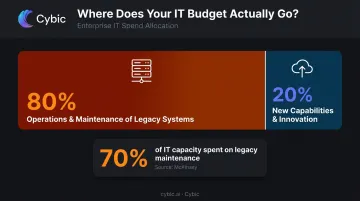
When the majority of IT spend goes to keeping old systems alive, there's little budget left to build competitive capabilities - which is precisely what modernization unlocks.
Security Exposure
Legacy systems carry compounding security risk. The GAO found that 7 of 11 high-priority federal legacy systems had known cybersecurity vulnerabilities, and 4 were running unsupported hardware or software. Verizon's 2024 Data Breach Investigations Report found that vulnerability exploitation as an initial breach entry point nearly tripled, accounting for 14% of all breaches - directly tied to unpatched and unsupported systems.
The pattern is consistent: old systems accumulate vulnerabilities faster than they can be patched, especially when the underlying platform no longer receives vendor support.
Performance, Scalability, and Agility
Modernized systems - particularly those built on cloud-native or microservices architectures - handle demand spikes without manual intervention. Legacy systems typically require scheduled downtime, manual scaling, and reactive incident response.
The operational cost of downtime is real. The Uptime Institute's 2024 analysis found that 54% of organizations reported their most recent significant outage cost more than $100,000, with 16% exceeding $1 million.
Beyond resilience, modern platforms unlock integration with analytics, automation, and AI tools. A manufacturer running predictive maintenance on a modernized platform can use AI to flag equipment failure before it happens. McKinsey documented multiple cases where applying AI to maintenance workflows reduced unplanned equipment downtime and freed up operational capacity - outcomes that depend entirely on the underlying platform being capable of supporting those integrations.
Compliance
The same architectural shift that enables AI integration also addresses compliance. Modern platforms are built with audit trails, access controls, and update mechanisms that support frameworks like HIPAA, GDPR, and SOC 2. Legacy systems often require expensive custom patches to meet evolving regulatory requirements - and in many cases, they simply can't.
The 7 R's of Enterprise Application Modernization
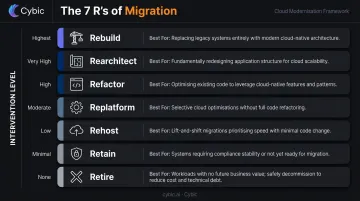
The 7 R's framework - drawn from modernization guidance by AWS and Microsoft - gives teams a structured way to assign each application the right level of intervention. The key word is right. Choosing a more complex approach than necessary wastes budget and time. Choosing too light an approach leaves the underlying problem unsolved.
| Strategy | Intervention Level | Best For |
|---|---|---|
| Retire | Decommission | Applications with no active business use |
| Retain | Keep as-is | Stable, compliant, low-risk systems |
| Rehost | Infrastructure move | Fast migration with minimal risk |
| Replatform | Targeted optimization | Moderate improvement without redesign |
| Refactor | Code restructuring | Valuable systems constrained by technical debt |
| Rearchitect | Architecture redesign | Systems that can't scale in current form |
| Rebuild | Start from scratch | Applications that can't be economically adapted |
Retire
Some applications simply no longer serve a real business function. Decommissioning them frees budget, reduces IT complexity, and eliminates security exposure from unmaintained systems. This is often the most underused strategy - organizations keep systems running out of habit or because nobody wants to own the decommission decision.
Retain
Not every system needs modernization now. Applications that are stable, compliant, and low-risk may be intentionally kept as-is, particularly when modernization cost outweighs the benefit in the near term. Retain is an active, intentional decision - made when the cost of change clearly outweighs near-term benefit.
Rehost
Rehost - commonly called lift-and-shift - moves an application to cloud infrastructure with minimal code changes. It's the fastest approach and carries the lowest migration risk. AWS uses rehost as a standard large-migration strategy for good reason: it moves quickly and reduces hardware costs immediately.
The limitation is equally clear: rehosting doesn't unlock cloud-native capabilities. Technical debt moves to a new address rather than being resolved.
Replatform
Replatform introduces targeted optimizations during migration - switching to a managed database service, adopting a cloud-native runtime, or replacing a specific component - without redesigning the core architecture. It balances speed with meaningful improvement and works well when the application's overall structure is sound.
Refactor
Refactoring restructures the codebase to improve performance, maintainability, and scalability while preserving the application's core logic. This is the right choice when the system is genuinely valuable but constrained by outdated code patterns or accumulated technical debt.
One important caveat: AWS explicitly notes that refactor is more resource-intensive than rehost or replatform and is generally not recommended for large-scale migrations without careful sequencing.
Rearchitect and Rebuild
These represent the highest-investment options. Rearchitecting transforms the underlying system structure, such as converting a monolith to microservices. Rebuilding starts from scratch using modern languages and frameworks. Both are appropriate when an application fundamentally cannot scale or adapt to current requirements. If salvageable logic exists, rearchitect. If the codebase is beyond economic repair, rebuild.
How to Build an Enterprise Modernization Roadmap
The data is clear: modernization fails when organizations skip the planning work. The GAO found that only 3 of 11 priority federal legacy systems had modernization plans containing all three required elements - milestones, work descriptions, and planned legacy disposition. Incomplete plans are directly linked to cost overruns and project failure.
Here's a five-step roadmap structure that holds up in practice.
Step 1 - Portfolio Assessment
Before selecting any strategy, conduct a full audit of the existing application portfolio. This means documenting:
- Performance bottlenecks and system dependencies
- Integration points with other systems
- Security vulnerabilities and compliance gaps
- Business criticality and active usage
Skipping this step is the primary reason modernization projects go over budget - you can't sequence what you haven't mapped.
Step 2 - Prioritization by Tier
Attempting to modernize everything simultaneously is a reliable path to failure. Tier the portfolio instead:
| Tier | Description | Action |
|---|---|---|
| Tier 1 | Business-critical systems | Highest priority; most rigorous planning |
| Tier 2 | Important but not urgent | Schedule after Tier 1 stabilizes |
| Tier 3 | Low-value or redundant systems | Decommission rather than modernize |
AWS's mainframe assessment guidance recommends this same grouping and sequencing output as the core deliverable of any portfolio assessment.
Step 3 - Strategy Selection per Application
Apply the 7 R's framework to each prioritized application. The selection criteria should be:
- Business value the modernized system will create
- Technical complexity of the change
- Available team capacity and skills
- Risk tolerance and business continuity requirements
The right answer is almost never "rearchitect everything." Most portfolios contain a mix of retire, retain, rehost, and replatform candidates - with a smaller number of applications that genuinely require refactoring or rebuilding.
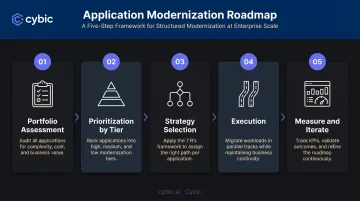
Step 4 - Execution with Business Continuity
Modernization runs in parallel with ongoing operations. The legacy system still needs maintenance, enhancements, and support throughout - and teams must be resourced for both tracks simultaneously. Underestimating this dual-track burden is one of the most common causes of project delays.
Cybic's approach addresses this directly through infrastructure-agnostic architecture: modernization proceeds incrementally, with on-premises systems maintained where necessary while cloud or hybrid components are built out selectively. This avoids forcing a big-bang cutover that puts business operations at risk.
Step 5 - Measure and Iterate
Define KPIs before migration begins, not after. Useful modernization metrics include:
- System performance (uptime, response times, error rates)
- IT cost reduction (infrastructure spend, maintenance hours)
- Deployment frequency and release cycle time
- Security incident reduction
- User adoption rates on modernized platforms
Treat modernization as a continuous program with defined review cycles. The portfolio will keep evolving - the planning discipline should too.
Common Modernization Challenges and How to Address Them
The Lift-and-Shift Misconception
Many organizations declare modernization complete after moving an application to the cloud. Without optimizing for the cloud environment, costs can actually increase. Technical debt doesn't disappear - it relocates. Rehost is a valid starting point, not an endpoint.
The Tribal Knowledge Problem
Legacy applications often run on undocumented business logic known only to two or three engineers. When those engineers leave, the institutional knowledge goes with them. Modernization scoping almost always underestimates how much time the discovery and documentation phase requires. This is one reason Cybic's engagement methodology includes a structured discovery phase - mapping current architecture, data flows, and integration dependencies before any migration begins.
Security During Transition
The period between legacy and modern is often the most vulnerable. NIST's cloud access-control guidance covers identity and access management across IaaS, PaaS, and SaaS environments, and CISA's 2025 alert on legacy Oracle Cloud environments is a concrete example of credential risks that emerge specifically during cloud transitions.
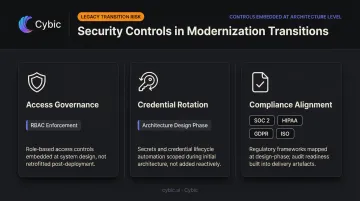
Access governance, RBAC, credential rotation, and compliance controls must be established at the architectural level before migration begins - not retrofitted after launch. Cybic builds these directly into modernization architecture from day one:
- Access governance and RBAC enforced before workloads move
- Credential rotation protocols established during architecture design
- Compliance alignment for SOC 2, HIPAA, GDPR, and ISO built in as design constraints - not post-deployment tasks
AI and the Next Phase of Enterprise Application Modernization
Moving to the cloud or cleaning up technical debt is no longer the finish line. For enterprises that want modernization to create competitive advantage, the real objective is building a foundation that can run intelligent, automated operations.
AI changes the modernization calculus in a specific way: the goal is embedding intelligence into systems so they can automate decisions, surface insights in real time, and adapt without manual intervention. That requires clean data pipelines, modern APIs, and scalable architecture - exactly what modernization delivers. The two initiatives are directly connected.
What AI-Powered Modernization Looks Like in Practice
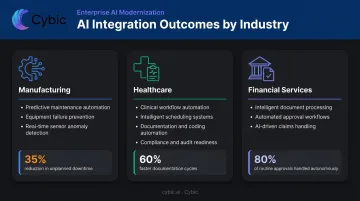
- Manufacturing: Predictive maintenance models integrated into production monitoring workflows, flagging equipment issues before downtime occurs
- Healthcare: Clinical workflow automation that handles scheduling, documentation, and compliance tasks - McKinsey reports that half of US healthcare organizations are already implementing generative AI
- Financial services and back-office operations: Intelligent document processing, automated loan approvals, and AI-driven claims handling that reduce manual processing time significantly
Gartner now recognizes AI-augmented code modernization tools as a distinct category, and IDC tracks intelligent application modernization platforms as an emerging market. The analyst consensus is that AI accelerates modernization assessment, code understanding, testing, and workflow automation - though actual returns vary based on implementation quality and how well the solution is integrated into existing operations.
Where Cybic's Drava Platform Fits
For organizations where modernization needs to enable AI - not just retire technical debt - that requires more than clean architecture. It requires a layer that connects enterprise data, ML models, and automation logic into a single governed system.
Cybic's Drava platform is built for that purpose. Rather than treating data pipelines, ML models, and automation as separate tools, Drava integrates them into a governed automation platform with built-in security controls, audit trails, and compliance frameworks.
This matters particularly in regulated industries like healthcare, energy, and financial services, where AI deployment requires demonstrable governance and auditability. Drava is designed so that governance isn't retrofitted - it's embedded in the architecture from the start.
Frequently Asked Questions
What is application modernization?
Application modernization is the process of updating legacy software systems - through rehosting, refactoring, rearchitecting, or rebuilding - to improve performance, security, and scalability. The goal is to align aging applications with current infrastructure, business requirements, and operational standards.
What are the 7 R's of application modernization?
The 7 R's are Retire, Retain, Rehost, Replatform, Refactor, Rearchitect, and Rebuild. Each represents a different transformation depth, chosen based on business value, risk tolerance, and the application's technical condition. AWS and Microsoft use slightly different labels, but the underlying decision logic is the same.
What are the three major enterprise applications?
ERP (Enterprise Resource Planning), CRM (Customer Relationship Management), and SCM (Supply Chain Management) are the three foundational enterprise application categories. All three are common modernization candidates as organizations move to cloud platforms and integrate AI into core workflows.
How long does enterprise application modernization typically take?
Timelines vary widely. A straightforward rehost can wrap in weeks - AWS documented migrations of over 1,200 servers in five months using a migration factory model. A full rearchitect or rebuild of a mission-critical system typically takes one to three years.
What is the biggest risk in enterprise application modernization?
Underestimating the cost and complexity of running legacy and modern systems in parallel is the most common risk. It's compounded by poor documentation of business logic and failure to embed security controls from the start - both of which drive cost overruns and missed timelines.