Introduction
Enterprise organizations across Manufacturing, Healthcare, Oil & Gas, and the Public Sector are running on systems built decades ago. COBOL mainframes still process transactions. Monolithic ERP stacks still manage supply chains. On-premises databases sit disconnected from modern tools, with no API layer in sight.
These legacy applications keep the lights on but they can't keep up. Business units demand speed, seamless integration, and automation. Meanwhile, IT teams spend 70% of their budgets maintaining aging infrastructure rather than driving anything new.
This guide breaks down legacy application modernization in practical terms: what it is, the six strategies available, and how to choose the right approach for your portfolio. It also covers what comes after modernization building systems that are ready for AI, automation, and the data pipelines that power them.
TLDR:
- 70% of IT budgets go to maintaining legacy systems, starving innovation
- Six modernization strategies exist: Rehost, Replatform, Refactor, Re-architect, Replace, Retire
- Refactoring costs 3-5x more upfront but delivers 30-40% lower TCO over three years
- Application portfolio assessment maps business value against technical health to guide strategy selection
- Modern systems become AI-ready when governance, APIs, and data pipelines are embedded from day one
What Is a Legacy Application And Why Does It Hold Businesses Back?
A legacy application is software still in active use that was built on outdated technology, architecture, or programming frameworks. The problem isn't age, it's adaptability. Legacy systems can no longer integrate with modern tools, scale to meet demand, or evolve to support new business requirements.
Common examples include:
- COBOL-based banking systems processing millions of daily transactions
- Monolithic ERP platforms managing procurement, inventory, and finance
- On-premises databases with no API layer, requiring manual data exports
- Custom applications built on unsupported frameworks with undocumented code
Defining characteristics of problematic legacy systems:
- Security patches stopped operating systems and frameworks no longer receive vendor updates
- Custom code locked to developers nearing retirement, with little or no documentation
- No connectivity to modern cloud services, APIs, or data pipelines
- Critical business logic trapped in the minds of employees who are leaving
- Clunky interfaces that slow workflows and frustrate the people using them daily
Not every mature system is a problem. Well-maintained software with active vendor support, clear documentation, and integration capabilities can serve organizations effectively for years.
The real issue emerges when a system starts blocking progress preventing new tool adoption, exposing the business to unpatched security vulnerabilities, or creating compliance gaps that regulators won't overlook.
Why Legacy Systems Are a Growing Business Risk
Legacy systems create compounding problems that worsen over time. What starts as a maintenance burden evolves into an existential business risk.
The Budget Trap
An average of 70% of enterprise IT budgets are consumed by routine maintenance of legacy systems. This leaves just 30% for innovation, new product development, customer experience improvements, or competitive initiatives. Technical debt can consume an additional 20-40% of development time, diverting skilled engineers from new development to keeping antiquated systems operational.
Security Vulnerabilities
Unpatched legacy systems are prime targets for attackers. Vulnerability exploitation accounted for 20% of all breaches in 2024, a 34% increase from the previous year. Approximately 60% of data breaches stem from known vulnerabilities that remain unpatched.
Real-world consequences:
- The UK's ICO fined Advanced Computer Software Group £3.07 million for failing to patch a known vulnerability (Zerologon) on legacy servers, leading to a ransomware breach that disrupted NHS 111 services
- HHS fined Anchorage Community Mental Health Services $150,000 for HIPAA violations resulting from running outdated, unsupported software
Compliance Burden
Legacy systems weren't built for today's regulatory environment. Key frameworks now demand capabilities that older architectures simply don't have:
- HIPAA / HITECH : encrypted data storage, access audit trails, breach notification controls
- GDPR / CCPA : data residency enforcement, right-to-erasure mechanisms, consent tracking
- Oil & Gas / Public Sector standards : operational data segregation, real-time reporting, role-based access
Retrofitting these controls onto legacy infrastructure is expensive and often incomplete. The fines cited above show what happens when organizations delay.
The Agility Gap
Modern business demands real-time data, API-driven integrations, and rapid deployment cycles. Legacy monoliths can't participate in these ecosystems. Elite DevOps performers deploy code 973 times more frequently and have 6,570 times faster lead times than organizations constrained by legacy architectures. That gap has a direct business cost: every sprint delayed by a legacy dependency is a feature a competitor ships first.
The 6 Legacy Application Modernization Strategies
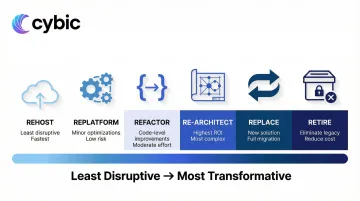
The industry commonly references the "5 Rs," but this guide expands to six by including Retire often the most overlooked but valuable option. These strategies form a spectrum from least disruptive (Rehost) to most transformative (Replace/Rebuild).
Rehost (Lift and Shift)
Rehosting migrates applications to new infrastructure typically cloud with minimal or no code changes.
When it makes sense:
- Speed is critical and budget is limited
- The application works well but infrastructure is aging
- You need quick wins to reduce data center costs
- It's a first step toward deeper modernization
You inherit all the technical debt, just in a new environment. The application still can't integrate easily, scale efficiently, or support modern workflows. Rehosting buys time, it doesn't solve fundamental architectural problems.
Replatform (Lift, Tinker, and Shift)
Replatforming makes targeted optimizations during migration without rewriting application logic. For example, moving from a legacy app server to a managed cloud service, or swapping a self-managed database for Amazon RDS or Azure SQL Database.
When it makes sense:
- You want performance improvements without full refactoring
- Managed services can reduce operational overhead
- The application core is sound but infrastructure components are outdated
The payoff: lower maintenance burden, improved reliability, and cost savings through managed services without the risk of rewriting code.
Refactor / Re-architect
Refactoring restructures existing code to improve quality and performance without changing core functionality. Re-architecting goes further redesigning the application's fundamental structure, such as breaking a monolith into microservices.
When it makes sense:
- The application has genuine long-term business value
- Technical debt is blocking integration and innovation
- You need to support modern workflows, APIs, and data pipelines
- The application will serve as a foundation for AI and automation
The investment is significant: refactoring requires 3-5x more upfront than rehosting but delivers 30-40% lower TCO over three years through autoscaling, managed services, and reduced maintenance. For applications with long-term business value, this is typically the highest-ROI path particularly when the goal is building API-accessible, data-ready architectures that support AI integration and intelligent automation.
Replace (Rebuild or Buy)
Replace means either rebuilding the application from scratch using modern technology or swapping it for a commercial off-the-shelf (COTS) or SaaS solution.
When it's justified:
- The codebase is undocumented and unmaintainable
- The architecture is too tightly coupled to support needed capabilities
- A SaaS solution can deliver 80% of required functionality at lower cost
- The application no longer aligns with business strategy
The risk profile here is the highest of any strategy. Half of all large IT projects exceeding $15 million blow their budgets by 45%, and 17% become "black swans" threatening company existence. 55-75% of ERP implementations fail, costing 189% more than budgeted. Full replacement also risks replicating legacy problems in new code or discovering that off-the-shelf solutions don't fit actual business processes.
Retire
Retiring means decommissioning applications that no longer provide business value.
Portfolio assessments frequently uncover redundant systems, duplicate functionality, abandoned pilot projects, or applications replaced but never shut down. Shutting these down reduces maintenance costs, licensing fees, security exposure, and operational complexity.
About 5% of enterprise workloads can be retired during modernization initiatives. It's the most underutilized lever in the toolkit: immediate cost savings, zero migration risk.
Retain
Retaining means keeping applications in their current environment due to unresolved dependencies, regulatory constraints, or lack of business justification for migration.
Retain is a valid strategy for systems that work adequately, have minimal integration needs, and face retirement within 1-2 years. The key is making this decision consciously, not by default.
How to Choose the Right Modernization Strategy
Strategy selection starts with understanding what you have and what it's worth. Guessing leads to expensive mistakes: modernizing the wrong applications or applying the wrong approach to critical systems.
Start with Application Portfolio Assessment
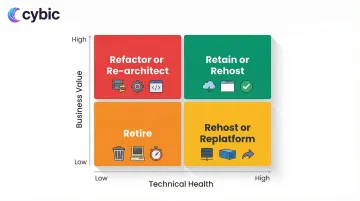
Before choosing any strategy, inventory all applications and map them against two dimensions:
- Business value : How critical is this to operations, revenue, or compliance?
- Technical health : How maintainable, secure, and scalable is it?
This creates a prioritization matrix. High-value, low-health applications are prime candidates for refactoring or re-architecting. Low-value, low-health systems should be retired. High-value, high-health applications can be retained or rehosted with minimal changes.
Assessment frameworks:
- Gartner TIME Model : Categorizes applications into Tolerate, Invest, Migrate, or Eliminate based on technical and functional fit
- Forrester REAP Model : A modern disposition matrix (Reassess, Extract, Advance, Prune) designed for cloud transformation and FinOps realities
Key Decision Factors
System complexity and documentation quality : Well-documented systems with clear architecture are candidates for refactoring. Undocumented spaghetti code may require replacement.
Integration dependencies : Applications tightly coupled to other systems require careful sequencing. Breaking dependencies may necessitate API layer development before modernization.
Regulatory requirements : HIPAA, GDPR, and industry-specific standards in Healthcare, Oil & Gas, and Public Sector constrain strategy choices. Some regulations require data to remain on-premises or within specific geographic regions.
Budget and timeline : Refactoring delivers better long-term ROI but requires 3-5x more upfront investment than rehosting. Organizations with limited budgets may need phased approaches.
Internal skill availability : Do you have teams capable of microservices development, cloud-native architecture, and DevOps practices? Skill gaps drive strategy selection and partnership decisions.
Tolerance for operational disruption : How much downtime or workflow change can the business absorb?
Incremental vs. Big Bang
Incremental modernization updates components gradually while keeping systems running: wrapping legacy logic in modern API layers, migrating modules one at a time, testing in production with controlled rollouts. This reduces risk and spreads costs over time.
Big bang approaches carry higher risk, require significant upfront investment, and demand rapid user retraining. They can deliver faster transformation but often cause severe operational disruption.
Industry reality: Asset-heavy industries like Manufacturing, Oil & Gas, and Healthcare typically benefit from incremental approaches. These sectors can't afford extended downtime or workflow disruptions that impact production lines, patient care, or field operations.
Governance and Security in Strategy Selection
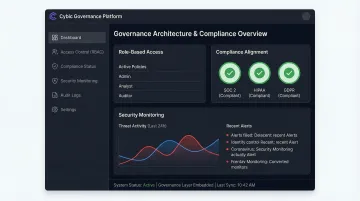
The strategy you select determines how exposed you'll be during the transition. Whichever path you take, security controls, data governance, access management, and compliance traceability must be embedded at the architectural level, not retrofitted after deployment. This is especially critical in regulated industries.
Cybic builds governance directly into modernized system architecture: role-based access controls, encrypted data protection, auditability of AI-driven actions, and compliance alignment with SOC 2, HIPAA, and GDPR. These become structural features of the system, ensuring modernization doesn't create new vulnerabilities or widen compliance gaps.
Why One-Size-Fits-All Strategies Fail
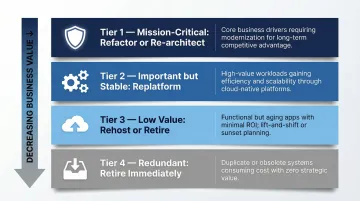
Large enterprises run dozens or hundreds of applications simultaneously, each with different risk profiles, business value, and technical debt. A portfolio-level strategy assigns different modernization treatments to different application tiers:
- Tier 1 (Mission-critical) : Refactor or re-architect for long-term value
- Tier 2 (Important but stable) : Replatform for efficiency gains
- Tier 3 (Low value) : Rehost if needed, retire if possible
- Tier 4 (Redundant) : Retire immediately
This nuanced approach optimizes ROI and minimizes risk across the entire application landscape.
Building Your Legacy Modernization Roadmap
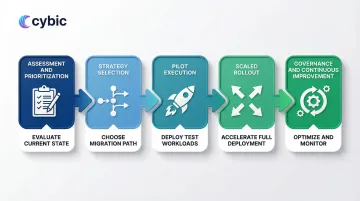
A successful modernization roadmap balances technical execution with organizational change management. The phases below address both dimensions : giving teams a clear sequence from initial discovery through to scaled deployment.
The Five-Phase Roadmap Structure
Phase 1: Assessment and Prioritization
Inventory all applications and classify them by business criticality, technical debt, and modernization urgency. This phase prevents teams from modernizing low-value systems while high-risk ones go untouched.
Key activities include:
- Cataloging every application, its dependencies, and its owners
- Scoring each system against a consistent risk-and-value framework
- Identifying quick wins (low complexity, high business impact) to build early momentum
- Flagging systems that require compliance or security review before any migration begins
Phase 2: Strategy Selection
For each application in scope, assign a modernization strategy that matches its technical profile and business value. Not every system warrants full replatforming.
Common options include:
- Retire : Decommission systems with no active users or business function
- Retain : Leave stable, low-risk systems unchanged for now
- Rehost : Lift-and-shift to cloud infrastructure with no code changes
- Refactor : Restructure code without changing external behavior
- Rebuild : Redevelop from scratch on modern architecture
Phase 3: Pilot Execution
Select one or two candidate applications from the priority list and run a contained modernization sprint. A pilot surfaces integration friction, team skill gaps, and tooling issues before they scale.
Focus the pilot on:
- Validating the chosen modernization strategy against real infrastructure
- Testing integration points with adjacent systems
- Measuring delivery velocity and defect rates against pre-set benchmarks
Phase 4: Scaled Rollout
Apply lessons from the pilot to the broader application portfolio. Work in waves grouping systems by shared technology stack or business domain to reduce context-switching and reuse patterns across teams.
Wave planning should account for:
- Dependency sequencing (modernize upstream systems before downstream consumers)
- Team capacity and parallel workstream limits
- Rollback procedures for each wave before go-live
Phase 5: Governance and Continuous Improvement
Modernization doesn't end at deployment. Establish ongoing processes to prevent technical debt from re-accumulating and to capture value from the modernized architecture.
Ongoing governance activities include:
- Tracking performance KPIs against pre-modernization baselines
- Running quarterly architecture reviews to catch drift early
- Feeding lessons learned back into the strategy playbook for future waves
Conclusion
Legacy application modernization is not a single decision - it is a structured program that requires disciplined strategy selection, rigorous portfolio assessment, and a phased execution approach designed to minimize operational disruption while maximizing long-term value.
The six strategies covered in this guide - Rehost, Replatform, Refactor/Re-architect, Replace, Retire, and Retain - are not competing options but complementary tools. Most enterprise portfolios require all six applied across different application tiers simultaneously. High-value systems warrant the 3-5x upfront investment of refactoring because the long-term TCO savings and capability gains justify it. Low-value or redundant systems should be retired immediately to reclaim budget and reduce security exposure. Applying a one-size-fits-all approach to any of this is how modernization programs fail.
The Application Portfolio Assessment is the starting point for every decision. Without a clear map of business value against technical health, organizations modernize the wrong systems, apply the wrong strategies, and spend years fixing avoidable mistakes. The Gartner TIME Model and Forrester REAP Model exist precisely because gut-feel prioritization at enterprise scale is not reliable.
The Five-Phase Roadmap - from Assessment and Prioritization through Governance and Continuous Improvement - provides the organizational structure to execute modernization in waves without destabilizing live operations. Pilots surface friction before it scales. Wave sequencing reduces context-switching. Ongoing governance prevents technical debt from re-accumulating in the systems you just modernized.
Critically, none of this work exists in isolation from what comes next. Modernized systems are the prerequisite for AI and automation - not an optional step toward them. Legacy architectures cannot participate in AI integration or intelligent automation pipelines because they lack the APIs, data accessibility, governance controls, and compute flexibility those systems require. Refactored applications with clean API layers, structured data outputs, role-based access controls, and cloud-native infrastructure are exactly what AI models, automation orchestrators, and real-time analytics platforms need to connect to enterprise operations. Organizations that complete modernization with governance embedded at the architectural level - not bolted on afterward - position themselves to deploy AI and automation capabilities quickly, safely, and at scale. Those that delay modernization are not simply deferring a technology project. They are deferring the operational foundation that every competitive AI and automation initiative depends on.
Frequently Asked Questions
What is legacy application modernization and why does it matter now?
Legacy application modernization is the process of updating, restructuring, or replacing software systems built on outdated technology, architecture, or frameworks that can no longer meet current business requirements. It matters now because the gap between legacy systems and modern infrastructure is widening at an accelerating rate: AI integration, cloud-native architecture, real-time data pipelines, and intelligent automation all require API-accessible, governed systems that legacy monoliths fundamentally cannot support. Organizations still running COBOL mainframes or disconnected on-premises databases are not just carrying technical debt - they are structurally blocked from adopting the capabilities their competitors are already deploying.
How do you choose between the 6 modernization strategies?
Strategy selection starts with an Application Portfolio Assessment that scores each system against two dimensions: business value (how critical it is to operations, revenue, or compliance) and technical health (how maintainable, secure, and scalable it is). High-value, low-health systems are candidates for Refactor or Re-architect. Low-value, low-health systems should be Retired. Systems that work adequately with minimal integration needs can be Retained or Rehosted as a first step. Replatforming suits applications with sound core logic but outdated infrastructure components. Replacement is justified only when a codebase is genuinely unmaintainable or when a SaaS solution covers 80% of requirements at lower cost - given that 55-75% of ERP replacements fail, it carries the highest risk profile of all six strategies.
What does a legacy application portfolio assessment involve?
A portfolio assessment inventories every application in the enterprise and maps it against business criticality and technical health to produce a prioritization matrix. Key activities include cataloging each application alongside its dependencies and owners, scoring systems against a consistent risk-and-value framework, identifying quick wins with low complexity and high business impact, and flagging applications that require compliance or security review before any migration begins. Assessment frameworks like the Gartner TIME Model (Tolerate, Invest, Migrate, Eliminate) and the Forrester REAP Model (Reassess, Extract, Advance, Prune) provide structured lenses for this classification, ensuring that modernization effort is directed toward the systems where it will have the greatest impact.
How long does a typical legacy modernization project take?
Project duration varies significantly based on portfolio size, application complexity, strategy selected, and organizational capacity. A contained rehosting effort for a single application can be completed in weeks. A full refactor or re-architecture of a mission-critical enterprise system typically takes 6-18 months, with the five-phase roadmap spanning multiple waves over 1-3 years for large portfolios. Incremental approaches - preferred in asset-heavy industries like Manufacturing, Healthcare, and Oil & Gas - spread modernization across controlled waves that keep live operations intact, which extends the overall timeline but dramatically reduces the risk of operational disruption compared to big-bang approaches.
What are the biggest risks in legacy modernization and how do you mitigate them?
The most common risks are scope underestimation, integration failures, skill gaps, and compliance exposure during transition. McKinsey research shows that large IT projects exceeding $15 million blow their budgets by 45% on average, with 17% becoming project failures that threaten company survival. Mitigation starts with running a pilot on one or two candidate applications before scaling - pilots surface integration friction and tooling issues early. Dependency sequencing (modernizing upstream systems before downstream consumers) prevents cascading failures during rollout. Embedding security controls, access management, and compliance traceability at the architectural level from day one - rather than retrofitting them afterward - eliminates the compliance exposure that has cost organizations like Advanced Computer Software Group and Anchorage Community Mental Health Services millions in regulatory fines.
How do modernized applications enable AI and automation capabilities?
Modernized applications enable AI and automation by providing the clean APIs, structured data outputs, governance controls, and scalable infrastructure those systems require to connect to enterprise operations. Legacy architectures cannot feed AI platforms or intelligent automation workflows because their data is locked in disconnected databases with no API layer, their access controls are too coarse for governed AI pipelines, and their infrastructure cannot scale to handle real-time inference or automation workloads. Refactored systems with microservices architecture, API-accessible data layers, role-based access controls, and cloud-native compute are precisely the foundation that AI models, automation orchestrators, and real-time analytics platforms need. Modernization is not a precondition for AI experimentation - it is a precondition for AI at production scale.