Introduction
Enterprise data teams are hitting a wall. Legacy warehouses built for batch reporting and static schemas are now expected to power real-time analytics, AI inference, and org-wide decision-making workloads they were never designed for.
The core problem is architectural. These systems run on proprietary hardware with rigid star schemas, can't process semi-structured or unstructured data, have no native streaming support, and connect poorly with modern ML frameworks. The distance between what legacy infrastructure can deliver and what the business now requires keeps growing.
This guide is for data architects, IT leaders, and engineering teams in industries like manufacturing, healthcare, oil and gas, and retail who are evaluating or executing a move to Azure. You'll learn:
- What data warehouse modernization on Azure actually involves
- Which Azure services fit which use cases
- How the migration process works end to end
- Where organizations most commonly go wrong
Key Takeaways
- Data warehouse modernization on Azure means re-architecting your data infrastructure for scalable analytics, real-time processing, and AI-readiness and not a simple lift-and-shift
- Azure's unified ecosystem like Synapse Analytics, Microsoft Fabric, Data Factory eliminates data silos and reduces infrastructure overhead
- Without modernization, organizations face growing query latency, rising maintenance costs, and an inability to operationalize ML or AI workloads
- Governance, security, and AI-readiness must be designed into the target architecture from day one, not retrofitted afterward
What Is Data Warehouse Modernization?
Data warehouse modernization is the process of migrating and re-architecting an organization's data infrastructure from legacy on-premises or outdated cloud systems to modern, scalable cloud-native platforms.
The goal is a data platform that can ingest structured and unstructured data at scale, serve real-time and historical queries, enforce governance, and support machine learning and AI applications.
That scope goes well beyond a simple migration. Where a lift-and-shift moves existing systems to the cloud unchanged, modernization means redesigning from the ground up:
- Shifting from ETL to ELT processing patterns
- Adopting lakehouse or medallion architectures
- Restructuring data for AI and ML consumption
- Rebuilding pipelines for scale, not just compatibility
Why Organizations Are Modernizing Their Data Warehouses on Azure
Core Limitations of Legacy Systems
Legacy data warehouses force the modernization decision through several critical constraints:
- Rigid star schemas that can't adapt to changing business requirements
- Inability to handle semi-structured or unstructured data
- High scaling costs on proprietary hardware
- No native support for streaming data
- Poor integration with ML frameworks
Business Pressures Driving Urgency
The financial burden of maintaining legacy systems adds up fast. Organizations spend up to 80% of their entire IT budget maintaining existing on-site hardware and legacy applications, with the average cost of operating just one legacy system reaching $30 million annually. Meanwhile, the global datasphere is projected to reach 175 zettabytes by 2025.
That data volume surge makes decision latency the next critical pressure point. The gap between when data becomes available and when action is taken creates "stale intelligence" like lost bids, shrinking margins, and slower customer response times that compound over weeks and months.
Azure's Specific Advantages
Azure offers several distinct advantages as a modernization target:
- Pay-as-you-scale compute: Both provisioned and serverless models align costs with actual usage
- Native Microsoft ecosystem integration: Seamless connections to Power BI, Azure ML, and Purview
- Multi-cloud and hybrid deployment support: Flexibility to operate across cloud, hybrid, or on-premises environments
- Global region availability: 70+ Azure regions and 400+ datacenters with fixed data residency boundaries for regulated industries
Industry-Specific Operational Needs
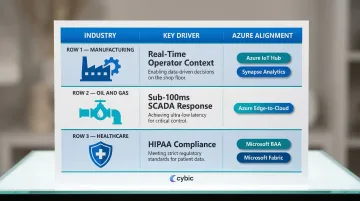
Different industries face unique pressures:
| Industry | Key Modernization Drivers | Azure Alignment |
|---|---|---|
| Manufacturing | Real-time context for factory operators to identify issues as they occur | Azure IoT Hub and Synapse Analytics process high-frequency telemetry for predictive maintenance |
| Oil & Gas | SCADA systems requiring sub-100 millisecond response times for critical control loops | Azure's edge-to-cloud capabilities support low-latency data streams for continuous monitoring |
| Healthcare | HIPAA Security Rule compliance requiring administrative, physical, and technical safeguards for electronic PHI | Microsoft offers a HIPAA Business Associate Agreement covering Azure and Fabric |
What Goes Wrong When Modernization Is Deferred
Deferred modernization doesn't hold the line, it accelerates the problem. Without a governed data foundation, organizations run into the same failure modes repeatedly:
- Data silos persist across business units, blocking cross-functional reporting
- Reporting teams operate on stale data, undermining decisions that require real-time input
- AI and ML pilots stall for lack of clean, governed data to train and validate against
- Technical debt compounds with every new data source added to the existing architecture
Up to 70% of data warehouse modernization projects fail or significantly exceed their budgets typically when teams underestimate the planning work required before a single line of migration code is written.
How Azure Data Warehouse Modernization Works
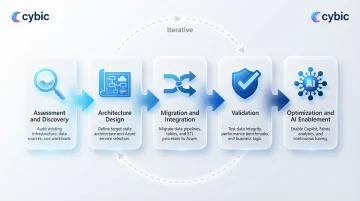
The end-to-end modernization process follows a conceptual flow: Assessment → Architecture Design → Migration and Integration → Validation → Optimization and AI Enablement. This is iterative, not a single linear project.
What feeds into the process:
- Existing schemas and data models
- ETL/ELT pipelines and orchestration logic
- Data volumes and growth projections
- Source system inventories
- SLAs and performance requirements
- Governance requirements
- Business use cases that must be preserved or improved
Each of these inputs shapes decisions at every phase. Here's how those phases typically unfold.
Assessment and Discovery
The assessment phase audits all existing data assets: cataloging tables, stored procedures, SSIS packages, SSAS cubes, reporting dependencies, and flagging data quality issues. Skipping or rushing this phase is the most common cause of cost overruns and migration failures.
The assessment includes:
- Evaluating current hardware, software platforms, and system configurations
- Assessing data accuracy, completeness, and reliability across source systems
- Integration mapping: Documenting how the warehouse connects to upstream and downstream systems
- Lineage mapping: Tracing data flows end-to-end from source to reporting output
Architecture Design and Service Selection
Service selection in this phase is driven by workload profile (SQL-centric vs. Spark-heavy vs. streaming), data volume (sub-1TB vs. petabyte scale), team skill set, and budget constraints.
Key architectural patterns include:
- Lakehouse architecture: Combines data lake storage flexibility with data warehouse performance
- Traditional data warehouse: SQL-centric, structured data optimized for BI and reporting
- Medallion architecture: Progressive data refinement through Bronze (raw), Silver (validated), and Gold (enriched) layers
Tool selection should follow architecture decisions, not precede them.
Migration, Integration, and AI Enablement
Data is moved using Azure Data Factory pipelines (incremental loads, full loads, change data capture), validated against source systems, and restructured into the target schema.
One step that many modernization projects miss is structuring the curated data layer for ML and AI consumption. Cybic's Drava platform connects this modernized Azure data layer directly to machine learning, AI reasoning, and intelligent automation workflows so organizations move from data infrastructure to operational intelligence without rebuilding from scratch.
Key Azure Tools and Services for Modernization
No single Azure service covers the full modernization stack the right architecture combines purpose-built services. Tool selection should follow workload type and team capability, not vendor positioning. The services below cover the core layers: compute, orchestration, storage, and unified analytics.
Azure Synapse Analytics
Synapse is a unified analytics platform that combines SQL-based data warehousing with Apache Spark for big data processing. It's best suited for organizations that need a single service for both structured reporting workloads and large-scale data transformation.
Key features:
- Dedicated SQL pools (measured in Data Warehouse Units) for predictable performance
- Serverless SQL that charges only for data processed
- Native integration with Azure Data Lake Storage and Power BI
- Built-in monitoring and workload management for concurrent query handling
Pricing details vary by region and configuration.
Microsoft Fabric
Fabric is Microsoft's SaaS-native, lakehouse-first data platform that unifies data engineering, data science, real-time analytics, and BI under one interface. It's the recommended entry point for organizations that want a fully managed environment and are open to a lakehouse architecture.
Microsoft is positioning Fabric as the ultimate modernization destination for analytics, with built-in Migration Assistants that automate the migration of Synapse dedicated SQL pools, Spark artifacts, and pipelines. While Azure Synapse continues to be fully supported, Microsoft is actively encouraging customers to transition to Fabric.
Azure Data Factory
ADF is the orchestration and pipeline layer of any Azure modernization, it handles ETL and ELT jobs, supports over 90 built-in connectors to source systems, and enables both batch and incremental data loads. In practice, ADF sits between source systems and the target Azure data store, moving and transforming data without requiring custom pipeline code for most standard integrations.
Azure Databricks
Azure Databricks is the preferred choice for organizations with heavy ML and data science workloads. It runs on a high-performance runtime built for large-scale Spark jobs, with the Photon engine accelerating SQL workloads and DataFrame API calls.
Key capabilities:
- Collaborative notebooks for data science and engineering teams
- Photon vectorized query engine for faster SQL and DataFrame performance
- Delta Lake support for ACID transactions on large datasets
- Direct integration with ADLS Gen2, Synapse, and Azure ML

Azure Data Lake Storage
ADLS Gen2 serves as the foundational storage layer underneath Synapse, Fabric, and Databricks. It provides:
- Scalable, tiered object storage with hierarchical namespace support
- Encryption at rest using Microsoft-managed or customer-managed keys
- Automated lifecycle policy management
- High-performance data access for analytics workloads
Common Pitfalls, Misconceptions, and When Azure Modernization May Not Be the Right Fit
The Lift-and-Shift Misconception
The most damaging misconception is treating modernization as a lift-and-shift. Migrating tables, stored procedures, and batch jobs to Azure without redesigning schemas or pipelines just produces cloud-hosted legacy problems and not a modern data platform. The architecture must change, not just the infrastructure location.
Companies spend 14% more on migrations than planned each year, and 38% see their migrations delayed by more than one quarter when they underestimate the scope of re-architecture required.
The Governance Gap
Teams consistently underestimate governance requirements. These controls must be designed into the architecture at the start, not bolted on later:
- Security controls and role-based access aligned to data sensitivity
- Data lineage tracking across ingestion, transformation, and serving layers
- Audit capabilities that satisfy compliance and regulatory requirements
Organizations that defer governance face compliance failures, costly rework, and stalled business adoption.
82% of enterprises have experienced security incidents due to cloud misconfigurations, and 40% of data breaches involve data stored across multiple environments, making them harder to contain and more expensive.
When Azure May Not Be the Right Move
Azure data warehouse modernization may not be appropriate for:
- Organizations with data volumes below the threshold where on-premises SQL Server remains cost-effective
- Teams without internal Azure expertise and no implementation partner
- Environments subject to data residency regulations that restrict cloud deployment
If any of these conditions apply, the more productive question isn't whether to modernize, it's how much of the stack to move, and when.
Frequently Asked Questions
What is the difference between data warehouse modernization and data migration?
Migration moves data from one location to another largely unchanged, while modernization involves re-architecting the data model, pipeline patterns, and governance structure to meet new business and technical requirements on the target platform.
How long does a data warehouse modernization project on Azure typically take?
Timelines vary based on data volume, legacy system complexity, and target architecture. Targeted modernizations can execute in weeks, while enterprise-scale re-architecture typically requires 12–18 months phased delivery helps demonstrate value incrementally and reduces risk throughout.
What is the difference between Azure Synapse Analytics and Microsoft Fabric?
Synapse is a platform-as-a-service offering combining SQL data warehousing and Spark, while Fabric is a newer SaaS-native platform built on a lakehouse foundation that integrates all data workloads under one interface. Microsoft has designated Fabric as its long-term analytics platform.
Can a modernized Azure data warehouse support real-time analytics?
Yes, Azure Synapse and Microsoft Fabric both support streaming ingestion and real-time query patterns, but achieving real-time analytics requires redesigning ingestion pipelines, it's not automatic after migration.
What are the main cost factors to consider when modernizing a data warehouse on Azure?
Key cost factors include compute (dedicated vs. serverless), storage tiers, data egress fees, licensing, and the hidden cost of data engineering hours for pipeline development. Without proper scaling controls, cloud costs can exceed on-premises costs in early phases.
Is Azure data warehouse modernization suitable for small or medium-sized businesses?
Yes, Microsoft specifically supports SMB modernization through Microsoft Fabric's SaaS model and Azure SQL Managed Instance, which offer lower entry points without requiring large data engineering teams.