Introduction
Most enterprises no longer choose between Snowflake and Databricks, they run both. The integration layer between them is where performance is won or lost. A 2024 ETR survey of nearly 1,800 respondents found that approximately 60% of Databricks accounts also run Snowflake, while about 40% of Snowflake accounts have Databricks installed.
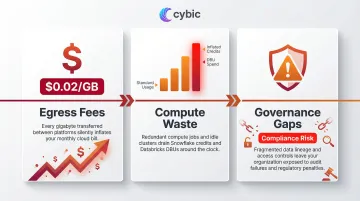
Unoptimized integrations create measurable costs across three areas:
- Egress fees: Redundant data movement bills at $0.02 per GB small per transfer, significant at scale
- Compute waste: Unnecessary query duplication inflates both Snowflake credit spend and Databricks DBU consumption
- Governance gaps: Fragmented controls across two platforms create compliance exposure, particularly in Healthcare, Oil & Gas, and Financial Services
What follows is a practical guide for teams already running both platforms: integration architecture patterns, signals that your setup is underperforming, and a framework for fixing it.
Key Takeaways
- Databricks owns data engineering and ML; Snowflake owns analytics and governance combining them requires deliberate integration design from the start
- The native Databricks Snowflake Connector (v4.2+) with query pushdown optimization forms the foundation of high-performance integration
- Watch for slow queries, rising compute bills, and data freshness gaps degradation creeps in gradually, not all at once
- Governance must be addressed at the integration layer, not managed independently within each platform
- Schedule regular optimization reviews, they're what keep hybrid architectures performant and cost-controlled over time
Why Optimizing the Snowflake-Databricks Integration Matters
Poorly configured integrations force full data scans and unnecessary data movement between platforms, directly inflating both Snowflake compute credits and Databricks DBU consumption. Cloud data egress costs across AWS, Azure, and GCP average $0.02 per GB for inter-region transfers, while Flexera's 2025 State of the Cloud Report estimates that 27% of cloud spend is wasted due to inefficiencies like unoptimized cross-platform data movement.
That wasted spend has a downstream cost beyond the billing statement. Delays in data availability slow ML retraining cycles, BI refresh rates, and real-time analytics delaying model deployments and operational reporting that teams depend on daily.
Query pushdown is a frequent culprit. When Spark SQL operators cannot be translated to Snowflake expressions, pushdown fails and both joins and aggregations execute in Databricks instead. This fallback triggers multiple round-trip queries to Snowflake and increases network data transfer, significantly degrading pipeline performance.
Performance degradation isn't the only risk. When access controls, audit trails, and data lineage are managed independently in each platform, compliance gaps multiply. For healthcare organizations, Snowflake requires a signed Business Associate Agreement (BAA) and Business Critical edition before storing PHI, while Databricks requires enabling the compliance security profile and an active BAA before processing PHI data. Without unified governance at the integration layer, demonstrating HIPAA or SOX compliance becomes audit-intensive and difficult to sustain.
Integration Architecture Options for Snowflake and Databricks
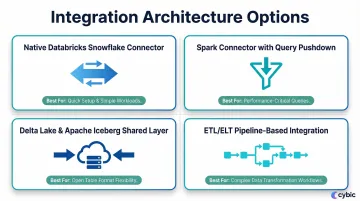
There is no single correct way to connect Snowflake and Databricks. The right approach depends on workload type, latency requirements, and data volume. Many teams use multiple methods simultaneously.
Native Databricks Snowflake Connector
Databricks Runtime 4.2+ includes a native Snowflake Connector that eliminates the need to manually import Spark connector libraries. The connector distributes processing across both systems automatically, handling read and write operations without external dependencies.
Prerequisites:
- Databricks account with Runtime 4.2 or later
- Snowflake credentials stored in Databricks secret manager (retrieved using
dbutils.secrets.get()) USAGEandCREATE STAGEprivileges on the target Snowflake schema
Best use case: Teams needing straightforward read/write operations between Databricks notebooks and Snowflake tables with minimal configuration overhead.
Spark Connector with Query Pushdown
Query pushdown moves filter and aggregation logic from Spark to Snowflake's compute engine before returning results, cutting data transfer volume significantly. Rather than pulling raw data into Spark and filtering there, Snowflake executes the logic server-side.
Query pushdown is enabled by default in Databricks but must be validated. Use the Spark UI to check query plans or review Snowflake's query history to confirm execution happened server-side. The method net.snowflake.spark.snowflake.Utils.getLastSelect() displays the actual query Snowflake received.
Ideal workload: Large-scale analytical queries where filtering and transformation logic can be pushed to Snowflake's compute layer, minimizing Spark cluster load and data transfer.
Delta Lake and Apache Iceberg as a Shared Data Layer
Organizations can link Delta Lake tables in Databricks to Snowflake via Apache Iceberg's REST Catalog (IRC) API, allowing Snowflake to query Delta Lake data directly without copying it.
Benefits:
- Eliminates data duplication between platforms
- Creates a single governed data layer
- Allows Snowflake Cortex and other AI features to run directly on Databricks-managed data
Tradeoff: This approach requires careful schema management and format compatibility governance. It's best suited for organizations with mature data engineering practices.
ETL/ELT Pipeline-Based Integration
The pipeline-based approach remains the most common starting point: using orchestration tools to extract data from one platform, transform it, and load it into the other on a scheduled or event-driven basis.
This approach has a ceiling. As data volumes grow, pipeline latency increases and operational complexity compounds which signs it's time to move toward connector-based or shared storage architectures.
Consider migrating away from pipeline-based integration when:
- Scheduled batch jobs can no longer meet latency requirements
- Pipeline maintenance is consuming disproportionate engineering time
- Data volumes regularly exceed transformation window capacity
Signs Your Snowflake-Databricks Integration Needs Optimization
Most integration problems don't announce themselves with a single failure but they accumulate as gradual performance degradation, cost creep, and operational friction.
Performance and Latency Indicators
Symptoms:
- Queries that previously returned results in seconds now take minutes
- Databricks jobs writing to Snowflake complete slower than baseline
- Snowflake virtual warehouse queuing observed during Databricks pipeline runs
Likely causes:
- Query pushdown not functioning as expected
- Oversized data transfers due to missing predicate filters
- Virtual warehouse sizing mismatched to concurrent workload demands
Cost and Resource Consumption Changes
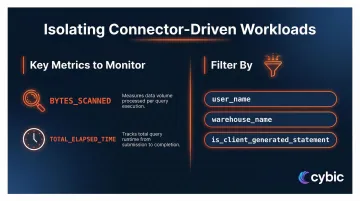
Snowflake credit consumption or Databricks DBU spend rising disproportionately to data volume growth signals integration inefficiency. To pinpoint the source, monitor these columns in Snowflake's QUERY_HISTORY view:
BYTES_SCANNED: flags full table scans from poorly filtered connector queriesTOTAL_ELAPSED_TIME: surfaces queries running far beyond expected duration
Filter ACCOUNT_USAGE.QUERY_HISTORY by user_name, warehouse_name, and is_client_generated_statement to isolate connector-driven workloads and catch unexpected cost spikes before they compound.
Data Freshness and Pipeline Reliability Issues
When Snowflake tables run hours behind Databricks Delta Lake, the cause is usually ETL bottlenecks or batch scheduling that should be replaced with streaming or connector-based reads.
Other warning signs that the integration layer needs a structural redesign:
- Recurring pipeline failures with no clear root cause
- Schema mismatch errors appearing after routine upstream changes
- Rising retry rates across Databricks jobs writing to Snowflake
Governance and Access Control Fragmentation
When role-based access controls are managed separately in Snowflake and Databricks with no unified policy, audit logs across both platforms drift out of sync. In a compliance review, that inconsistency exposes unresolved access gaps rather than a clean audit trail.
In regulated industries such as Healthcare (HIPAA) and Oil & Gas in particular, data access auditability isn't a best practice; it's the baseline requirement for passing an audit. A fragmented governance model creates the kind of blind spots that surface at the worst possible moment.
Snowflake-Databricks Optimization Best Practices
Optimization is not a one-time fix but an ongoing operational discipline organized by area: performance, cost, and governance.
Configure and Validate Query Pushdown
Verify that Snowflake query pushdown is active by checking the Spark UI for query plan indicators and cross-referencing with Snowflake's query history to confirm execution happened server-side.
Configuration options tune pushdown behavior for specific query patterns. Wide aggregations and large filter predicates deliver the highest performance gains when pushdown is enabled.
Right-Size Compute on Both Platforms
Snowflake virtual warehouse sizing: Integration jobs that write large batches from Databricks require larger, short-lived warehouses rather than always-on small warehouses. Increasing warehouse size does not always improve data loading performance, performance is influenced more by the number of files being loaded and their size. Unless bulk loading hundreds or thousands of files concurrently, a smaller warehouse (Small, Medium, Large) is generally sufficient.
Set auto-suspend to 5-10 minutes or less to prevent warehouses from consuming credits when inactive. Match the auto-suspend value to gaps in your query workload, setting it too low (1-2 minutes) for workloads with frequent short gaps causes continual suspending and resuming, incurring the minimum 60-second credit charge each time.
Databricks cluster configuration: Apply autoscaling cluster policies, appropriate worker node types for data transfer vs. compute-heavy ML jobs, and spot/preemptible instance strategies to reduce DBU cost. Populate pools with spot instances for worker nodes to reduce costs for data transfer workloads. Always use on-demand instances for the driver node to prevent cluster failure if spot instances are evicted.
Optimize Data Movement with Partitioning and Pushdown Filters
Adding explicit partition filters and predicate pushdown hints in Databricks connector queries prevents full table scans in Snowflake.
Before optimization:
df = spark.read.format("snowflake").options(**sfOptions).option("dbtable", "orders").load()
filtered_df = df.filter(df.order_date >= "2024-01-01")
After optimization:
df = spark.read.format("snowflake").options(**sfOptions).option("query", "SELECT * FROM orders WHERE order_date >= '2024-01-01'").load()
Define clustering keys on tables accessed frequently by Databricks jobs. Cluster on columns most commonly used as filter predicates to reduce data scanned per connector query. Clustering is most cost-effective for tables containing multiple terabytes of data where queries are highly selective or frequently sort the data.
Align Governance Across Both Platforms
Teams in regulated industries often treat governance as a post-launch task. That delay is costly: unsynchronized RBAC, data masking policies, and audit logging across Snowflake and Databricks slow security reviews and inflate compliance overhead.
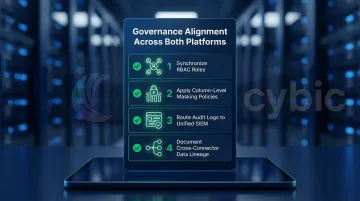
Practical governance alignment actions include:
- Synchronize role definitions between Snowflake RBAC and Databricks Unity Catalog
- Apply consistent column-level masking policies across both platforms
- Route audit logs from both systems into a single SIEM or audit store
- Document data lineage for pipelines that cross the connector boundary
Cybic's Drava platform enforces unified governance across multi-platform data environments by embedding access controls, encrypted data protection, and AI action auditability directly at the architectural level. This stops the fragmentation that happens when teams bolt governance on after deployment particularly critical in healthcare, energy, and public sector contexts where compliance is non-negotiable.
Establish a Regular Optimization Review Cadence
Connector configurations and warehouse sizing that handle today's data volumes often break down when workloads scale or new pipelines are added. Building a structured review cadence catches drift before it becomes a performance or cost incident.
Recommended review schedule:
- Weekly: Monitor query performance and cost dashboards
- Monthly: Review warehouse utilization and pipeline failure rates
- Quarterly: Audit RBAC alignment, schema compatibility, and evaluate whether integration architecture still fits workload patterns
Conclusion
Snowflake and Databricks are most valuable when treated as a unified hybrid architecture. That architecture only delivers that performance when the integration layer is optimized, not just configured once and left alone.
Teams who invest in structured optimization validating query pushdown, right-sizing compute, aligning governance, and reviewing performance on a regular cadence consistently see lower cloud spend, faster pipelines, and governance that holds up under audit.
Frequently Asked Questions
How does Snowflake integrate with Databricks?
Databricks Runtime 4.2+ includes a native Snowflake Connector enabling direct read/write without manual library imports. Additional options include the Spark connector with query pushdown and Apache Iceberg-based shared storage layers via Unity Catalog integration.
What is query pushdown and how does it improve Snowflake-Databricks performance?
Query pushdown moves filter and aggregation logic from Spark to Snowflake's compute engine before data is returned, reducing data transfer volume and cutting both Spark cluster and Snowflake warehouse consumption. This optimization is enabled by default but should be confirmed by checking the Spark query plan for pushdown indicators.
Should I use Delta Lake or Snowflake storage for shared data in a hybrid architecture?
Delta Lake is best for Databricks-native ML and streaming workloads, while Snowflake storage suits analytics and governed data sharing. Iceberg REST Catalog integration can allow both platforms to read the same Delta Lake data without duplication.
How do I manage costs when running both Snowflake and Databricks simultaneously?
Key levers include enabling query pushdown to reduce data scanned, using auto-suspend (5-10 minutes) on Snowflake warehouses, applying Databricks autoscaling with spot instances for worker nodes, and adding partition filters to connector queries to avoid full table scans.
What are the most common performance bottlenecks in Snowflake-Databricks integration?
Top causes include query pushdown not functioning due to unsupported query patterns, missing predicate filters causing full table scans, virtual warehouse queuing during concurrent pipeline writes, and oversized batch transfers in ETL-based integrations.
How do I enforce governance and access control across both Snowflake and Databricks?
Governance requires coordination at the integration layer: synchronize RBAC policies across both platforms, align data masking rules, and ensure audit logs from each system feed into a unified compliance framework.