
Azure supports HIPAA-eligible workloads and Microsoft will sign a Business Associate Agreement (BAA). But that's where Microsoft's compliance responsibility ends. The configuration, governance, and ongoing management of ePHI in Azure falls entirely on your organization.
This guide covers what you need before any data moves, the exact four-phase migration process, the controls you must configure, and the mistakes that most commonly cause violations.
Key Takeaways
- Azure is not HIPAA compliant by default - compliance depends on how you configure and govern the environment
- A signed BAA with Microsoft is a legal prerequisite, but it does not transfer compliance responsibility to Microsoft
- Configure encryption, RBAC, MFA, private connectivity, and audit logging before any PHI moves
- Migration follows four phases: PHI inventory, legal foundation, secure transfer, and post-migration validation
What You Need Before Migrating PHI to Azure
Preparation determines whether the migration is compliant or a liability. Skipping the pre-migration phase is the most consistent root cause of HIPAA violations in cloud migrations - not the migration tools themselves.
Service Eligibility
Not every Azure service can handle ePHI. Microsoft's cloud services in audit scope list is the definitive reference for which services are covered under the HIPAA BAA. Before selecting any Azure service for ePHI storage, processing, or transmission, verify it appears on that list. Services outside it cannot be used for PHI, regardless of how they're configured.
Key eligible services include:
- Azure Blob Storage
- Azure SQL Database
- Azure Virtual Machines
- Azure Machine Learning
- Azure Health Data Services
Legal and Policy Readiness
The Microsoft HIPAA BAA is embedded in the Microsoft Product Terms and Data Protection Addendum (DPA). It's a default component, not a separate contract, but you must confirm it's in place before any PHI touches Azure.
Beyond the BAA, your internal HIPAA risk analysis must be current. HHS guidance is clear: risk analysis must be updated when new technologies or business operations are introduced. A cloud migration qualifies.
Shared Responsibility
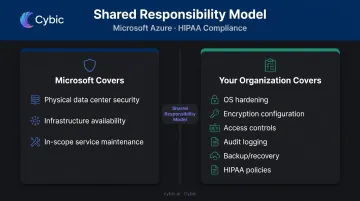
Microsoft covers physical data center security, infrastructure availability, and in-scope service maintenance. Your organization is responsible for:
- OS hardening and patch management
- Encryption configuration
- Access controls and identity management
- Audit logging and monitoring
- Backup and recovery
- All HIPAA policies and documentation
This division is non-negotiable. A signed BAA with Microsoft only covers Microsoft's half - your configuration decisions determine whether the other half holds up under audit.
How to Migrate Data to Azure with HIPAA Compliance
This is a four-phase process where sequence matters. Executing the data transfer before access controls or encryption are in place isn't a technical shortcut - it's a compliance violation.
Step 1: Inventory and Classify Your PHI
Identify every data source containing ePHI: EHR databases, medical imaging stores, lab results, billing records. For each, document:
- Data types and sensitivity levels
- Current location and format
- Downstream systems that will need access post-migration
- Data volumes and transfer timelines
At this stage, conduct or update your HIPAA Security Rule risk analysis. This is a legal requirement under 45 CFR §164.308(a)(1) - an accurate assessment of risks to the confidentiality, integrity, and availability of ePHI. It also forms the documented justification for every architecture decision in the next step; without it, you have no compliance foundation.
Step 2: Design a HIPAA-Compliant Azure Architecture
Only select services confirmed on Microsoft's audit scope list for any workload touching PHI. Document your service selection rationale - this documentation becomes your audit trail.
Your Identity and Access Management (IAM) architecture must be designed before migration, not configured during or after. Plan:
- RBAC assignments using least-privilege as a hard constraint
- Managed identities for applications instead of shared keys
- Azure AD authentication for all storage and database services
- MFA enforcement for all administrator accounts
Controls not designed in from the start rarely exist reliably in production. Cybic applies this same discipline to healthcare AI deployments - RBAC, encryption, and auditability are built into the architecture before a single workload goes live, not configured after the fact.
Step 3: Establish a Secure Data Transfer Channel
Select your transfer method based on data volume, infrastructure, and your threat model:
| Transfer Method | Best For | Key Security Property |
|---|---|---|
| Azure ExpressRoute | Large-scale, ongoing migrations | Private connection - no public internet traversal |
| Azure VPN Gateway | Cross-premises connectivity when ExpressRoute isn't available | IPsec/IKE encrypted tunnels |
| Azure Data Box | Offline, high-volume physical transfers | AES-256 encryption at rest on the device |
| Azure Database Migration Service | Structured database workloads | TLS 1.2 enforced by default |
| AzCopy with HTTPS | Blob and file data | HTTPS-only enforcement via "Require secure transfer" |
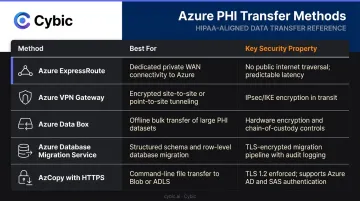
Never transfer PHI over HTTP. Azure Storage can enforce HTTPS-only connections, rejecting non-secure requests entirely - enable this before any data moves.
Step 4: Configure Controls, Execute, and Validate
Before PHI moves, run a configuration checklist against HIPAA Security Rule technical safeguard requirements under 45 CFR §164.312. Verify:
- Encryption at rest and in transit is active
- Public access on all PHI-bearing storage is disabled
- Private Endpoints are deployed
- Audit logging is enabled on all services
- MFA is enforced on all administrative accounts
After migration, the work isn't done. Validate data integrity, confirm audit logs are capturing all access events, and run a post-migration risk assessment. This documentation is your primary evidence record for OCR audits - keep it complete and retrievable.
Key HIPAA Configuration Controls in Azure
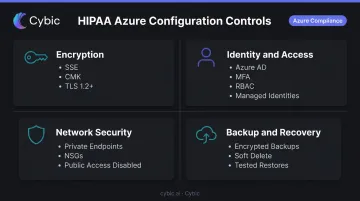
Getting data into Azure is the starting point - securing it to HIPAA standards requires deliberate configuration. Every control listed below must be explicitly enabled; none are active in a standard Azure deployment.
Encryption at Rest and In Transit
- Enable Azure Storage Service Encryption (SSE) on all storage accounts containing PHI - uses 256-bit AES by default
- Use server-side encryption with customer-managed keys (CMK) stored in Azure Key Vault for VM disk encryption
- Enable "Require secure transfer" on all storage accounts and enforce TLS 1.2+ across all services
Identity and Access Management
- Enable Azure AD authentication for all storage and database services
- Assign managed identities to applications - avoid shared access keys
- Enforce MFA on all administrator accounts and any user with PHI access
- Review and audit RBAC assignments quarterly
Network Security and Isolation
- Disable public network access on all storage accounts and databases containing PHI
- Deploy Azure Private Endpoints to restrict ePHI access to your private virtual network only
- Configure Network Security Groups (NSGs) to block inbound HTTP and limit access to known IP ranges
Once network boundaries are locked down, visibility becomes the next priority - you need a record of every access event to satisfy HIPAA's audit trail requirements.
Audit Logging and Continuous Monitoring
- Enable Azure Monitor diagnostic logs on all PHI-bearing services - capture access, read, write, and delete events
- Configure Microsoft Defender for Cloud for posture management, vulnerability scanning, and Just-In-Time VM access
- Route logs to Microsoft Sentinel or a third-party SIEM to support HIPAA's mandatory audit trail requirements
With monitoring in place, the final layer is ensuring data can be recovered - and proving that recovery actually works.
Backup and Recovery
- Configure Azure Backup with encryption enabled and access-controlled recovery points
- Enable soft delete on Azure Blob Storage with a minimum 7-day retention period
- Document RTO and RPO objectives in your contingency plan
- Test restores at least annually - untested backups do not satisfy HIPAA contingency plan requirements
Common Mistakes That Cause HIPAA Violations
These aren't theoretical risks. They're the failure modes that appear repeatedly in OCR enforcement actions.
Assuming the BAA transfers compliance responsibility. The BAA establishes Microsoft's obligations as a business associate - it does not make your environment compliant. Your organization remains wholly responsible for how PHI is stored, accessed, and protected.
HHS has resolved enforcement actions against covered entities that stored ePHI on cloud servers without a BAA, but having a BAA doesn't eliminate the obligation to configure the environment correctly.
Migrating PHI before configuring controls. Organizations frequently transfer data first, intending to configure encryption and access controls immediately after. Any period where PHI is accessible without proper safeguards in place is a potential violation - even if that window is brief.
Leaving default configurations in place. Common dangerous defaults include:
- Public access enabled on storage accounts
- RDP open to the internet on Windows VMs
- Audit logging disabled across services
- No MFA on administrator accounts
- Anonymous blob access allowed
These aren't edge cases. CISA's list of misconfigurations exploited in ransomware campaigns maps closely to typical Azure default states. Defender for Cloud will flag most of them, but only if it's been enabled before PHI arrives.
When Azure Migration Is (and Isn't) Right for Healthcare Data
Azure is well-suited for healthcare organizations that need:
- Scalable storage for EHR data, medical imaging, or analytics workloads
- Long-term compliant retention of patient records
- Integration with HIPAA-eligible AI and analytics services like Azure Machine Learning or Azure Health Data Services
That said, a fully self-managed Azure migration carries higher risk for small practices or teams without dedicated cloud security expertise. For those organizations, two approaches deserve consideration:
- Keep sensitive PHI on-premises, extend to Azure selectively - a hybrid approach limits your compliance surface area and contains the blast radius of any misconfiguration to non-PHI workloads
- Engage a governed implementation partner - HHS 405(d) guidance specifically identifies managed security providers as a valid path for smaller organizations without in-house cloud security teams
Cybic's healthcare data governance engagements address both scenarios. Architecture is infrastructure-agnostic - with RBAC, encryption, and audit trails built in from the start - and designed to operate across cloud, hybrid, and on-premises environments without introducing new compliance gaps.
Frequently Asked Questions
How do you migrate data to Azure cloud?
Assess your data and services, confirm the Microsoft BAA is in place, then design a secure transfer architecture using ExpressRoute or VPN Gateway. Use Azure Database Migration Service for structured data, AzCopy for blob/file transfers, and Azure Data Box for large offline workloads. Validate security controls before and after migration.
Does Microsoft Azure comply with HIPAA?
Azure is not HIPAA certified - no formal HHS certification exists for cloud service providers. Microsoft signs a BAA and has aligned Azure's infrastructure with HIPAA-equivalent standards including FedRAMP High, ISO 27001, and NIST SP 800-53. Actual compliance depends entirely on how customers configure their environments.
Can Microsoft 365 be HIPAA compliant?
Yes, Microsoft 365 can support HIPAA-compliant workflows with specific configuration. The BAA covers eligible M365 services, but organizations must enable appropriate access controls, audit logging, and data loss prevention settings - the default M365 configuration does not meet HIPAA requirements.
Does signing the Azure BAA make my organization HIPAA compliant?
No. The BAA establishes Microsoft's obligations as a business associate. Your organization remains responsible for implementing administrative, physical, and technical safeguards under the HIPAA Security Rule - the BAA does not transfer that obligation.
What Azure tools are used for HIPAA-compliant data migration?
The primary tools are:
- Azure Database Migration Service - structured database workloads
- AzCopy - blob and file data transfers over HTTPS
- Azure Data Box - large-scale offline transfers
- Azure ExpressRoute / VPN Gateway - secure private network connectivity during migration