Introduction
Enterprises across healthcare, manufacturing, oil & gas, and financial services are running out of runway on aging infrastructure. On-premises data centers are expensive to maintain, difficult to scale, and structurally incompatible with the AI-driven tools organizations need to deploy. AWS cloud migration has become the strategic answer for IT leaders who need to modernize without disrupting operations.
According to Gartner, Amazon held 37.7% of the global IaaS market in 2024 with $64.8B in revenue - a commanding lead that reflects how deeply AWS has become embedded in enterprise infrastructure strategy.
This guide covers everything you need to plan and execute a successful migration: the 7 Rs framework, AWS's native toolset, a five-step execution process, and the most common challenges teams run into. Written for IT leaders, cloud architects, and business decision-makers who want a practical roadmap - not a vendor brochure.
TLDR
- AWS holds 37.7% of the global IaaS market - the migration ecosystem is mature and well-supported
- The 7 Rs framework helps teams assign the right strategy to each workload
- AWS provides free native tools for discovery, server migration, and database replication
- Migrate in phases: low-risk workloads first, mission-critical systems last
- A completed AWS migration unlocks the infrastructure needed to deploy enterprise AI at scale
What Is AWS Cloud Migration and Why Does It Matter?
AWS cloud migration is the process of moving an organization's digital assets - applications, databases, workloads, and infrastructure - to Amazon Web Services. That scope covers full migrations, hybrid setups where some systems stay on-premises, and cloud-to-cloud moves from providers like Azure or GCP.
Core Business Drivers
The shift from capital expenditure to operational expenditure is the most cited driver. Instead of buying and maintaining physical servers, you pay for what you consume. Cost structure, though, is just the starting point.
Key drivers include:
- Elastic scalability - add or reduce capacity in minutes, not months
- Disaster recovery - AWS regions and availability zones provide built-in redundancy
- Access to 200+ services - from managed databases to machine learning infrastructure, all available on demand
- Operational focus - stop spending engineering time on hardware maintenance
Three Layers of Enterprise Migration
Most migrations touch all three of these layers simultaneously:
- Data migration - databases, data warehouses, file storage
- Application migration - moving or modernizing software workloads
- Infrastructure migration - servers, networks, virtual machines
That overlap is exactly why a structured strategy matters. Teams that treat each layer independently often hit dependency conflicts mid-migration - discovering, for instance, that an application cutover was scheduled before its underlying database was fully replicated. Mapping all three layers together from the start keeps those hand-offs predictable and sequenced correctly.
The 7 AWS Migration Strategies Explained
The "7 Rs" is AWS's standard framework for categorizing how each workload should be handled. Not every application gets migrated the same way. Teams evaluate each workload based on complexity, business value, and cloud-readiness, then assign one of seven strategies.
| Strategy | What It Means | Best For | Relative Effort |
|---|---|---|---|
| Rehost | Move as-is to AWS | Fast data center exits | Low |
| Replatform | Targeted optimizations, same core architecture | Managed services adoption | Medium |
| Refactor | Rebuild as cloud-native | Max scalability and performance | High |
| Repurchase | Replace with SaaS | Commodity software | Low–Medium |
| Retire | Decommission unused apps | Portfolio cleanup | Minimal |
| Retain | Keep on-premises | Compliance or unclear ROI | N/A |
| Relocate | Move hypervisor layer to AWS | VMware environments | Low–Medium |
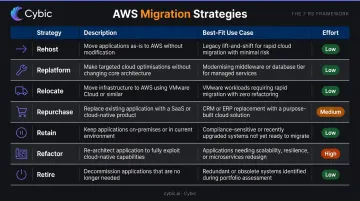
Rehost (Lift and Shift)
Move applications to AWS with no code changes. It's the fastest strategy and the right choice when the primary goal is exiting a data center quickly. The trade-off: you don't take advantage of cloud-native capabilities, so performance and cost improvements are limited until you optimize later.
Replatform (Lift, Tinker, and Shift)
Make targeted optimizations without changing the core architecture. A common example: migrating a self-managed MySQL database to Amazon RDS. You get managed patching, backups, and scaling without rewriting the application - faster than refactoring, with meaningful operational gains.
Refactor (Re-architect)
Rebuild or significantly rearchitect an application to be cloud-native, adopting microservices, containers, or serverless functions. AWS notes that refactoring can take up to 20 times longer than rehosting because it changes both code and architecture simultaneously. It requires the most effort but delivers the highest long-term performance and scalability gains.
Repurchase (Drop and Shop)
Replace an existing application with a SaaS alternative. Moving from a legacy on-premises CRM to Salesforce is a common example. This makes sense for commodity software where self-hosting adds maintenance cost without competitive advantage.
Retire
Decommission applications that are redundant, underused, or no longer needed. Many organizations discover during discovery that 10–20% of their portfolio can simply be turned off. This reduces migration scope and ongoing maintenance costs.
Retain (Revisit)
Some workloads stay on-premises - typically due to compliance requirements, a recent infrastructure upgrade, or unclear migration ROI. The key is documenting which workloads are retained and scheduling periodic reassessment.
Relocate
Move infrastructure to AWS without modifying operations. Originally associated with VMware Cloud on AWS, the Relocate strategy moves the hypervisor layer rather than individual servers. Note: As of April 30, 2024, VMware on AWS is no longer resold by AWS or AWS channel partners and is now available through Broadcom directly; confirm availability with your AWS account team before planning this path.
Key AWS Migration Tools You Need to Know
Core AWS Migration Tools, by Phase
AWS provides a purpose-built toolset covering every migration phase: discovery, planning, execution, and tracking. Most connect through AWS Migration Hub, a centralized dashboard that tracks progress across all workloads.
| Tool | Purpose | Cost |
|---|---|---|
| AWS Application Migration Service (MGN) | Lift-and-shift server migration via continuous block-level replication | Free for first 90 days per server |
| AWS Database Migration Service (DMS) | Database migration with minimal downtime | Usage-based pricing |
| AWS Migration Hub | Central dashboard tracking all migration activity | Free |
| AWS DataSync | Automated file and object data transfer | Usage-based pricing |
| Migration Evaluator | Cost modeling and business case development | Complimentary service |
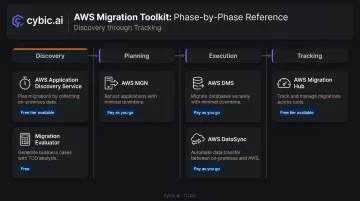
AWS Application Migration Service (MGN)
MGN is the primary tool for lift-and-shift server migrations. It replicates source servers continuously at the block level, allowing non-disruptive testing before cutover. Each source server gets 2,160 hours (90 days) of free use - sufficient for most migrations to complete before cutover.
AWS Database Migration Service (DMS)
DMS keeps the source database operational during replication, which is critical for minimizing downtime. It supports both homogeneous migrations (Oracle to Oracle, MySQL to MySQL) and heterogeneous migrations (Oracle to Amazon Aurora, SQL Server to MySQL). DMS protects data in transit via SSL/TLS encryption on endpoint connections.
One caveat: DMS Fleet Advisor, previously used for database fleet discovery, was discontinued as of May 20, 2026. Teams previously relying on it for pre-migration database assessment should use Migration Evaluator or alternative discovery tools instead.
Migration Evaluator
Formerly known as TSO Logic, Migration Evaluator is a complimentary service that builds a data-driven business case before you commit to migration. It models your current on-premises costs against projected AWS spend - useful for building a business case with leadership and setting a realistic budget baseline.
How to Plan and Execute a Successful AWS Cloud Migration
Step 1 - Assess and Discover
Every migration starts with inventory. Use AWS Application Discovery Service to collect server configurations, usage data, and network dependencies from your on-premises environment. Pair this with the AWS Cloud Adoption Framework (CAF), which structures readiness across six perspectives: business, people, governance, platform, security, and operations.
At this stage, define your KPIs: cost savings targets, uptime goals, performance benchmarks. Skipping this assessment is one of the most common causes of migration failure - teams that start moving workloads before mapping dependencies invariably hit blockers mid-project.
Step 2 - Define Strategy and Architecture
Assign one of the 7 Rs to each workload. Then architect your AWS landing zone:
- Configure VPCs, IAM roles, and security groups
- Establish connectivity via AWS Direct Connect (dedicated physical link) or AWS Site-to-Site VPN (IPsec tunnels)
- Provision infrastructure using AWS CloudFormation or Terraform for consistency and repeatability
Infrastructure as Code is non-negotiable for landing zone setup. Manual configuration creates drift and makes rollback difficult.
Step 3 - Migrate in Phases, Starting with Low-Risk Workloads
Don't move everything at once. AWS prescriptive guidance recommends grouping workloads into dependency-based waves, with the portfolio workstream running 1–2 weeks ahead of the migration workstream for each wave.
The sequence:
- Start with non-critical internal tools or development environments
- Validate results against your KPIs
- Proceed to business-critical systems once the process is proven
- Run parallel environments temporarily as a safety net
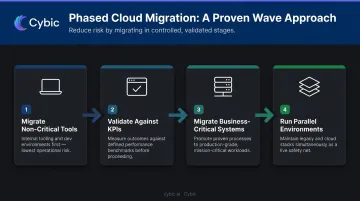
Use AWS MGN for server rehosting and AWS DMS for continuous database replication across waves.
Step 4 - Test, Cut Over, and Validate
Before the production switch:
- Run a full dry-run cutover rehearsal
- Execute a final incremental data sync
- Schedule the production switch during off-peak hours
- Redirect traffic using DNS switching
After cutover, run functional, performance, and security tests against your pre-migration benchmarks. Maintain a documented rollback plan with specific trigger conditions - not just "if something goes wrong," but defined thresholds that automatically initiate rollback.
Step 5 - Optimize Post-Migration and Layer in AI
Going live is where optimization begins. Address these post-migration priorities immediately:
- Right-size instances based on actual usage patterns, not pre-migration estimates
- Implement auto-scaling to handle demand variability without over-provisioning
- Tag all resources for cost attribution and chargeback visibility
- Monitor continuously via AWS CloudWatch, setting alerts before issues escalate
A completed AWS migration also creates the architectural foundation for enterprise AI. Healthcare organizations can deploy governed AI systems on their AWS environment while maintaining HIPAA compliance; manufacturers can run real-time production monitoring and workflow automation on the same infrastructure. Cybic builds these AI layers - autonomous agents, enterprise LLM applications, intelligent automation - directly on top of clients' cloud infrastructure once migration is complete.
Common AWS Cloud Migration Challenges and How to Overcome Them
Legacy System Complexity
Tightly coupled legacy applications with hidden dependencies are the most common migration blockers. A system that looks like a standalone application often hides connections to a half-dozen others.
Solution: Run a thorough dependency mapping during the discovery phase. For applications that can't run natively on cloud VMs, consider containerization or a phased refactoring approach rather than forcing a lift-and-shift.
Cost Overruns and Billing Surprises
Flexera's 2025 State of the Cloud Report found that 29% of IaaS/PaaS cloud spend is wasted. During migration, parallel environments running old and new infrastructure simultaneously can push costs well above projections.
A few practices reduce cost exposure:
- Model costs with Migration Evaluator and AWS Pricing Calculator before starting
- Set CloudWatch budget alerts before the first workload moves
- Use Reserved Instances or Savings Plans for steady-state workloads post-migration
- Tag every resource from day one for cost attribution
Security, Compliance, and Downtime Risks
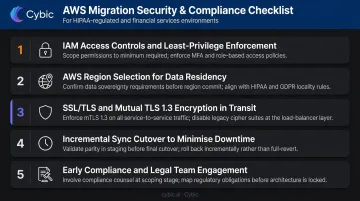
Regulated industries face the steepest compliance hurdles. Under HIPAA, cloud providers handling ePHI are classified as business associates, meaning AWS and any services touching patient data require a Business Associate Agreement. Financial services, government, and other regulated sectors carry comparable obligations that must be resolved before a single workload moves.
Key practices:
- Enforce IAM access controls and least-privilege principles
- Select the appropriate AWS region for data residency requirements
- Use SSL/TLS for data in transit via DMS and mutual TLS 1.3 for DataSync transfers
- Plan incremental sync cutover to minimize downtime windows
- Engage compliance and legal teams before migration begins, not after
AWS Cloud Migration Best Practices
Plan before you migrate, not during. Define business objectives and success metrics before a single workload moves. Use the AWS Well-Architected Framework - now covering six pillars including sustainability - as your design standard. Security, reliability, performance efficiency, cost optimization, operational excellence, and sustainability should be designed in from the start, not retrofitted.
Migrate in waves, not in one big bang. Low-complexity internal tools go first. Mission-critical production systems go last.
AWS guidance structures each wave with a 1–2 week portfolio workstream and a 3–4 week migration workstream, with the portfolio team staying five waves ahead of execution. That cadence gives teams time to learn and adjust before touching systems that can't tolerate failure.
Treat post-migration optimization as a continuous practice. Use AWS Trusted Advisor for ongoing recommendations across cost, availability, performance, and security. A basic FinOps discipline includes:
- Resource tagging for visibility and cost attribution
- Budget alerts and regular reviews in AWS Cost Explorer
- Reserved Instances or Savings Plans for predictable workloads
- Quarterly architecture reviews to catch drift early
The cloud environment should improve over time, delivering measurable gains rather than just replicating what existed on-premises.
Frequently Asked Questions
What are the AWS migration tools?
The primary AWS-native tools are: AWS Application Migration Service (server rehosting), AWS Database Migration Service (database migration with minimal downtime), AWS Migration Hub (centralized tracking), AWS DataSync (file and object data transfer), and Migration Evaluator (cost modeling and business case). AWS Application Discovery Service also supports pre-migration inventory, though new customer onboarding has shifted toward AWS Transform for similar capabilities.
What are the 7 migration strategies for AWS?
The 7 Rs are: Rehost (lift and shift), Replatform (lift, tinker, shift), Refactor (re-architect for cloud-native), Repurchase (replace with SaaS), Retire (decommission unused apps), Retain (keep on-premises for now), and Relocate (move hypervisor layer). Each workload gets its own strategy based on complexity, business value, and cloud-readiness - not a single choice applied migration-wide.
How long does an AWS cloud migration take?
A single application migration can take a few weeks. A full data center migration typically spans 6–24 months. Timeline depends on the number of workloads, legacy system complexity, data volume, landing zone readiness, team expertise, and whether a phased or big-bang approach is used. AWS prescriptive guidance recommends wave-based planning for anything beyond a handful of applications.
How do you minimize downtime during an AWS migration?
Use AWS DMS continuous replication to keep source and target databases in sync until cutover, then schedule the final switch during off-peak hours. Always run a rehearsal cutover first and maintain a rollback plan with defined trigger thresholds so the team can restore operations quickly if issues arise.
What is the AWS Migration Acceleration Program (MAP)?
MAP is AWS's structured enterprise migration program with three phases: Assess, Mobilize, and Migrate & Modernize. It connects organizations with 200+ certified Migration Competency Partners and provides financial incentives, including AWS service credits and partner investments, to offset migration costs like labor, training, and parallel environments.
How much does AWS cloud migration cost?
Costs vary widely based on workload volume, chosen migration strategies, and required services. AWS MGN and Application Discovery Service have no upfront licensing cost. For a data-driven estimate specific to your environment, use Migration Evaluator and the AWS Pricing Calculator before committing to a migration plan.